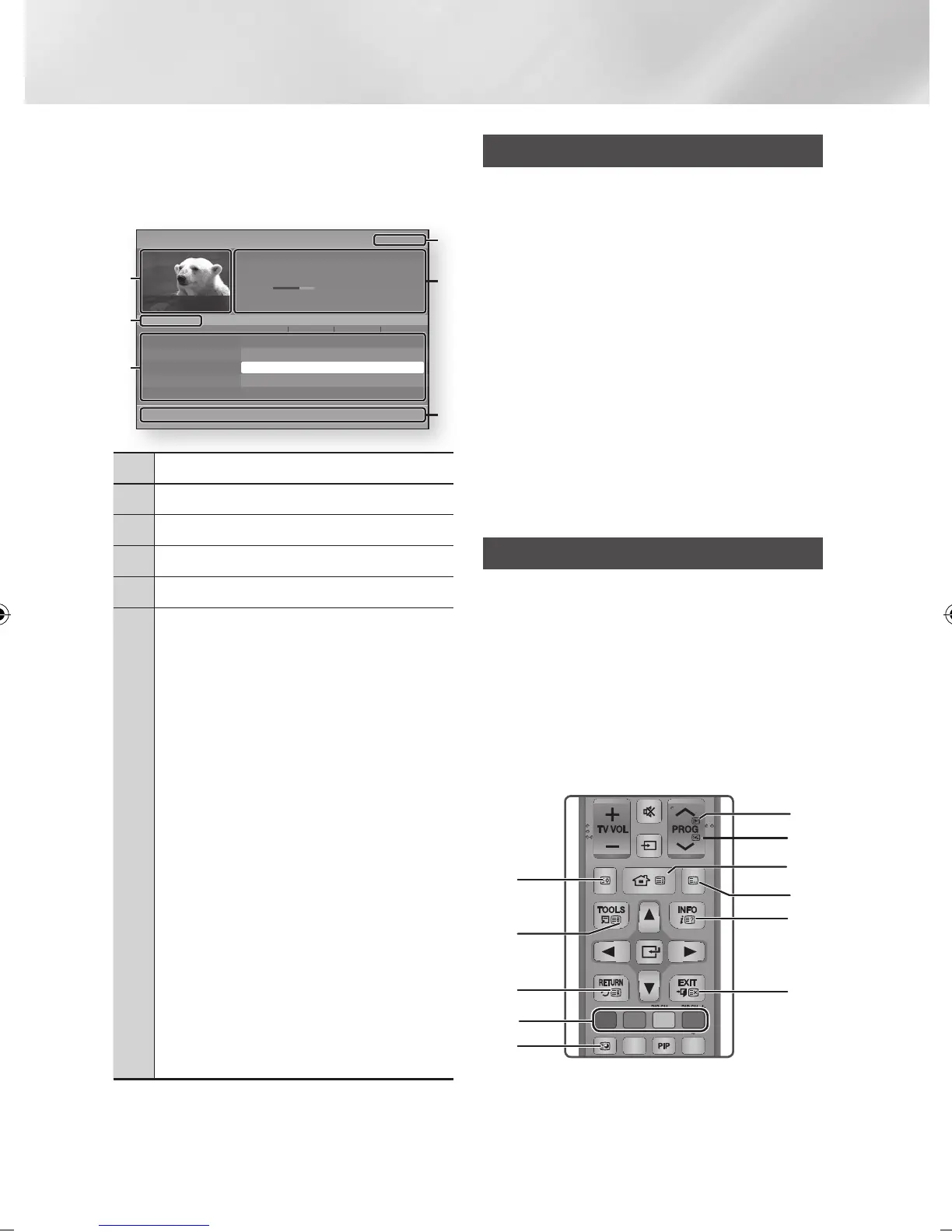
1. Press the GUIDE button.
The guide screen will be displayed.
• Guide Screen
1
Displays the channel screen.
2
Displays view mode.
3
Displays the Stored channels.
4
Displays the current date and time.
5
Displays the channel information.
6
Navigation Help : Displays remote control buttons
available.
• RED (A) : To set the programme schedule.
• YELLOW (C) : It displays channel from now to 24
hours after.
If you select YELLOW (C) button, GREEN (B)
button will be displayed. Press this to display the
list of channels before 24 hours.
• BLUE (D) : To change the Channel View.
• INFO button : Displays the Programme
information.
•
ƒ
: Go to previous page or next page.
•
s
button
- When you select a programme currently being
broadcast, you can watch the selected channel
in the full screen.
- When you select a programme scheduled to
broadcast, you can set the Schedule Viewing
or Schedule Recording. Press the ◄► button
to select the Schedule Viewing or Schedule
Recording, then press the
s
button again.
The Timer icon appears on the guide screen.
Schedule Manager
You can reserve the desired TV programmes using
this menu.
Make sure that clock must be set before operating
this function. (See page 27)
1. Select Schedule Manager on the Home
screen, and then press the
v
button.
2. Press the RED (A) button.
3. Select Schedule Viewing or Schedule
Recording, and then press the
v
button.
4. Fill the input items, and then press the
v
button.
| NOTE |
\
In the guide view, Schedule Viewing and Schedule
Recording schedules are not displayed.
Using the Teletext Service
If DTV programme supports teletext signal, you
can use teletext service. For Teletext information
is displayed correctly, channel reception must be
stable. Otherwise, information may be missing or
some pages may not be displayed.
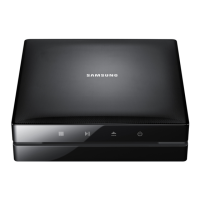
1. Press TTX/MIX button while you are viewing
a TV channel.
2. By pressing the TTX/MIX button repeatedly,
you can change or exit the teletext mode.
FUNCTION
TV SOURCE
POWER
RECEIVER
DIGITAL
SUBTITLE
INPUT
1 2 3
4 5 6
7 8 9
PANDORA SUBTITLE
SUBTITLE
INPUT
DISC MENU TITLE MENU
0
POPUP
A B C D
SMART HUB
SEARCH
BD TV
TV MUTE
TV SOURCE
TTX/MIX
SOCIAL REC REC PAUSE
2D 3D
CH LIST HOME GUIDE
1
7
!
0
3
4
5
8
9
2
6
a
Sche. Mgr
c
+24 Hours
d
Ch. Mode
i
Information
ƒ
Page
"
Watch
9:20 Fri 11 Jun
Guide
Des jours et des vies
No Information
9:05 - 9:35
No Information
Channel View - All
52 France 2 HD
1:00 – 2:00 1:00 – 2:00 1:00 – 2:00 1:00 – 2:00
Today
▲
812 Class News No Information
813 Coming Soon No Information
814 Discovery No Information
815 DiscoveryH&L No Information
▼
817 heat No Information
1
5
4
2
3
6
|
54 English
02230J-BD-E8900-EN-ENG.indd 54 2012-04-13 오후 2:53:33



 To Next Page