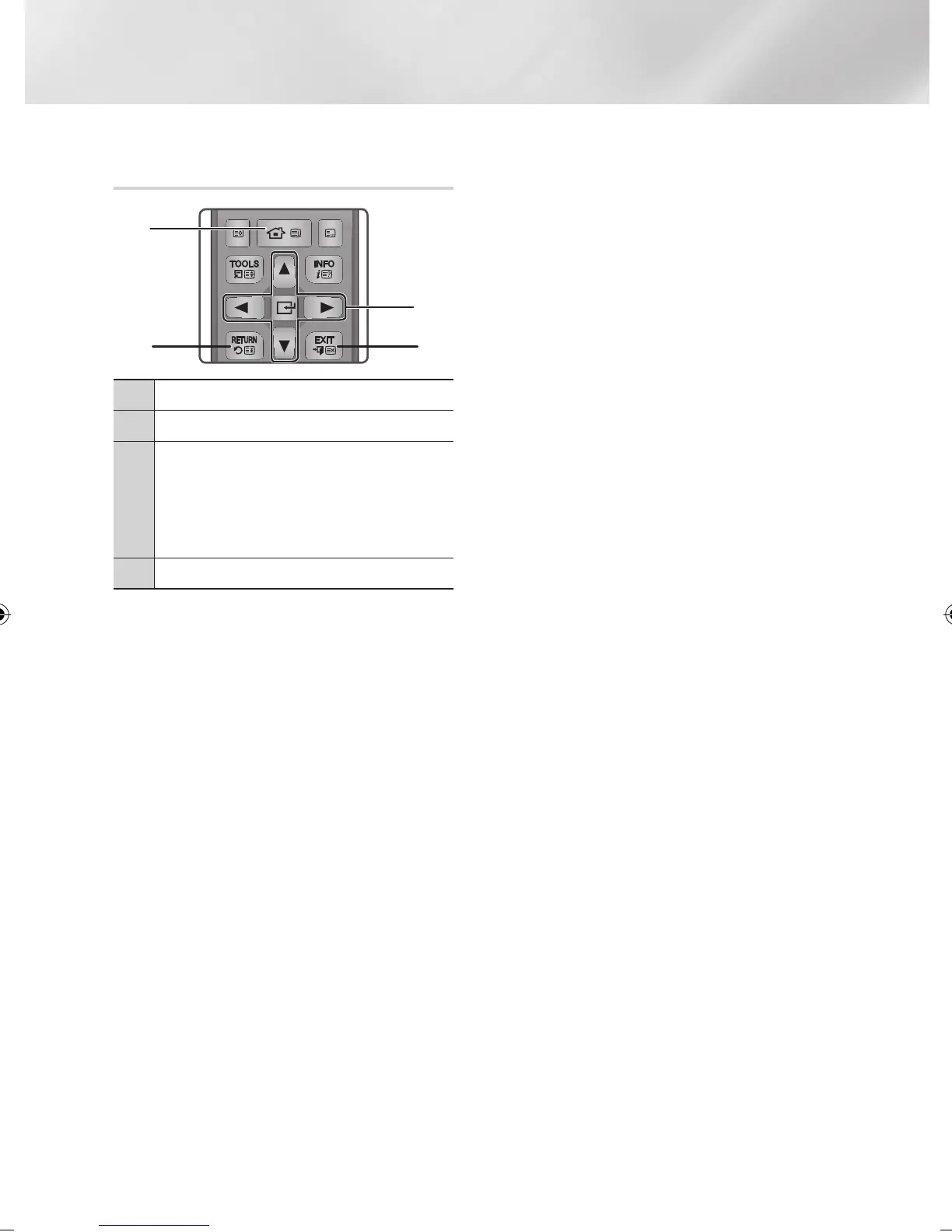
Buttons on the Remote Control used
for the Settings menu
1
HOME Button : Press to move to the Home screen.
2
RETURN Button : Return to the previous menu.
3
v
(Enter) / DIRECTION Buttons :
• Press ▲▼◄► to move the cursor or select an
item.
• Press the
v
button to activate the currently
selected item or confirm a setting.
4
EXIT Button : Press to exit the current menu.
Detailed Function Information
Each Settings function, menu item, and individual
option is explained in detail on-screen. To view an
explanation, use the ▲▼◄► buttons to select the
function, menu item, or option. The explanation
will usually appear on the screen.
A short description of each Settings function
starts on the next page. Additional information on
some of the functions is also in the Appendix of
this manual.
FUNCTION
TV SOURCE
POWER
RECEIVER
DIGITAL
SUBTITLE
INPUT
1 2 3
4 5 6
7 8 9
PANDORA SUBTITLE
SUBTITLE
INPUT
DISC MENU TITLE MENU
0
POPUP
A B C D
SMART HUB
SEARCH
BD TV
TV MUTE
TV SOURCE
TTX/MIX
SOCIAL REC REC PAUSE
2D 3D
CH LIST HOME GUIDE
1
2 4
3
|
22 English
02230J-BD-E8900-EN-ENG.indd 22 2012-04-13 오후 2:53:19



 To Next Page