before you begin
SETTING THE CLOCK
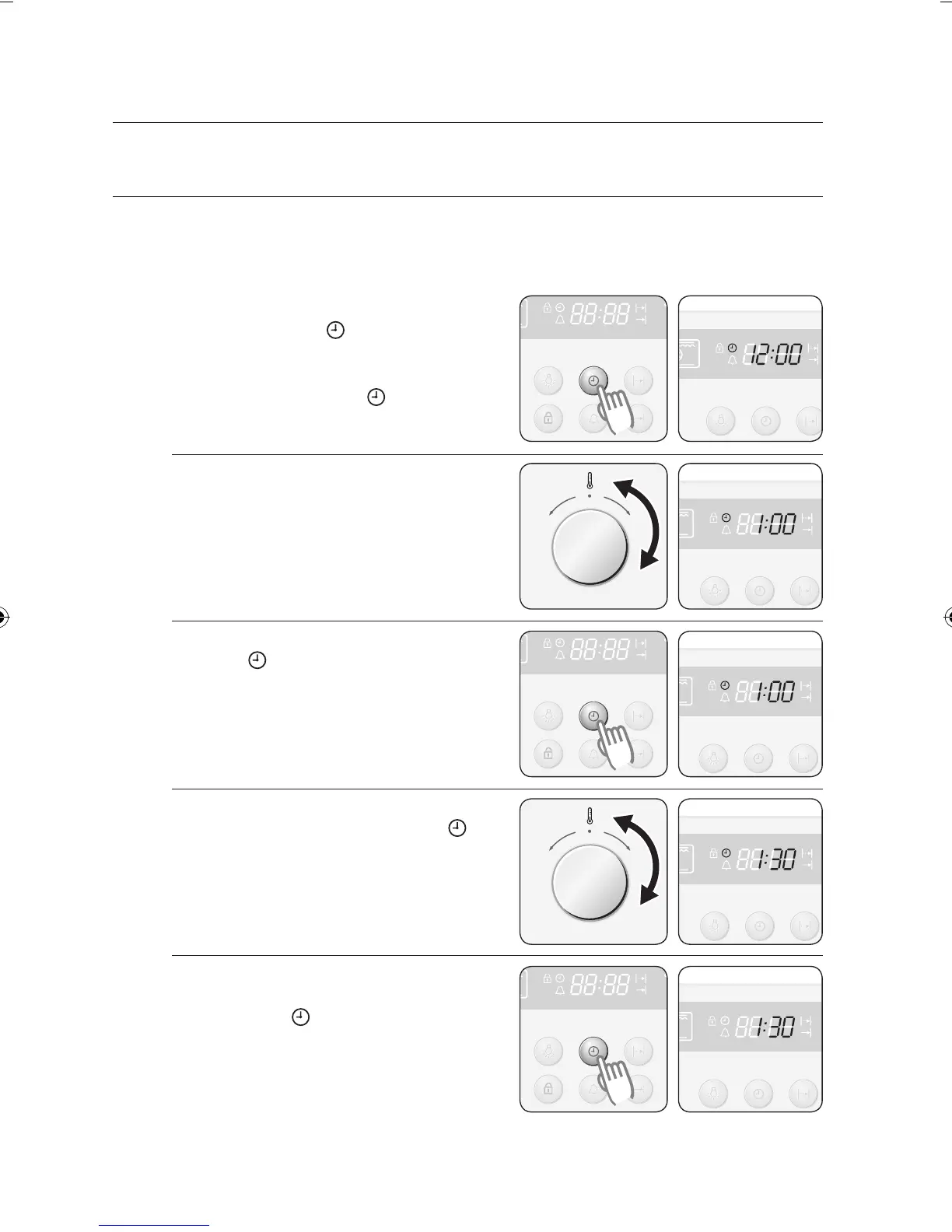
When power is first supplied to the oven, the display on the control panel will light briefly.
After 3 seconds, an icon of a clock and 12:00 will begin blinking in the display. The oven
cannot be operated until the clock is set.
1
The oven is inoperable until the clock
has been set. “ ” and “12:00” will
blink in the display when power is first
supplied to the appliance. Press the
Clock button. The “ ” and “12: ”
will blink.
2 Turn the Time / Temp Control Knob
to set the hour of the day.
Example: To set 1:30
3 Press the Clock button.
The “ ” and “ :00” will blink.
4 Turn the Time / Temp Control Knob
to set the minute of the time. “ ” will
blink.
5 Press the Clock button to finish
setting the clock or wait for about 10
seconds. “ ” will disappear and
“30” will stop blinking. The display
shows the time of day. The appliance
is now ready to use.



 To Next Page