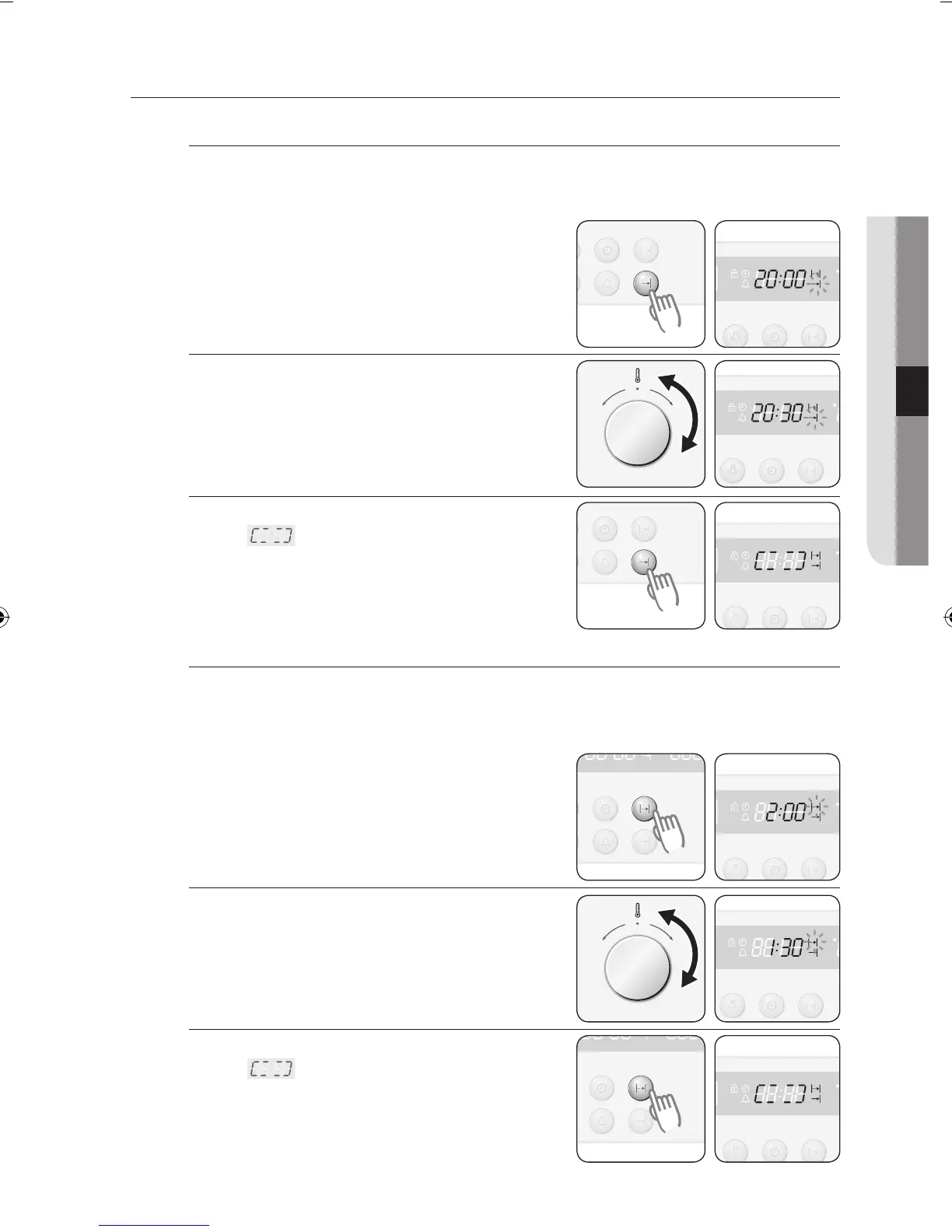
DELAYED START
Case 1 - Cook time is entered first
If the end time is entered after the cook time has already been set, the cook time
and the end time are calculated and if necessary the oven sets a delayed start
point.
1
Press the End Time button.
Example: Current time is 15:00 and the
desired cook time is 5 hours.
2 Turn the Time/Temp Control Knob to set
the end time.
Example: You want to cook for 5 hours
and finish at 20:30.
3 Press the End Time button.
A “ ” symbol appears until the
delayed start point.
Case 2 - End time is entered first
If the cook time is entered after the end time has already been set, the cook time
and the end time are calculated and if necessary the oven sets a delayed start
point.
1
Press the Cook Time button.
Example: Current time is 15:00 and the
desired end time is 17:00.
2 Turn the Time / Temp Control Knob to
set the cook time.
Example: You want to cook for 1 hour and
30 minutes and end by 17:00.
3 Press the Cook Time button.
A “ ” symbol appears until the
delayed start point.



 To Next Page