Services
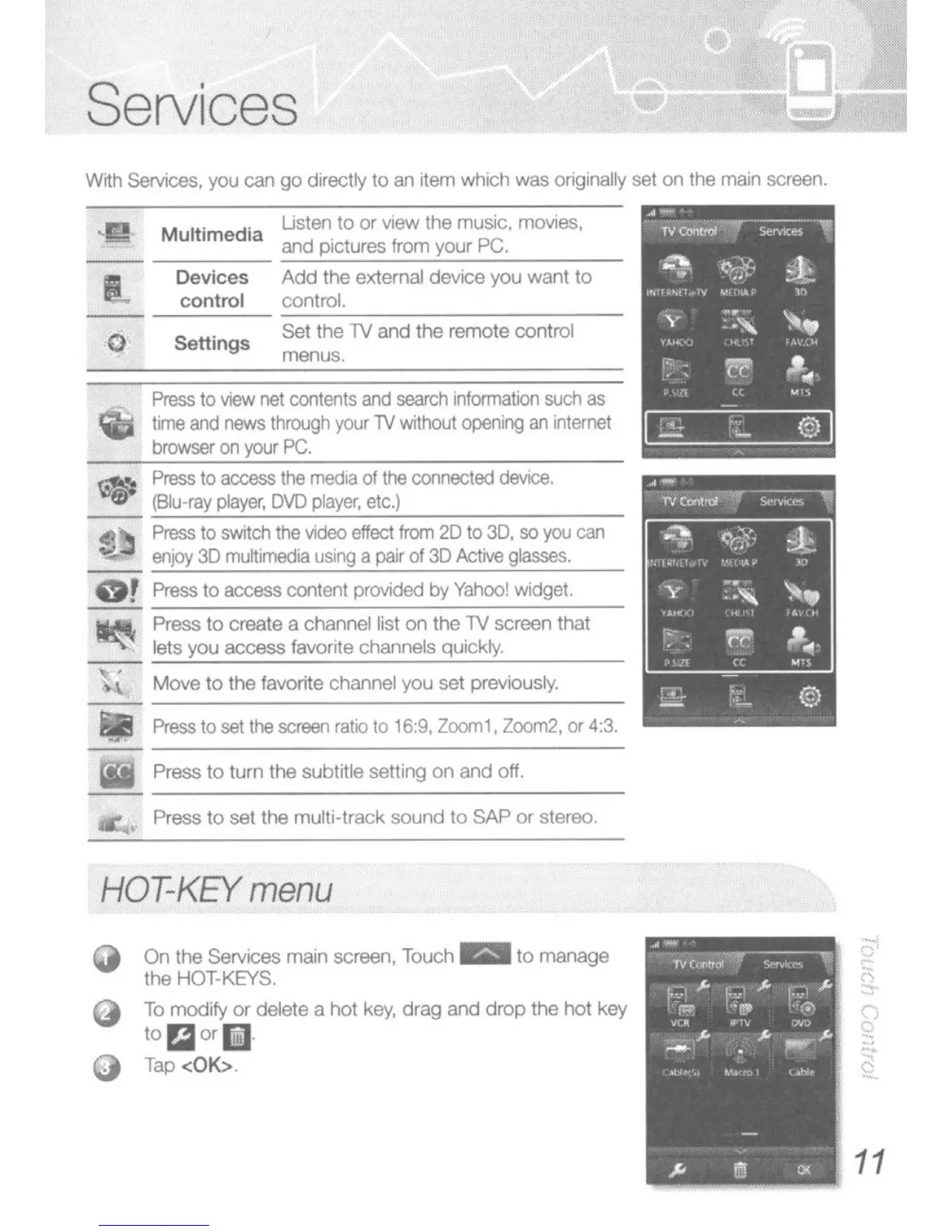
Wrth Services. you can
go
directly
to
an item which was originally set
on
the main screen.
Move
to
the favorite channel you set previously.
Press
to
set
the
screen
ratio
to 16:9,
Zoom1. Zoom2,
or
4:3.
Add
the external device you
want
to
control.
Uslen to
or
view the music, movies,
and pictures from your PC.
Set the
1V
and the remote control
menus.
Devices
control
Settings
Multimedia
Press
to
vteW
net
contents
and
search
information
such
as
time
and
news
through
yOur
TV
without
opening
an
internet
browser
on
your
PC.
~
Press
10
access
the
media
of
the
connected
device.
~
~(8:::lu:::-r:::a,-y:::pl:::ay:::er:;-.:::D:-VD=p:;:'a!..:ye:::r.-;;e:::tc:::I,---:-:;::-::-=,-
_
S
Press
to
switch
the
video
effect
from
20 to
3D,
so
you
can
~
enjoy
3D
multimedia
using
a
pair
of
3D
Active
glasses.
or
~Pr:-e:::ss,---to,--ace_ess-,--_CO<1--,(_en_(:::p-,ro-,~:--d:-ed_b-cY:::~-,a:::h:::OO:::!_"'_':::d"ge:::(_,
,---_
tlbII. Press
to
create a channel list
on
the
1V
screen that
~~
lets you
access
favorite channels quickly.
Iii
Press
10
turn the subtitle selting
on
and off.
Press
to
set the multi-track
sound
to
SAP
or
stereo.
•
HOT-KEY
menu
On
the Services
main
screen, Touch
_to
manage
(he HOT·
KEYS,
To
modify
or
delete a
hot
key,
drag
and
drop
the
hot
key
to
Piol
or
Ii
Tap <OK>.
11





 To Next Page