EasyManua.ls Logo

Samsung C700 - Add External Device

Samsung C700
38 pages
Print Icon
To Next Page IconTo Next Page
To Previous Page IconTo Previous Page
Loading...
Devices control
It
Ttis fLnctiort lets
you
control
connected
extemal devices such
as
B1u-ray ptayers,
DVD
players, etc. with your
LCD
remote. Atter
you
connect
the
device
to
the
Tv,
the
LCD remote
can
learn the navigatiOn, number, and other keys needed
to
operate
and
control the
devK:e.
The
LCD
remote controls
the
devices
WIth
Its standard,
lR
(infra red)
controllunctionality.
Make
SIJ9
the external device
IS
propet1y connected
to
the
TV
before adding It
to
the
remote
control.
Add
External
device
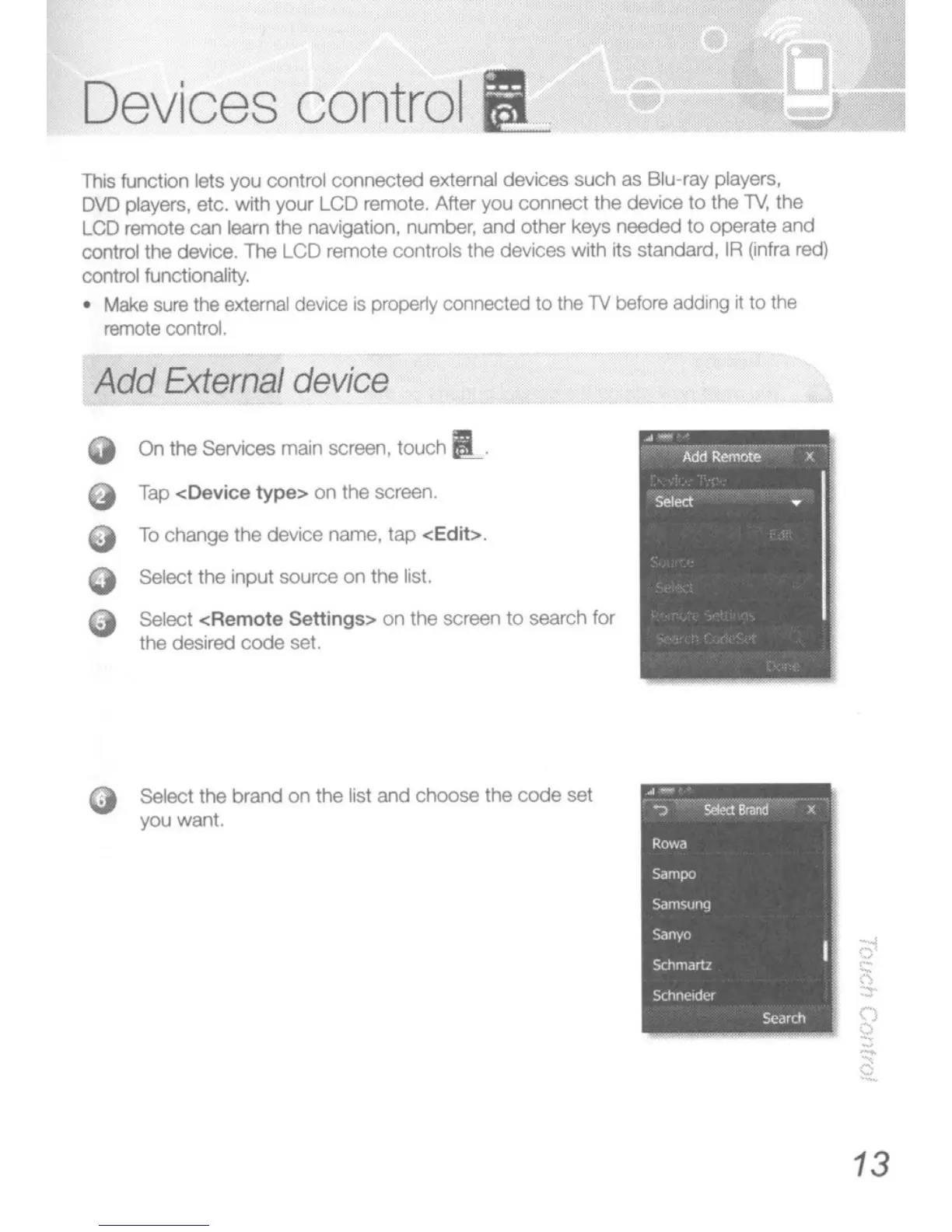
On
the services
main
screen, touch
it.
9 Tap
<Device
type>
on the screen.
To
change the device name, tap
<Edit>.
Select the input source
on
the list.
Select
<Remote
Settings> on the screen
to
search
fOf
the desired
ccxje
set.
Select the brand
on
the list and
choose
the
code
set
you want.
13

Related product manuals