Settings menu
Add
Macro
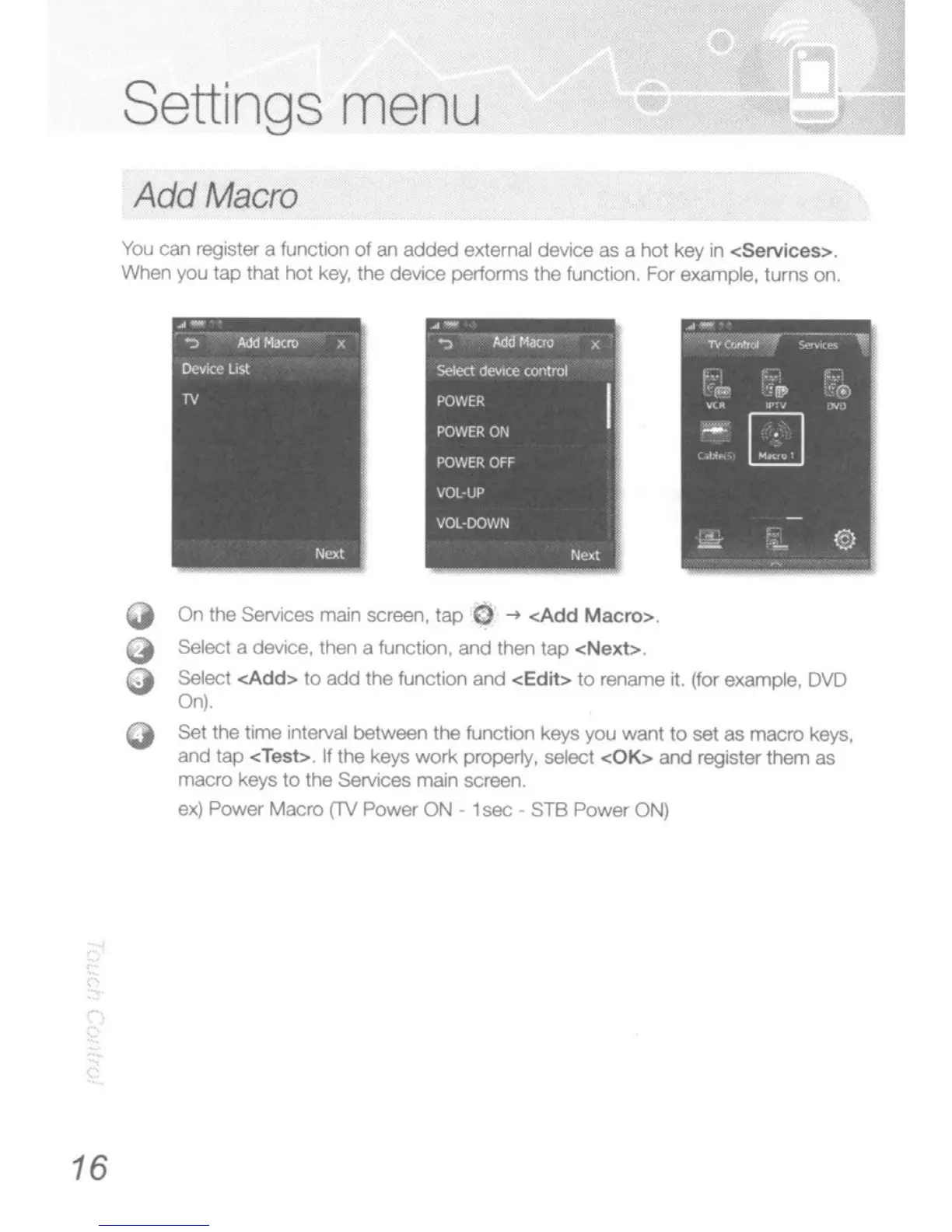
You
can
regtS1er
a function
of
an
added
external
device
as a hot
key
in
<Services>
When you tap that hot key, the
device
pertorms the function. For example,
turns
00.
.-
-:)'-
"4l1~
--..-
lC
select
deVIce
o:wJtrol
PO\\lER
POWER
ON
POWER
OFF
VOL-UP
VOl-DOWN
16
Q
o
On
the Services main screen.
tap
0
-+
<Add Macro>
Select
a device,
then
a funchon.
and
then tap
<Next>
Select <Add>
to
add
the function
and
<Edit>
to
rename it. (for
example,
DVD
On).
Set
the
tme
nlerval
between the function keys you
want
to
set
as
macro
keys,
and
tap <Test> If
the
keys work property, select <OK>
and
register them as
macro
keys
to
the SeMces marn screen.
ex)
POINef'"
Macro
(TV
Power
ON
1
sec
-
STB
Power
ON)





 To Next Page