EasyManua.ls Logo

Samsung C700 - Networked Wi-Fi Connection

Samsung C700
38 pages
Print Icon
To Next Page IconTo Next Page
To Previous Page IconTo Previous Page
Loading...
Touch Control
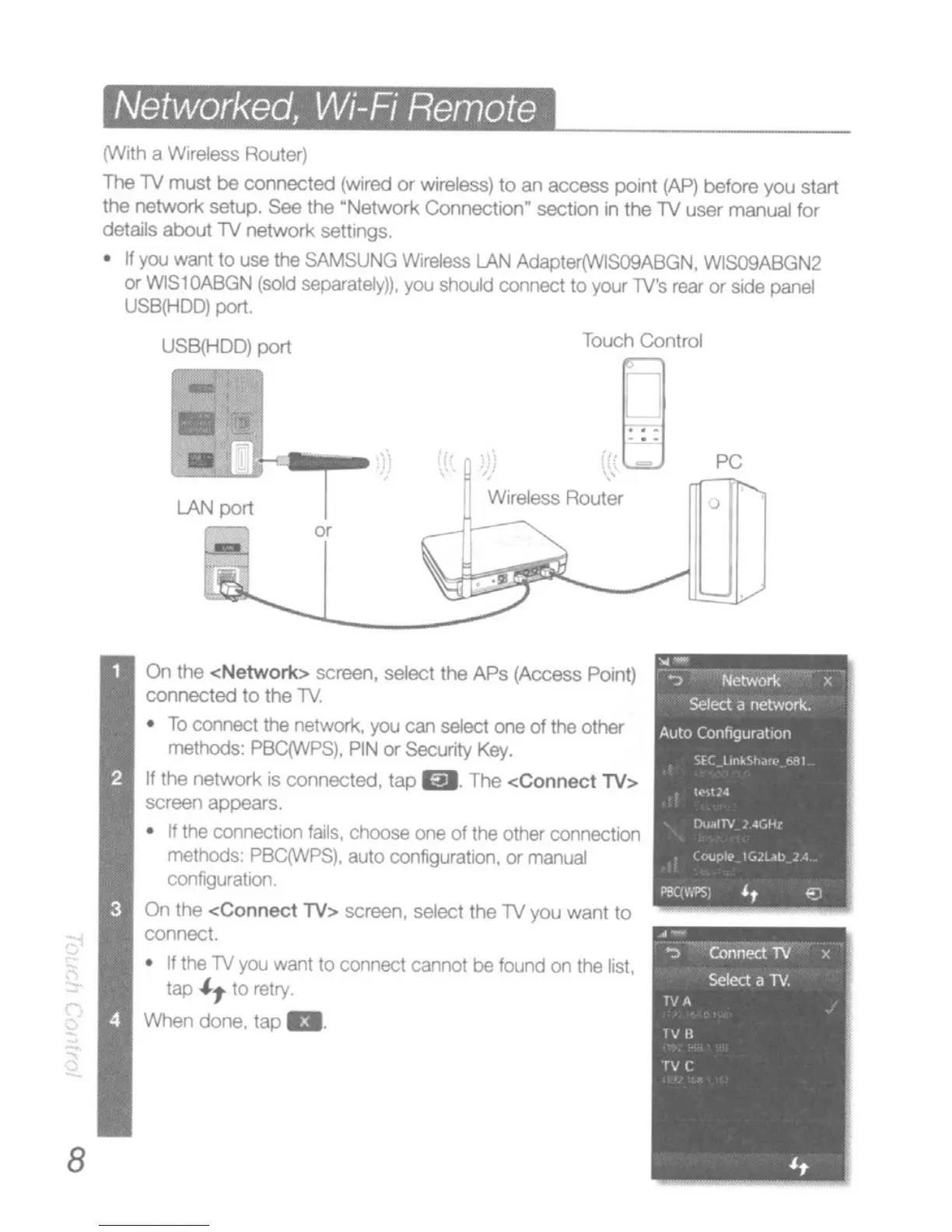
Networked, Wi-Fi Remote
(With a WireleSS Router)
The
TV
must
be
comectecl
(wired
or
wireless)
to
an
access point
CAP)
before you start
the
network setup. See the
~Network
Connection~
sectJOf'l
in the
TV
user manual for
details about
TV
network settingS.
n
yoo
want
to
use
Itle
SAMSUNG
W,t1!less
LAN
Adapter(WlS09ABGN.
WlS09ABGN2
or
WlS
1
OABGN
(sold
separalely)),
you
should
connect
to
your
lV's
rear
or
side
panel
USB(HDD)
port.
USB{HDD)
port
LAN
port
0<
PC
,
8
On
the
<Network>
screen, select the
APs
(Access Point)
connected
to
the lV.
To
connect
the network.
you
can
select
one
of
the other
methods' PBqWPS).
PIN
0< Security
Key.
If the
network
is connected.
tap
m. The
<Connect
TV>
screen appears.
If
the COIYleCtlOl"l
fails.
dloose
one
of the
other
connectIOn
methods:
PBC(IJVPS).
auto
configLXatlOl'l.
or
manual
configurallOf"l.
On
lhe
<Connect
TV> screen, select the TV you
want
to
connect.
If
the
TV
you
want
to
connect cannol be
found
on
the
list,
tap
"',
to relry.
When
done.
tap
a.

Related product manuals