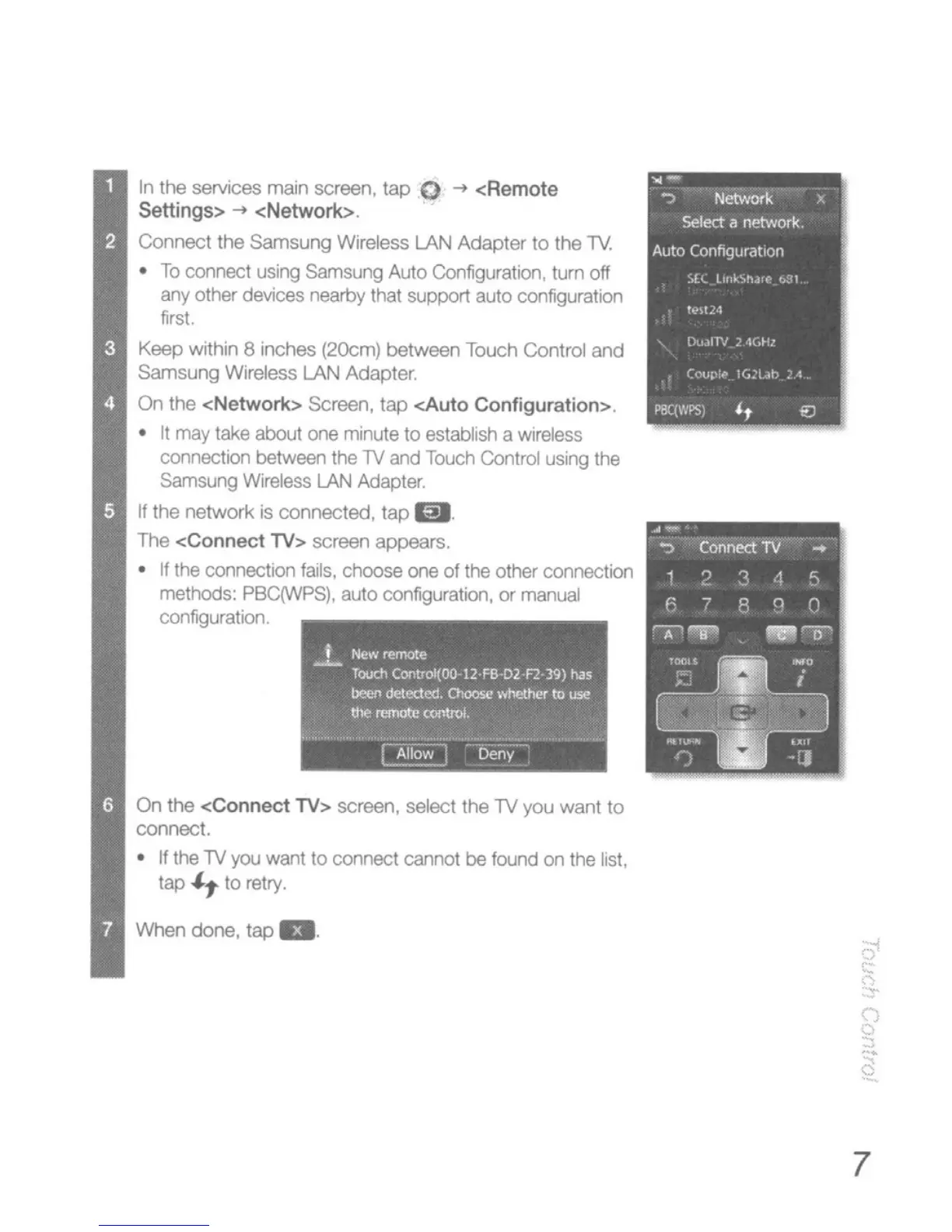
In
the services maln screen, tap 0
-+
<Remote
settings>
-+ <Network>
CoMect the Samsung Wireless LAN Adapter
10
the
TV.
•
To
comect using Samsung Auto Configuration. tum off
arty
other
devices
nearby that support auto
configuratIOn
first.
Keep
Wlthrn
8
rnches
(2OCm)
between Touch Control
and
samsung Wireless LAN Adapter.
On
the <Network>
SCreen,
tap <.Auto Configuration>.
•
It
may
take
about
one
minute
to
establish a
wireless
connection between
the
TV
and
Touch
Control using
the
Sam
sung
Wireless
LAN
AdaptElf.
If
the network
is
connected, tap m.
The
<Connect
TV> screen appears.
•
If
the
connectJon
fallS,
choose
one
of the other connection
methclds:
PBC(WPS), auto configuration,
or
manual
configuration.
On
the <Connect TV> screen, select the
TV
you want
10
connect.
•
If
the
TV
yo.;
want
to
connect cannot
be
found on the list,
tap
It
10
retry.
When done, tap
g,
•
7





 To Next Page