14
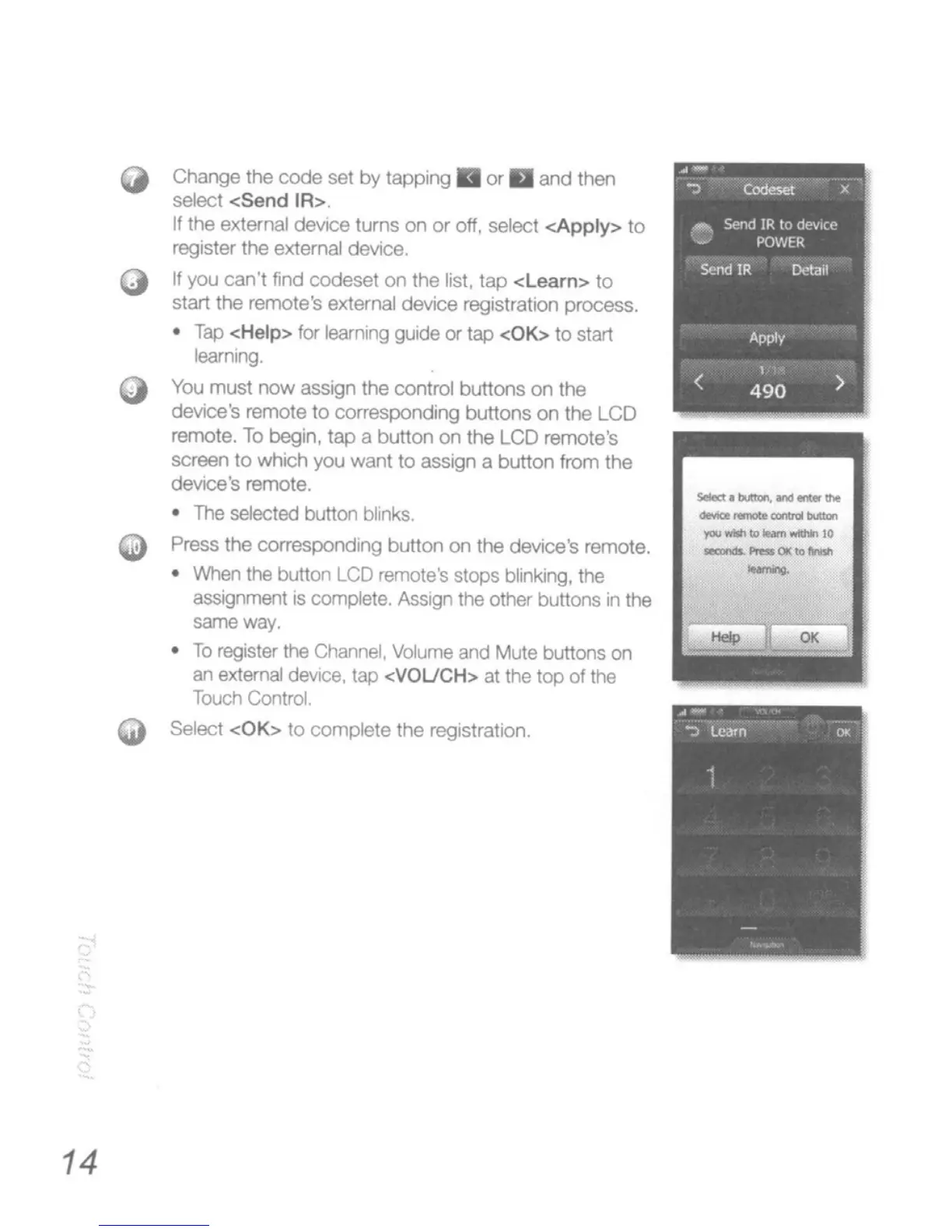
Change
the
code
set
by
tappng
• 0<
II
and
then
select
<Send
IR>.
If
the external device
turns
on
or
off, select
<Apply>
to
register the external device.
If
you can't find codeset on the list.
lap
<Learn>
10
start the remote's external device registratiOn process.
•
Tap
<Help>
for
learning
guide
or
tap
<OK>
to
start
learnJr"IQ_
You
must
now
assign
the
control
buttons
on
the
device's remote
to
correspondIng
buttons
on
the
LCD
remote.
To
begin, tap a
button
on
the
LCD
remote's
screen
to
which you want to asslgn a button from
the
device's remote.
•
The
sdectad button b6ink$
Press
the
COO'espondll"lQ
button
on
the device's remote.
•
INhen
the button
LCD
remote's
stops
blinking, the
assignment is complete. Assign the other buttons
in
the
same
way.
•
To
register the
Channel.
Volume
and
Mute buttons
on
an
external device, lap <VOUCH> at the
top
of the
Touch
Control.
Select
<OK>
10
complete the regIstration.
s-l:.~
__
.".
----
"",
10
_'-e-:
.....
-





 To Next Page