1
Your DECT Handset
The handset will provide you with the greatest possible degree of flexibility and mobility due to
high battery capacity, practical weight, size and design.
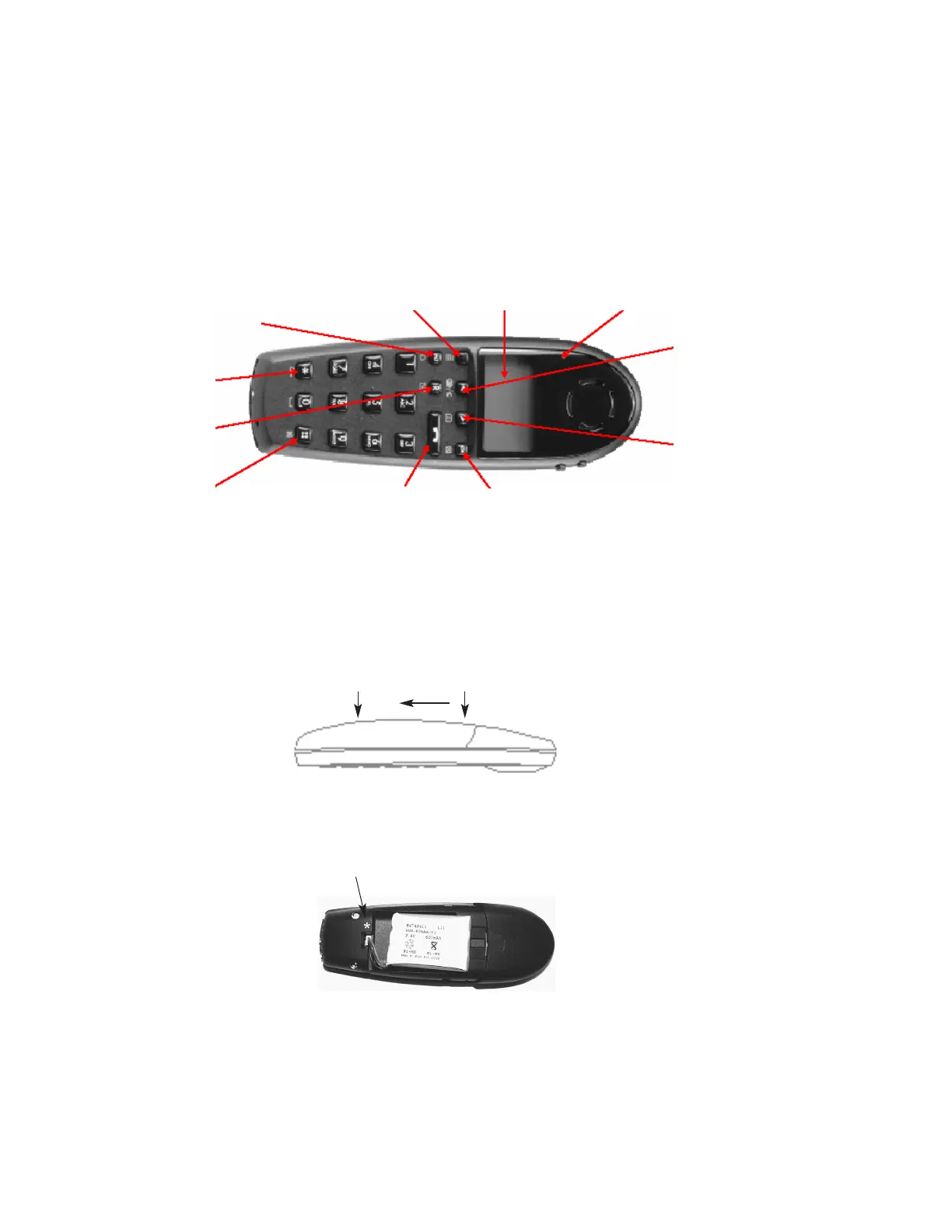
1. Construction
2. Battery installation
Before using the telephone it is important that you connect the battery to the connector in the bat-
tery box. Assemble the battery cover as described below and place the handset into the charger.
1. Push the battery cover 5 mm towards the headset plug using your thumbs.
2. Lift off battery cover.
3. If the battery is not already installed, place battery plug in the slot in the battery box.
Place the battery plug in the slot with red wire closest to the mark
*
(see figure).
5
Keyboard LOCK
(Menu*)
MENU key Display with backlight
Recall key
(MAIL key)
SILENT (Menu#)
ON/OFF HOOK key -
also used as ON key
CONFIRMATION key -
MUTE microphone.
MUTE ringer when ringing.
Long key press turns OFF.
Right arrow key, save number.
Telephone book menu from
standby text
Left arrow key, Redial menu
from standby text
Volume up/down
LED
Key for internal calls
1407-3600-HD . ED2, R&T 75 50 26 66
D5000 Handset User Guide
Samsung DECT
4. Insert battery with the label readable and replace cover.



 To Next Page