6
A
UTO KEYLOCK: Turn auto keylock function on/off using > and <. Confirm with (OK). With auto key-
lock turned on the handset will automatically lock the keys after 60 seconds. Press “ ” to
activate the keys again.
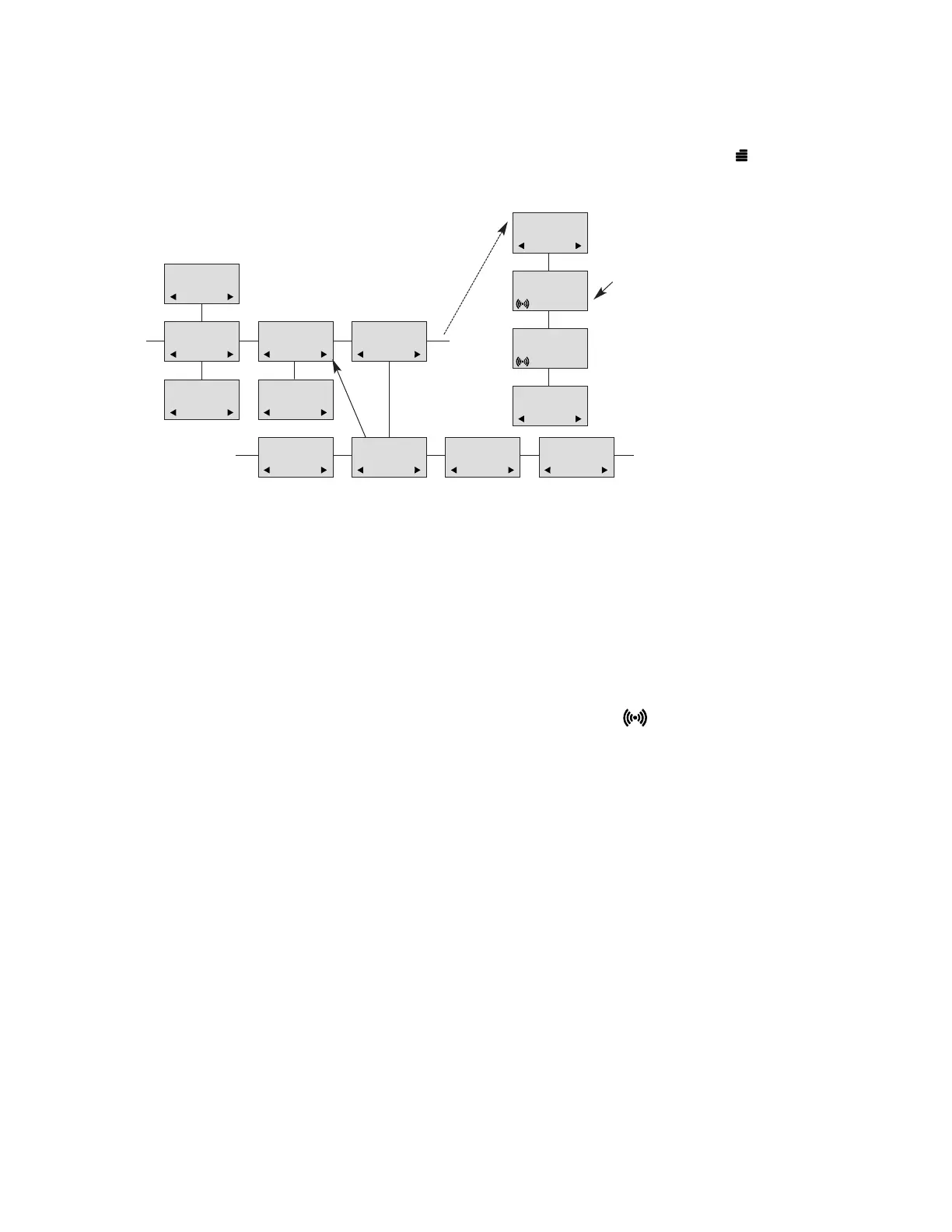
8.5 Menu subscription and login
8.5.1 Create subscription
To make subscriptions, the system must allow subscriptions to be made. Some systems also re-
quire an Access Code (AC). If more than one system currently permits subscription, you will need
to know the ID of the system to which you wish to subscribe. Access Codes and system IDs will
be provided by the system administrator.
Choose the SUBSCRIPTION CREATE menu to subscribe to a new system (see 8.5 and 8.5.4).
During subscription the handset will search for free positions and perform subscription on the first
free position. An alternative position can be chosen using < or >. Enter the AC (if required) using
the keyboard, and press (OK). If the subscription is successful, the startup text will be replaced by
the standby text given into the system by the system administrator and is shown in the display.
If not, the subscription has failed and the procedure must be retried.
If the handset is already subscribed to 10 systems, you will have to remove a subscription before
creating a new subscription (see 8.5.3).
8.5.2 Login
The handset can be subscribed to 10 different systems enabling you to use the same handset on
10 different systems.
If you would like to change to another system, use the login menu to connect to another system
number.
The actual chosen system is shown with the red LED on.
To change to another system use < or > and press OK to confirm.
To be able to log on to a system, subscription to the system has to be established. (See 8.5.1.)
Under LOGIN/SELECT LOGIN only subscriptions will be shown. Free positions will not be shown.
8.5.3 Auto login
The handset can be subscribed to 10 different systems. If Auto login is chosen from the menu,
the handset automatically selects a system. The selected system is marked with an “A”.
Password is factory set 0000
LOGIN
SYSTEM1*
CREATE
SEARCH ID:
123456789012
REMOVE
SYSTEM 4
123456789015
REMOVE
SYSTEM 1*
123456789012
REMOVE
SYSTEM 2
123456789013
REMOVE
SYSTEM 3
123456789014
MENU
LOGIN
MENU
SELECT LOGIN
SUBSCRIPTION
CREATE
SUBSCRIPTION
REMOVE
REMOVE?
PASSWORD
_ _ _ _ _
SUBSCRIPTION
REMOVE
REMOVE
SYSTEM 1
SUBSCRIPTION
REMOVE
4
D5000 Handset User Guide
Samsung DECT



 To Next Page