4
6.2 During conversation
6.2.1 Volume regulation:
Use the two keys placed at the right side of the handset for volume control.
6.2.2 Microphone mute:
Press the OK key ( ); MIC. MUTED is showed in the display.
Press the OK key ( ) to enable the microphone again.
6.2.3 Transferring the call to another handset:
Press R, and dial new number.
Press the key and the call is transferred to the other handset.
7. Profiles (Setups)
The handset has two user-defined profiles (setups), and a mode where all sounds are disabled
(SILENT). Pressing “ ” followed by “OK” will show the chosen profile. A new profile can be se-
lected by using the arrow keys. To select the chosen profile press “OK”. To escape (without stor-
ing anything) press “ ” again.
A quick way of choosing a profile, is to press “ ” and then 1, 2 or # (1 is “Profile 1”, 2 is “Profile
2” and # is “SILENT”). To change the set up in a profile, press “ ” followed by “OK” twice. All
settings have to be defined under each of the two profiles. The display shows if the SILENT mode
or PROFILE2 is chosen.
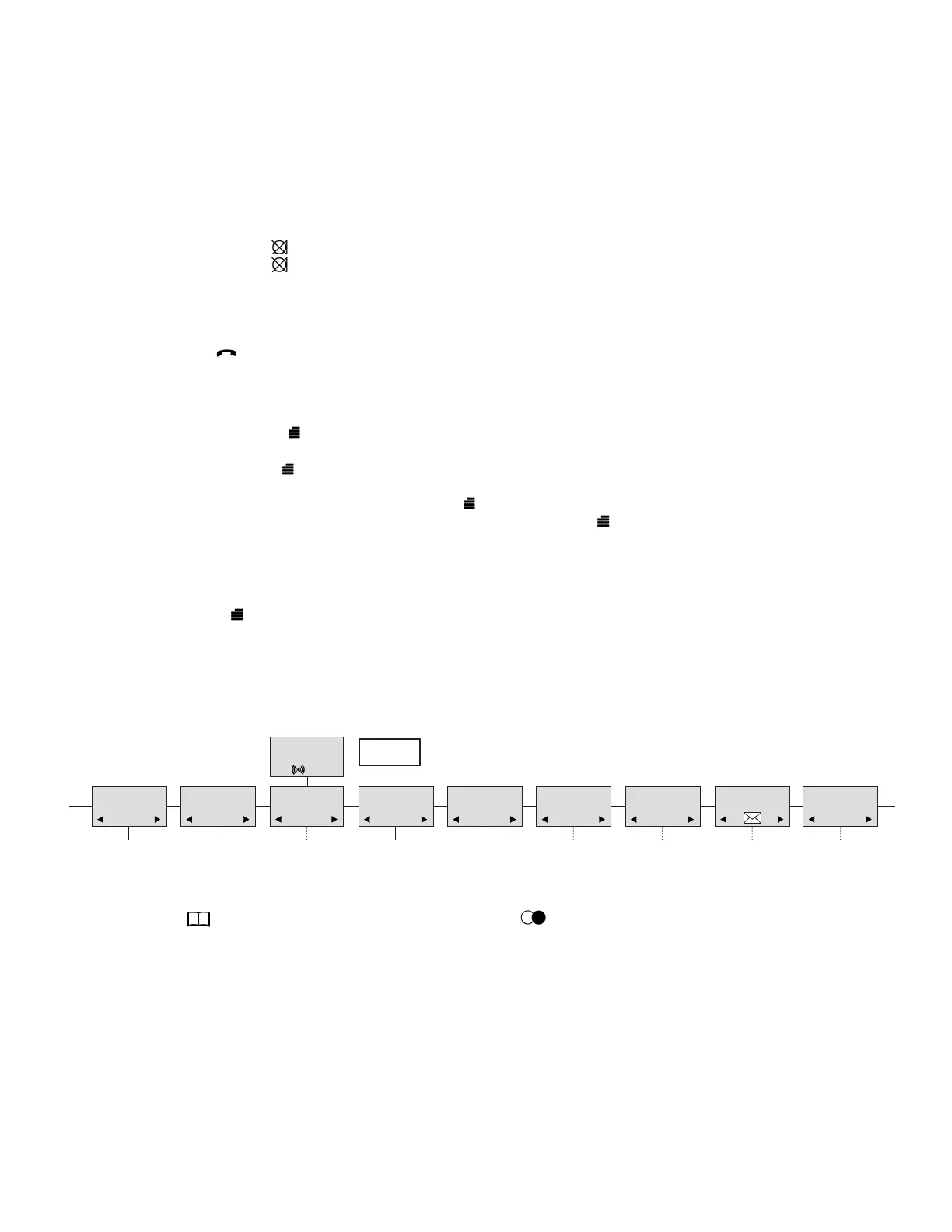
8. Menu structure
Pressing the key, enters or exits the menu structure. It has to be used if a “NO” or “CLEAR” is
wanted in the menu structure.
Pressing the OK key jumps to a lower level in the menu. When the lowest menu level is reached,
it will store the setting and jump to a higher level. It has to be used if a “YES” is wanted.
The phone book and redial menu can be accessed directly: the phone book by pressing the
> key ( ) and the redial menu by pressing the < key ( /C).
8.1 Using the alphanumeric keyboard
The normal dialling keys (0-9) are used for writing the name to be placed in the phone book. By
pressing the keys a certain number of times the related letters or digits will appear in the display.
Spaces are made by using the 0 key. Key # changes between uppercase and lowercase letters.
The arrows will move the cursor. Left arrow is also used for deleting (hold for one second). New let-
ters can be inserted.
Change of key press and pauses lasting more than one second automatically moves the cursor to
next position.
MENU
LOGIN
MENU
MSF FUNCTION
MENU
EXT. SERVICE
MENU
BATTERY
MENU
PHONE BOOK
MENU
REDIAL
MENU
MAIL
MENU
MENU
LANGUAGE
PROFILE
SET UP
D5000 Handset User Guide
Samsung DECT



 To Next Page