11
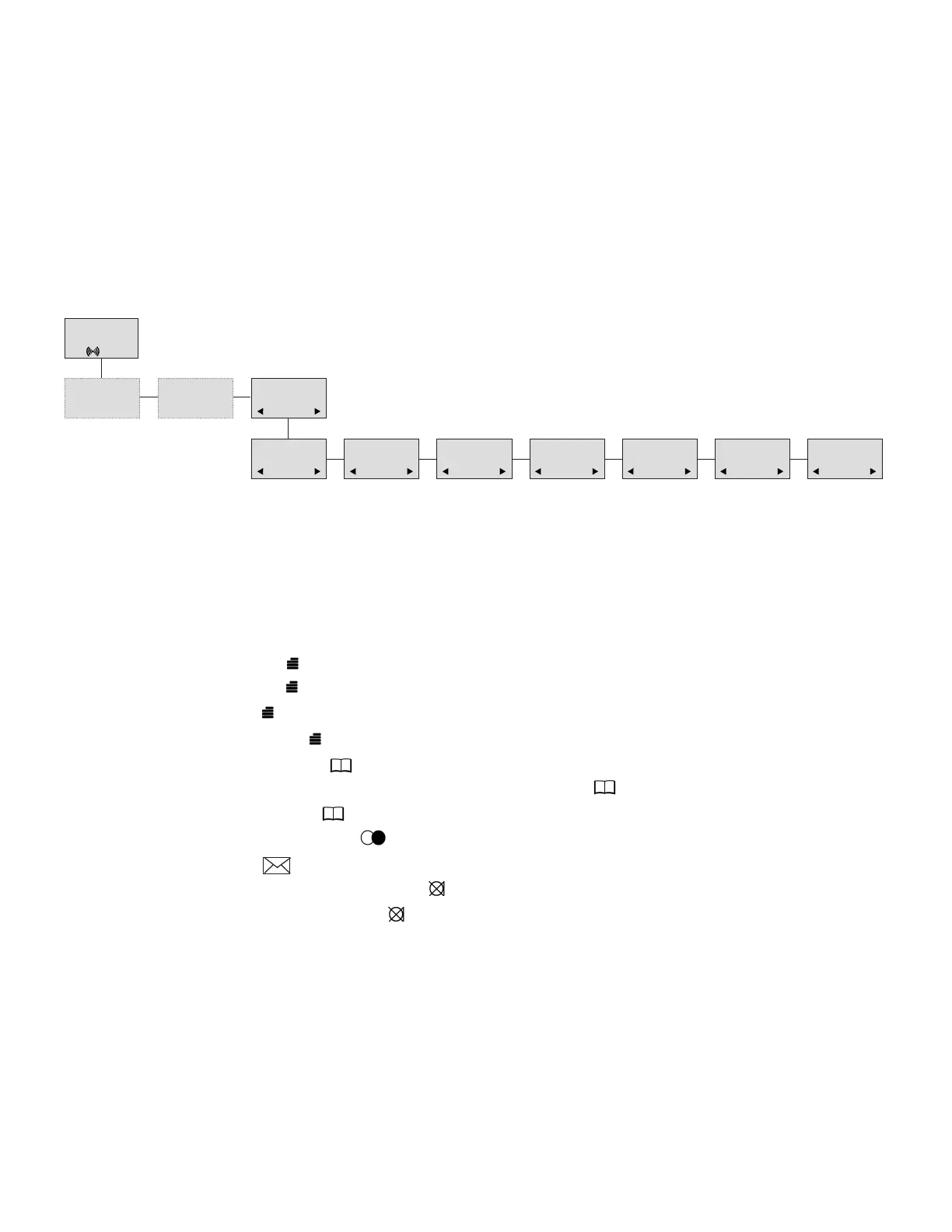
8.12 Menu language
There are six predefined languages in the handset: English, German, French, Italian, Spanish
and Dutch. Select the required language by accessing the menu, locating the language menu and
selecting the required language by pressing the OK key. Another language might be present and,
if so, will be shown as ”OPEN”. The ”OPEN” selection is a specific dealer language and is factory
programmed.
9. Shortcuts
”PROFILE 1”: Press: 1.
”PROFILE 2”: Press: 2. (Display shows PROFILE 2).
”SILENT”: Press: #. (No sounds) (Display shows SILENT).
”KEY LOCKED”: Press: (Display shows KEY LOCKED).
“PHONE BOOK”: Press > ( ) key in standby.
Name search in phone book: Press the first letter in name and > ( ) afterwards.
Store a number: Press > ( ) after the number (in on-hook condition).
“REDIAL ”and “CLIP”: Press < ( /C) key in standby.
“MAIL”: Press R ( ) key in on-hook condition.
MUTE temporarily the ringer: Press “OK”( ) when the telephone is ringing.
MUTE the microphone: Press “OK”( ) when the telephone is off-hook.
RECALL: Press the ALT key if residential system, else press the “R” key.
Pause(-): Hold * for one second.
Change from pulse to DTMF(T): Hold for two seconds.
MENU
LANGUAGE
SELECT
LANGUAGE
ENGLISH
SELECT
LANGUAGE
GERMAN
SELECT
LANGUAGE
FRENCH
SELECT
LANGUAGE
ITALIAN
SELECT
LANGUAGE
SPANISH
SELECT
LANGUAGE
DUTCH
SELECT
LANGUAGE
OPEN
SAMSUNG
D5000 Handset User Guide
Samsung DECT



 To Next Page