5
8.2 Key functions
8.3 Profile set-up
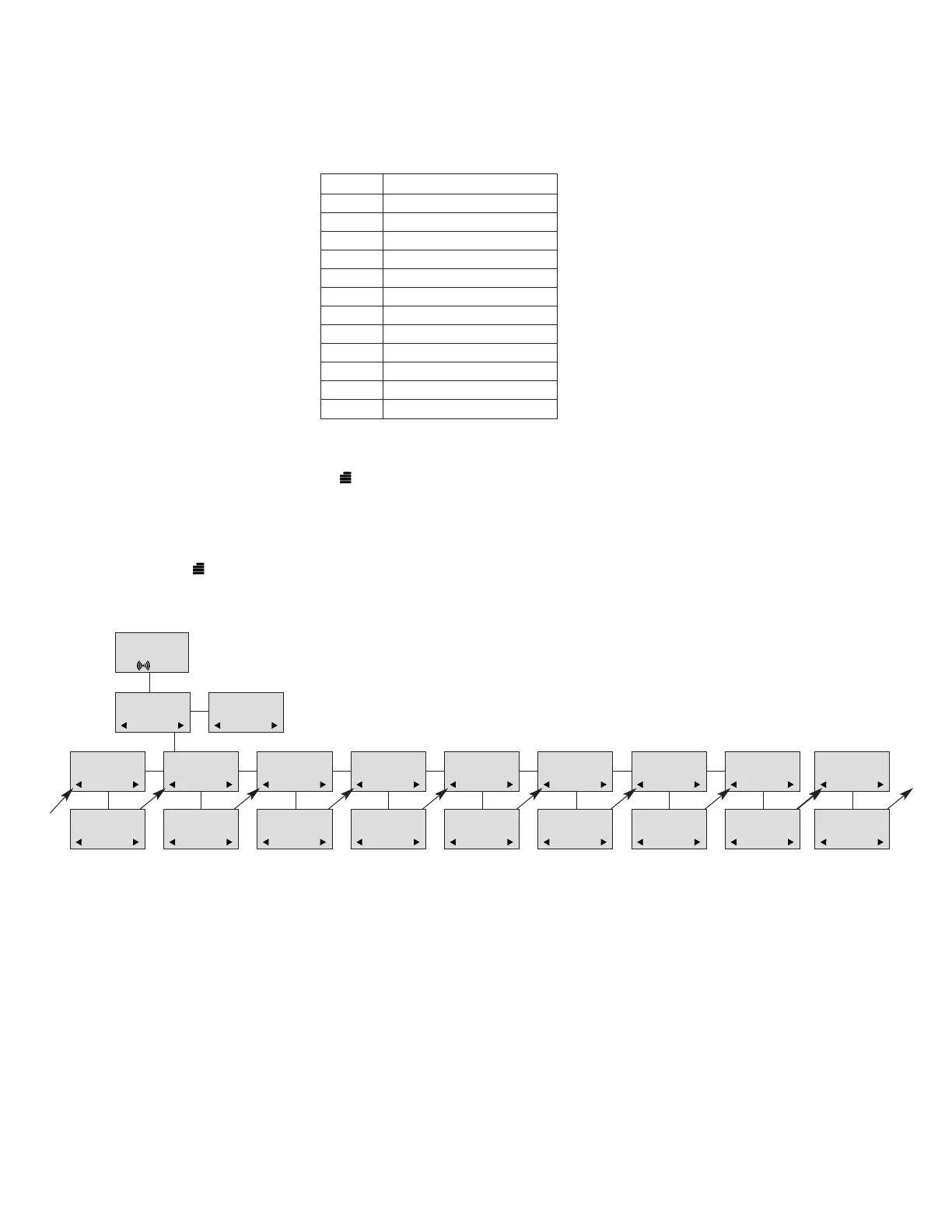
In the following you will find a description of how to set up one of the two profiles. To enter the
Profile Set-up menu press “ ”. Then press “OK” and use > or < to find the profile you wish to
change and confirm with “OK”. You are now able to switch between the different settings. Press
“OK” when you find the setting you wish to change. Change the setting as required, confirm with
“OK” and automatically you go to the next setting.
Press “ ” to finalize profile setup.
Profile Set-up
8.4 Profile functions
B
ACKLIGHT: Turn backlight on/off using > and <. Confirm with (OK).
R
INGERTONE: Scroll through the nine different ringer tones using > and <. Confirm with (OK).
R
INGER VOL: Turn the volume up and down using > or <. Confirm with (OK).
KEY CLICK: Turn on/off using > and <. Confirm with (OK).
V
IBRATOR: Turn on/off using > and <. Confirm with (OK).
B-
ANSWER: Turn on/off using > and <. Confirm with (OK). When turned on, the telephone auto-
matically goes off hook when ringing. If subscribed to a DECT system, it automatically goes on
hook when calls are terminated.
S
TART VOL: Adjust Start Volume using > and <. Confirm with (OK).
O
UT OF RANGE: Turn out of range indication on/off using > and <. Confirm with (OK). With the out
of range indicator turned on, a beep will appear when the telephone is moving out of range of the
base station, and “OUT OF RANGE” will appear in the display.
Key
1 Æ Ø Å @ Ä Ö ß Ü 1
2 A B C @ Ä Á À Â 2
3 D E F 3
4 G H I Ï Î 4
5J K L5
6 M N O Ö Ó Ò 6
7 P Q R S ß 7
8 T U V Ü Ú Ù Û 8
9W X YZ 9
0 Space . , _ - + : ? ! 0
*
* # / \ ( ) = &
# Upper/lower-case
13
SET PROFILE1
BACKLIGHT
SET PROFILE1
RINGERTONE
SET PROFILE1
RINGER VOL
SET PROFILE1
KEY CLICK
SET PROFILE1
VIBRATOR
SET PROFILE1
B-ANSWER
SET PROFILE1
START VOL
SET PROFILE1
OUT OF RANGE
BACKLIGHT
ON/OFF
RINGERTONE
1,2.........
RINGER VOL
❚❚❚❚❚
KEY CLICK
❚❚❚❚❚ - - -
VIBRATOR
ON/OFF
B-ANSWER
ON/OFF
START VOL
❚❚❚❚❚
OUT OF RANGE
TONE ON/OFF
SET PROFILE
PROFILE 1
SET PROFILE
PROFILE 2
SET PROFILE1
AUTO KEYLOCK
AUTO KEYLOCK
ON/OFF
D5000 Handset User Guide
Samsung DECT



 To Next Page