EasyManua.ls Logo

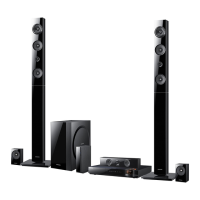
Samsung HT-E6500W - User Manual

Samsung HT-E6500W
86 pages
Print Icon
To Next Page IconTo Next Page
Loading...
imagine the possibilities
Thank you for purchasing this Samsung product.
To receive more complete service,
please register your product at
www.samsung.com/register
5.1CH Blu-ray™
Home Entertainment System
user manual
HT-E6500W
HT-E6500W_ZA_0417-1(D2D).indd 1 2012-04-17 7:01:32

Table of Contents

Questions and Answers

  • E
    Eric JohnsonSep 1, 2025
    Why is sound only coming from a few speakers on my Samsung Home Theater System?
    • T
      Tyler Lopez Jr.Sep 1, 2025
      If sound is only coming from some speakers on your Samsung Home Theater System, note that certain Blu-ray/DVD discs only output sound from the front speakers. Check that all speakers are properly connected and adjust the volume. Also, when listening to a CD, radio, or TV, sound is typically output only to the front speakers.
  • J
    jamesarmstrongAug 31, 2025
    Why is there no HDMI output from my Samsung HT-E6500W?
    • Z
      ztapiaAug 31, 2025
      If there's no HDMI output from your Samsung Home Theater System, verify the connection between the TV and the HDMI jack on the system. Also, confirm that your TV supports the HDMI input resolution (480p/720p/1080i/1080p).
  • C
    Christy AvilaAug 30, 2025
    What to do if playback does not start on my Samsung HT-E6500W?
    • A
      Arthur LambertAug 30, 2025
      Check the region number of the Blu-ray/DVD disc. Blu-ray/DVD discs purchased from abroad may not be playable. CD-ROMs and DVD-ROMs cannot be played on this product. Make sure that the rating level is correct.
  • D
    David EstradaAug 29, 2025
    What to do if I can't receive radio broadcasts on my Samsung Home Theater System?
    • L
      landrycraigAug 29, 2025
      Check if the antenna is connected properly. If the antenna's input signal is weak, install an external FM antenna in an area with good reception.
  • R
    Rebecca KingAug 28, 2025
    What to do if playback doesn't start immediately on my Samsung HT-E6500W Home Theater System?
    • L
      Lisa YoungAug 28, 2025
      If you are using a deformed disc or a disc with scratches on the surface, this may cause a delay. Try wiping the disc clean.
  • V
    Valerie EdwardsAug 27, 2025
    Why can I hear sound from only a few speakers on my Samsung HT-E6500W?
    • J
      Jill GarciaAug 27, 2025
      On certain Blu-ray/DVD discs, sound is output from the front speakers only. Check if the speakers are connected properly. Adjust the volume. When listening to a CD, radio, or TV, sound is output to the front speakers only.
  • C
    Christina KochAug 27, 2025
    How to reset my Samsung HT-E6500W?
    • J
      Joseph RitterAug 27, 2025
      To reset your Samsung Home Theater System, press and hold the remote control's 5 button for 5 seconds in STANDBY mode. Be aware that using the RESET function will erase all stored settings, so only use this if necessary.
  • T
    Timothy EstradaAug 25, 2025
    Why is my Samsung HT-E6500W remote control not working?
    • L
      lesliecortezAug 26, 2025
      If the Samsung Home Theater System remote control isn't working, make sure you're within range and pointing it correctly at the sensor. Also, check if the batteries are working. Finally, ensure you've selected the correct mode (TV or BD) on the remote for the function you're trying to use.
  • R
    Rebecca WilliamsAug 25, 2025
    What to do if there is no HDMI output on my Samsung Home Theater System?
    • M
      Michelle CamposAug 25, 2025
      Check the connection between the TV and the HDMI jack of the product. Verify that your TV supports 480p/720p/1080i/1080p HDMI input resolution.

Summary

Safety Information

Warning

Reduce risk of fire or electric shock; do not expose to rain or moisture.

CLASS 1 LASER PRODUCT

Compact Disc player classified as CLASS 1 LASER product with radiation precautions.

Precautions

Important Safety Instructions

Read and follow all safety instructions carefully before using the unit.

Handling Cautions

Precautions for handling the apparatus, power plug, and liquids.

Remote Control

Tour of the Remote Control

Explains the function of each button on the remote control.

Connections

Connecting the Speakers

Instructions and guidance on speaker placement and connection.

Connecting to a TV

Explains how to connect the product to a TV via HDMI or Video cable.

Connecting to External Devices

Explains connecting external devices via HDMI, Optical, or AUX.

Connecting to a Network Router

Illustrates wired and wireless network connection methods.

Settings

The Initial Settings Procedure

Step-by-step guide for initial setup after connecting the product.

Auto Sound Calibration

Explains the Auto Sound Calibration function and how to run it.

Media Play

Controlling Video Playback

Controls for playback of video files (play, pause, search, repeat).

Controlling Music Playback

Controls for playback of music files (play, pause, skip, repeat).

Controlling Photo Playback

Controls for playback of photo content.

Appendix

Troubleshooting

Table of common symptoms and their remedies.

LIMITED WARRANTY TO ORIGINAL PURCHASER

Quick Installation Guide

First Steps

Initial steps for setting up the product.

Video Out Connections

How to connect the product to a TV via HDMI or Video cable.

Audio In Connections

Method 2: OPTICAL - Connecting an External Digital Audio Component

Connect external digital audio device via Optical.

Method 3: AUX IN - Connecting an External Analog Component

Connect external analog audio device via AUX.

Network Connections

Layout of the Speaker System

How to lay out the speaker system components.

Final Steps

Plug in the main unit and insert batteries into the remote.

Instructions for powering the unit and inserting remote batteries.

Initial Settings

Safety Warnings

READ THIS BEFORE USING YOUR SAMSUNG PRODUCTS!

Samsung HT-E6500W Specifications

General IconGeneral
Disc types supportedBD, CD, CD-R, CD-RW, DVD, DVD+R, DVD+RW, DVD-R, DVD-RW
Playback disc formatsBlu-Ray audio, Blu-Ray video, CD audio, CD video
Number of optical discs1 discs
Optical disc player typeBlu-Ray player
Built-in HDDNo
TV tuner integrated-
Image formats supportedJPG
Apple docking compatibilityiPhone, iPod
Compatible memory cardsNot supported
Video formats supportedAVCHD, MKV, MPEG, MPEG4, VC-1, WMV, XVID
Audio decodersDolby Digital, Dolby Digital Plus, Dolby Pro Logic II, Dolby TrueHD, DTS, DTS 96/24, DTS-HD
RMS rated power1000 W
Audio output channels5.1 channels
Audio formats supportedAAC, AC3, LPCM, MP3, WMA
Product colorBlack
USB direct playbackYes
Consumer Electronics Control (CEC)Anynet+
HDMI in2
USB version2.0
SCART ports quantity0
Number of HDMI outputs1
Package depth446 mm
Package width606 mm
Package height374 mm
Package weight15000 g
Weight and Dimensions IconWeight and Dimensions
Main unit weight3900 g
Main unit dimensions (WxDxH)430 x 315 x 63 mm

Related product manuals