11
English
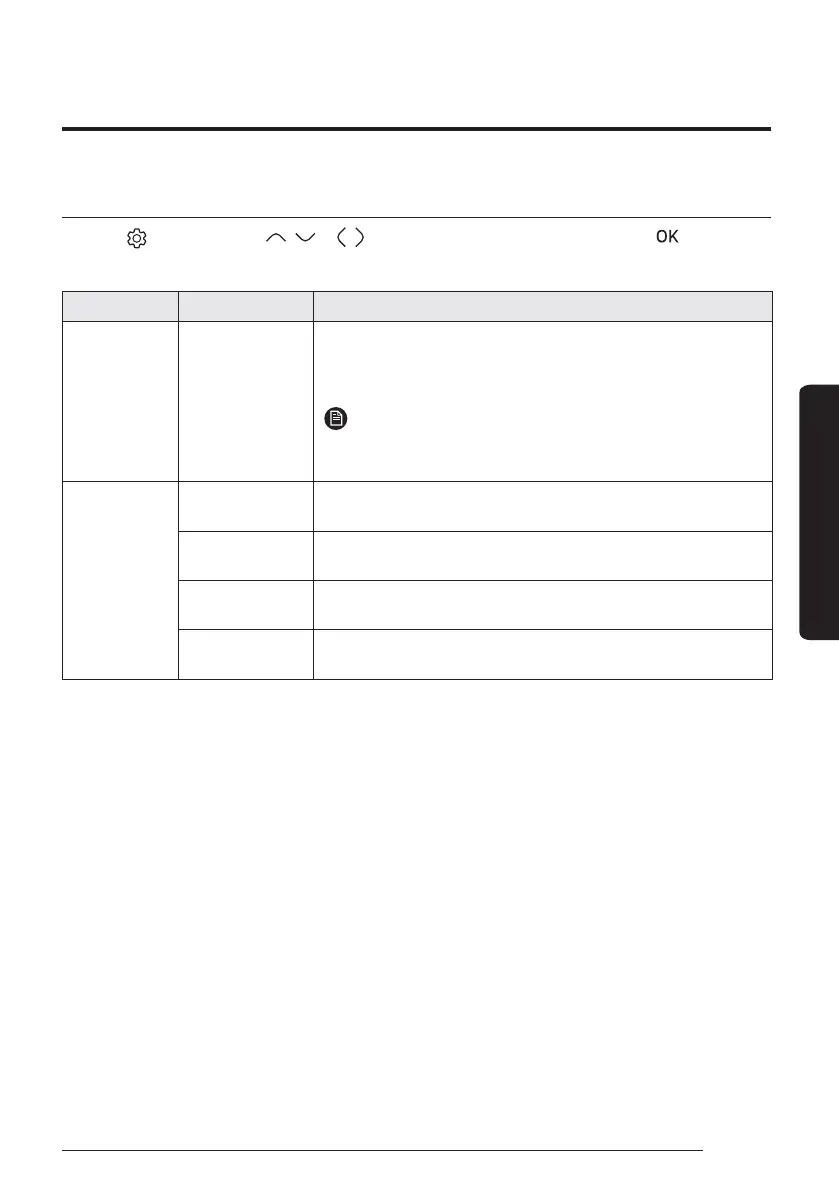
Energy-Saving Operation
Energy
Press the
button, press the , or , button to select Energy, and then press the
button.
You can see and set any of Energy Usage and Energy Setting.
Classification Type Description
Energy Usage -
Displays the Instantaneous Power, Weekly Energy Usage, Monthly
Energy Usage, Yearly Energy Usage, Energy Usage over Last Year,
and Operation Time in graph format.
NOTE
࡙ For accuracy of operation time, use the DMS time.
࡙ Ɵ˵ʪиʪʪцʒϑΧɇц˙ͱͱиϑϩ˵ʪÃƊĮߩߧߡߢϑϩɇʒɇθʒϑࢋ
Energy Setting
Target Energy
Consumption
Sets the target energy consumption.
Target Operation
Time
Sets the target operation time.
Alarm Popup
Sets whether or not to generate an alarm when the target energy
consumption is reached.
Usage Data
Initialization
Initialises the entire energy function.



 To Next Page