EasyManua.ls Logo

Samsung MIM-E03CN - Setting Options; How to Set Options

Samsung MIM-E03CN
60 pages
Print Icon
To Next Page IconTo Next Page
To Previous Page IconTo Previous Page
Loading...
13
English
Setting Options
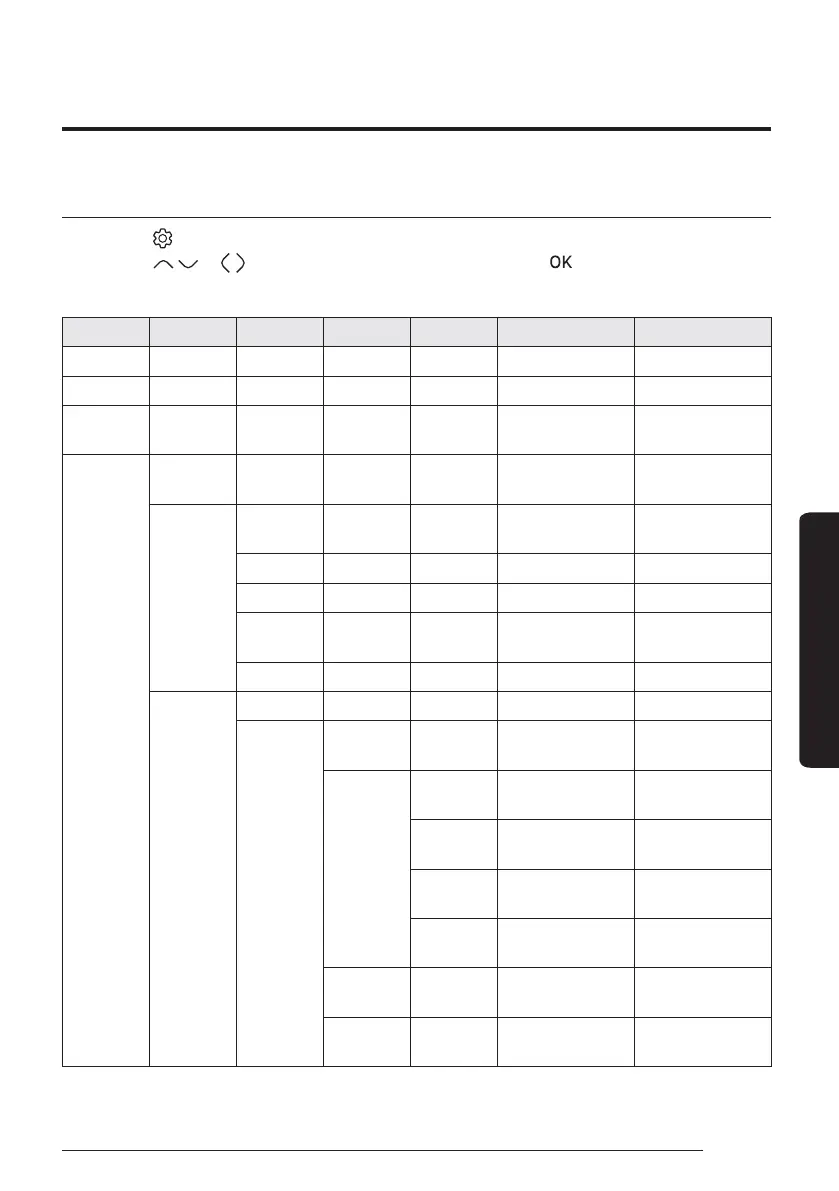
How to set the Options
1 Press the button.
2 Press the
or button to select Option, and then press the button.
3 See the following pages to select the desired menu.
Step 1 Step 2 Step 3 Step 4 Step 5 Description Default
Button Lock ON/OFF OFF
Error List - -
Indoor Unit
Information
--
User Mode
Language
Differs depending on
the language
First value for the
language pack
Daylight
Saving Time
Daylight
Saving Time
ON/OFF OFF
Unit Day/Week Week
Month January to December Mar
Week
1st to 4th, F (final
week)
F (final week)
Day 1 to 31 22
Lock
All Lock ON/OFF OFF
Lock of
partial
function
Operation
Lock
ON/OFF OFF
Operation
Mode Lock
All Mode
Lock
ON/OFF OFF
Auto Mode
Lock
ON/OFF OFF
Cool Mode
Lock
ON/OFF OFF
Heat Mode
Lock
ON/OFF OFF
Temperature
Lock
ON/OFF OFF
Schedule
Lock
ON/OFF OFF
Setting Options

Other manuals for Samsung MIM-E03CN

Related product manuals