14
Setting Options
English
Setting Options
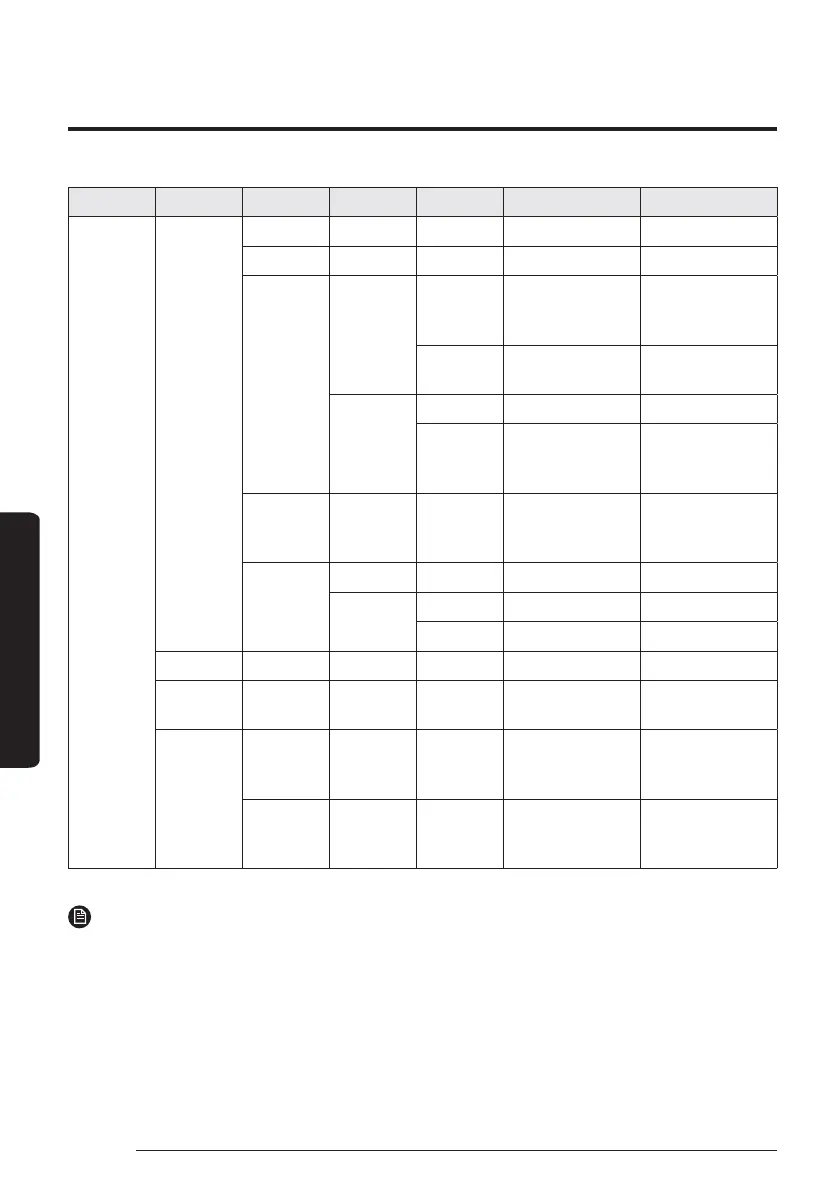
Step 1 Step 2 Step 3 Step 4 Step 5 Description Default
User Mode
Wired
remote
controller
LED ON/OFF ON
Button Mute ON/OFF OFF
Current Time
Date
Date Format
YYYY/MM/DD,
DD/MM/YYYY,
MM/DD/YYYY
DD/MM/YYYY
Year/Month/
Day
2000 to 2099/1 to
12/1 to 31
2019.01.01
Time
Time Format 12-Hour/24-hour 12-Hour
Hour/
Minute/
AM/PM
0 to 12/0 to
60/AM.PM
PM 12 Hour 00
Minute
Reset
Remote
Controller
--
Display
Setting
Brightness 10 to 100% 100%
Screen Saver
Timer 10 to 60 seconds 30sec
Brightness 0, 10, 30, 50, 70% 30%
Smart Reset - -
Reset All
User modes
--
Service Time
Check
Service Call
Number
Service call number
entered for Service
mode
-
Last
Inspection
Final control date
entered for Service
mode
-
NOTE
࡙ When two wired remote controllers are connected, the brightness can be set within 10 to 50%.



 To Next Page