ENG - 4
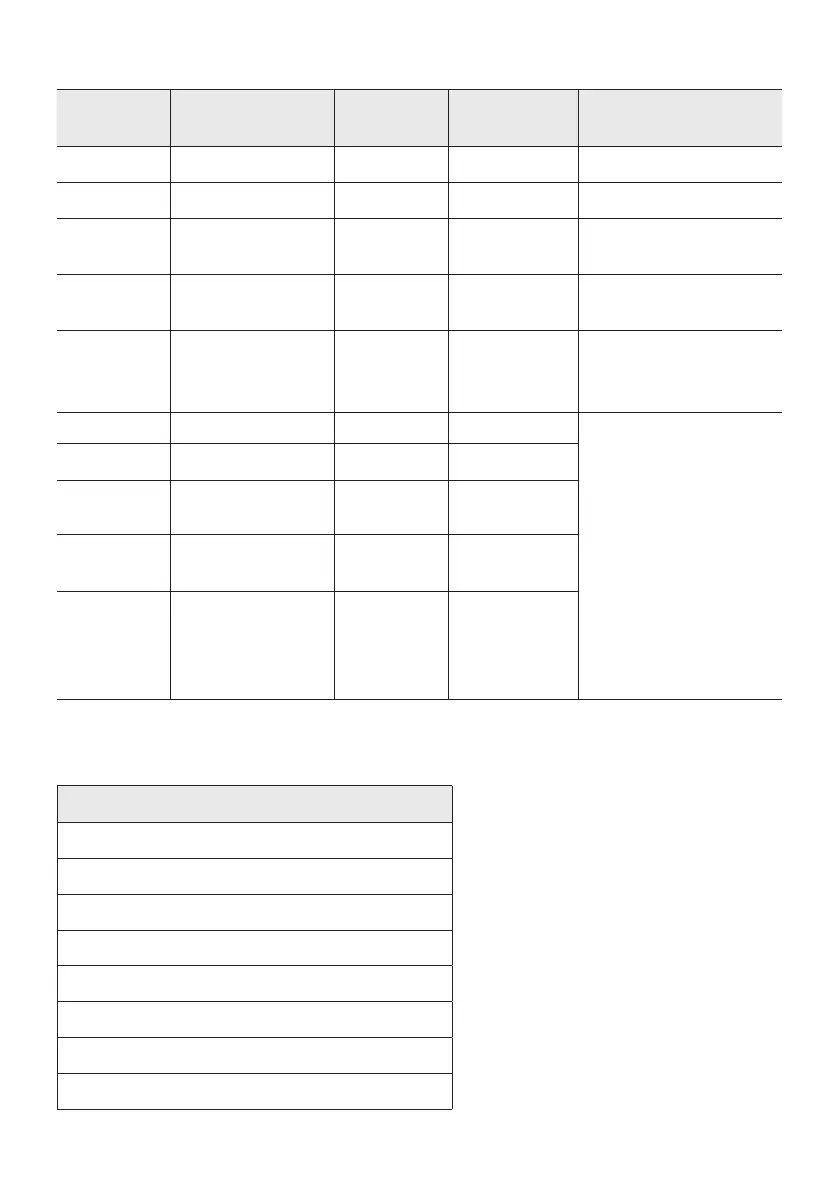
Charge LED State of the Sound Tower:
Off Fully charged Off(black) Off (black)
Off Charging Green blinks N/A
Off Not in charging Off (black) Off (black)
The AC cable is not
inserted.
Stand by Fully charged Blue on N/A
There is no standby mode
in DC mode.
Stand by Charging Green blinks N/A
The charging LED is the
same as when Sound
Tower is shut down.
On Fully charged Blue on Blue on
When turned on, Sound
Tower mainly reects the
current battery state.
On Charging Green blinks N/A
On
Not in charging and
30%~98%power
Green on Green on
On
Not in charging and
5% ~ 29% power
Red on Red on
On
Not in charging and
below 5% power
Red on
Power off after
Light bar
orange blink
once
In DC mode shutdown, the entire system power will be turned off. So in the off state, compared with AC
mode, the following functions are not supported.
Wake up via bluetooth
Shop mode
Power Off Setting
Customer Reset
Power on via IR
Battery Charge
AUI on/off
UI feedback of LED lighting bar(front) on/off


 To Next Page