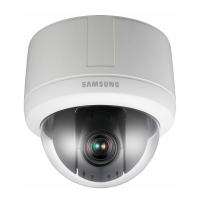
How to fix bad colors on my Samsung Security Camera?
- KKaren SchmidtAug 16, 2025
If the colors in your Samsung Security Camera's picture don't look right, check the White Balance settings. You can also adjust the Color Menu in Image Adj.
How to fix bad colors on my Samsung Security Camera?
If the colors in your Samsung Security Camera's picture don't look right, check the White Balance settings. You can also adjust the Color Menu in Image Adj.
Why is no picture displayed on my Samsung SCP-2120 Security Camera monitor?
If your Samsung Security Camera is not displaying a picture, make sure the power and video cables are securely connected to both the camera and the monitor. Also, check if the iris of the lens is closed and adjust it if needed. Finally, examine the camera's fixed shutter speed and adjust it via the camera's shutter menu. If the issue persists, consult the operation manual of the system controller connected to the camera.
Why is my Samsung SCP-2120 picture out of focus?
If your Samsung Security Camera image is blurry, start by checking the dome cover and camera lens for dirt or smudges and clean them off. Also, consider the distance to the subject and its surroundings; a white background can cause focusing issues. If using Auto Focusing, try switching to Manual Focus mode. You can also try restoring the camera settings to default using the reset menu or adjust the Sharpness level.
What to do if the picture from my Samsung Security Camera is too dark or bright?
If the image from your Samsung Security Camera appears too dark or too bright, navigate to the camera's Brightness menu and adjust the settings to your preference.
How to fix digital noise in my Samsung SCP-2120 picture?
If you're seeing digital noise in your Samsung Security Camera's picture, verify that the video cable is properly connected. Also, ensure that neither the power nor the video cable exceeds the recommended maximum length. You might also want to adjust the Sharpness level.
Why is my Samsung SCP-2120 picture flickering?
If your Samsung Security Camera's picture is flickering, first check the dome cover and lens for dirt or smudges and clean them. If the camera is pointed directly at a fluorescent light or sunlight, try changing the camera's direction.
Why doesn't pan, tilt, zoom, or focus work on my Samsung Security Camera?
If the pan, tilt, zoom, or focus functions are not working on your Samsung Security Camera, check that the power and video cables are securely connected. Also, verify that Pan Limit and Tilt Limit are not set; if they are, remove them. If the issue persists, a motor or the lens may be overheated.
Why does my Samsung SCP-2120 Security Camera monitor display a white image?
If your Samsung Security Camera monitor shows a white image, check if the iris of the lens is open and adjust the iris menu accordingly.
Why does my Samsung SCP-2120 Security Camera controller not work?
If the controller for your Samsung Security Camera isn't working, ensure that the camera and all peripheral devices are properly connected. Also, verify the ID, protocol, and baud rate settings.
Why does my Samsung SCP-2120 Security Camera switch between color and B&W frequently?
If your Samsung Security Camera switches between color and black and white modes too often, adjust the Duration and Dwell Time in the Day & Night menu.
Details the camera's 12X optical zoom combined with 16x digital zoom for up to 192x magnification.
Explains safety symbols, warnings, and essential precautions for safe operation.
Covers wiring diagrams, DIP switch setup, cable preparation, and mounting examples (wall, ceiling, flush).
Explains focus modes (Auto, Manual, One Shot) and digital zoom capabilities.
Details methods to adjust color balance for accurate video output.
Covers brightness, iris, shutter, and Sens-Up for optimal image exposure.
Describes HLC and BLC features to manage challenging lighting conditions.
Covers managing presets, swing, group, tour, PTZ trace, auto run, and schedules.
Details configuration for alarm triggers and outputs.
Details the camera's 12X optical zoom combined with 16x digital zoom for up to 192x magnification.
Explains safety symbols, warnings, and essential precautions for safe operation.
Covers wiring diagrams, DIP switch setup, cable preparation, and mounting examples (wall, ceiling, flush).
Explains focus modes (Auto, Manual, One Shot) and digital zoom capabilities.
Details methods to adjust color balance for accurate video output.
Covers brightness, iris, shutter, and Sens-Up for optimal image exposure.
Describes HLC and BLC features to manage challenging lighting conditions.
Covers managing presets, swing, group, tour, PTZ trace, auto run, and schedules.
Details configuration for alarm triggers and outputs.
| Brand | Samsung |
|---|---|
| Model | SCP-2120 |
| Category | Security Camera |
| Language | English |