English-16
Operating Smart A/C application
Setting additional functions of the air conditioner
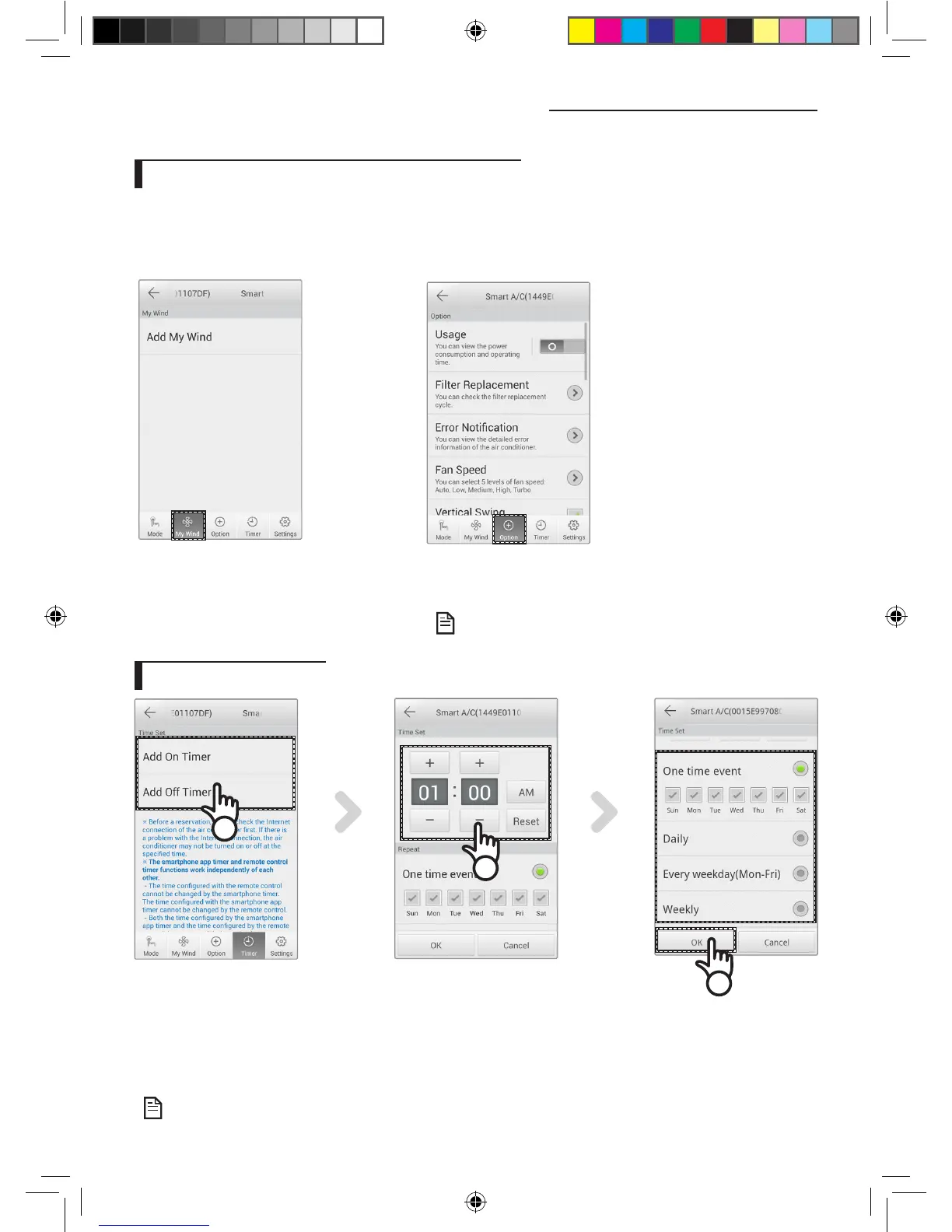
f You can control the additional functions the air conditioner supports.
f The additional functions will be activated depending on the air conditioner functions.
f My Wind, Usage, Filter Replacement, Error Notication, Color Of Wind function can be controlled only through the
application. You must be connected to Wi-Fi and run the application in order to use these functions.
1. The user save the function for me with
establishment.
Air-conditioner can be controlled easily.
1. Press the [Option] tab at the bottom of the screen.
2. Select the operation mode or additional functions you want.
• For the details of each additional function, refer to the user
manual of each air conditioner.
Setting timer function
2
1
3
1. After pressing the[Timer] tab at the bottom of the screen, press the [On Timer] or [O Timer] tab.
- When you want to set on time, press the [On Timer] tab or [O Timer] tab for o time.
2. Press the [+], [-] or [AM], [PM] tab to set the on time or o time.
3. After setting repetition cycle, press the [OK] tab.
• On time and o time cannot be set at the same time.
NOTE
NOTE
A3050 ET WiFi APP_IB_04209A-00_EN.indd 16 2013-10-11 14:49:45



 To Next Page