English _85
WEB VIEWER
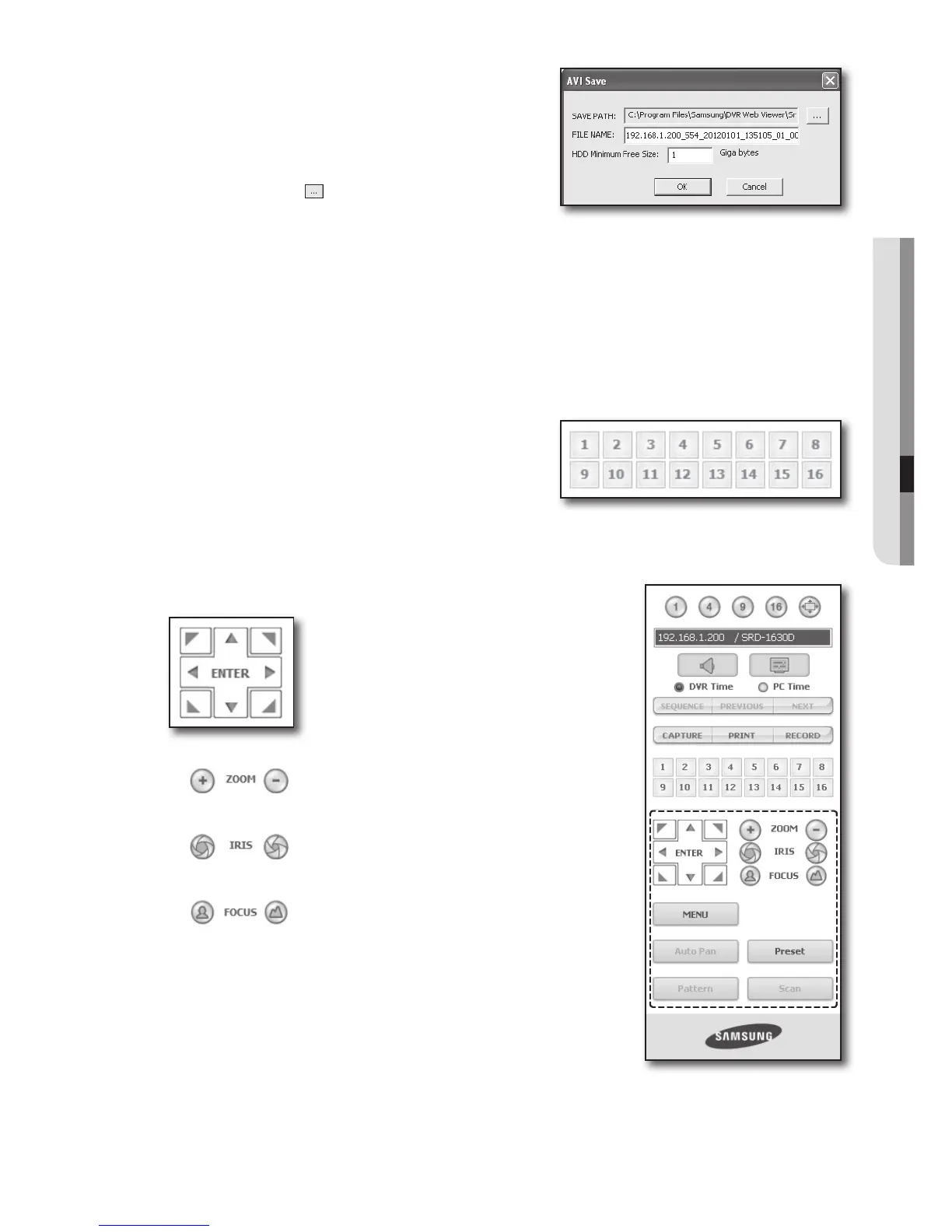
• RECORD : Saves the current image on the screen and
saves it as a avi video file.
M
To record it, it is required at least 1GB of available space.
The default saving path is “C:\Program Files\Samsung\DVR
Web Viewer\VideoClip\Live”. To change the saving path, click
<SAVE PATH (
)> button and then select the path you
want. For Windows Vista or 7, the saving path is “C:\users\
(user ID)\AppData\Local-Low\Samsung\DVR Web Viewer\VideoClip\”.
The file is automatically named as following : “IP address_Port number_YYYYMMDD_camera number_index”
Ex) 192.168.1.200_554_20120101_135105_01_00
For AVI Save, you need the H.264 codec for playing saved files.
HDD Minimum Free Size : During the recording, if there is no more capacity available in the HDD than set free space
will prompt with a popup message : “Cannot record due to insufficient disc space in the HDD”.
Changing the Live Screen Channel
• Blue numbers : The channel connected to the current live
screen
• Gray numbers : The channel not connected to the current
live screen
Using PTZ Camera
Click the direction buttons to control the camera.
• <
>
You can zoom in or out an image by using the ZOOM button.
• <
>
You can adjust the entering light amount by using the IRIS button.
• <
>
You can adjust the focus by using the FOCUS button.



 To Next Page