Shooting options
66
Adjusting brightness and color
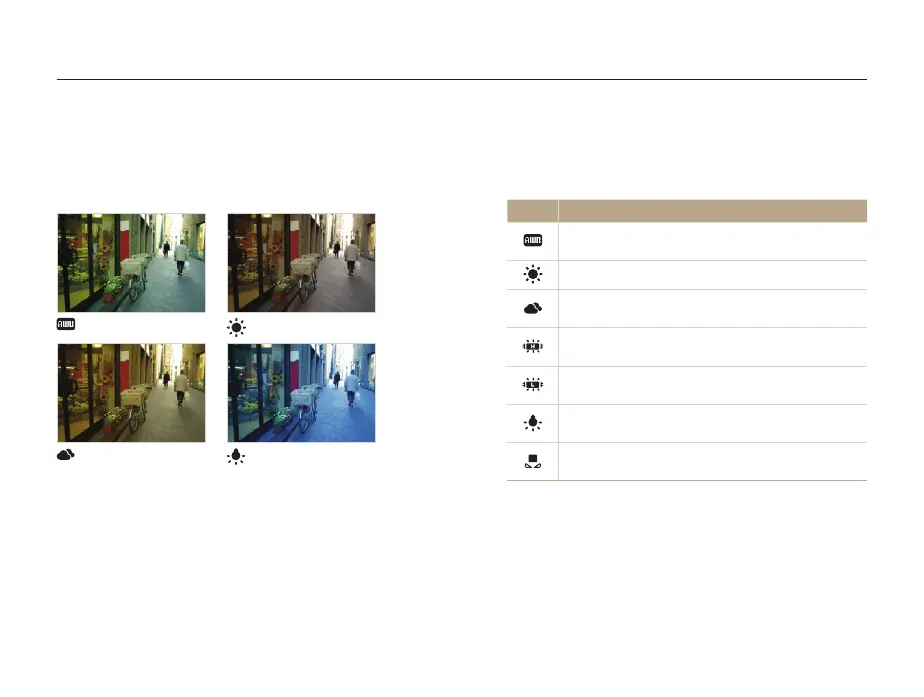
Selecting a White Balance setting
The color of your photo depends on the type and quality of the
light source. If you want the color of your photo to be realistic,
select a White Balance setting that is appropriate for the lighting
conditions, such as Auto WB, Daylight, Cloudy, or Tungsten.
Auto WB
Daylight
Cloudy
Tungsten
pv
1
In Shooting mode, press [
m
].
2
Select
a
or
v
White Balance.
3
Select an option.
Icon Description
Auto WB: Automatically set the White Balance based
on the lighting conditions.
Daylight: For outdoor photos on a sunny day.
Cloudy: For outdoor photos on a cloudy day or in
shadows.
Fluorescent_H: For shooting under a daylight
fluorescent or 3-way fluorescent light.
Fluorescent_L: For shooting under white fluorescent
light.
Tungsten: For shooting indoor photos under
incandescent bulbs or halogen lamps.
Measure: Shutter: To use White Balance settings that
you define. (p. 67)



 To Next Page