Your Monitor
Front
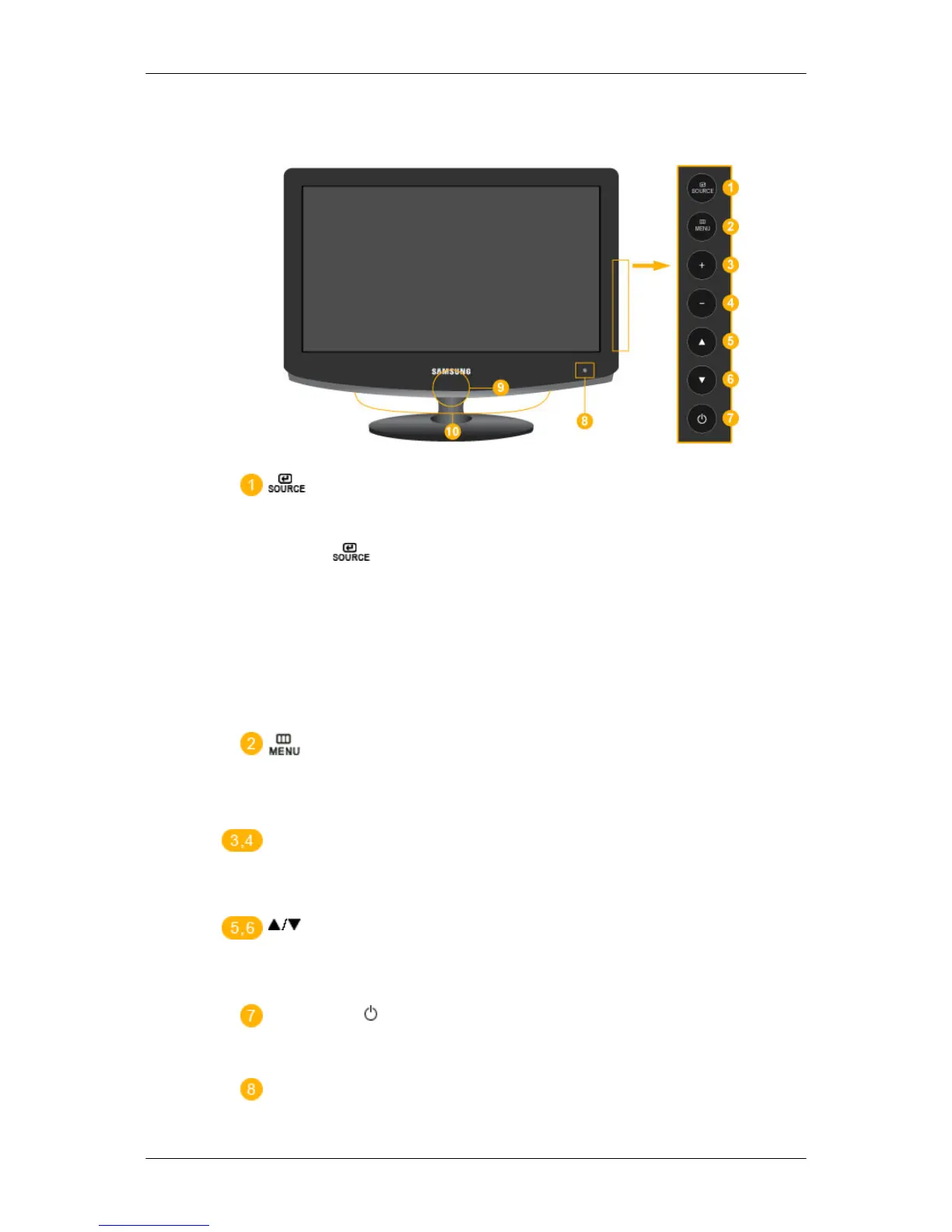
Activates a highlighted menu item.
Push the '
', button to change the input signal source.
Changing
the source is only allowed for external devices connected to the
product at the time.
To switch Screen modes:
[PC]
→
[DVI]
→
[TV]
→
[Component]
→
[HDMI1]
→
[HDMI2]
>> Click here to see an animation clip
Use this button to open the on-screen menu and to exit from the on-screen
menu or to close the screen adjustment menu.
+ / -
Moves from one menu item to another horizontally or adjusts selected
menu values. Adjusts the audio volume.
Moves from one menu item to another vertically or adjusts selected menu
values. In TV mode, selects TV channels.
Power button [ ]
Use this button for turning the product on and off.
Remote Control Sensor
Aim the remote control towards this spot on the Monitor.
Introduction






 To Next Page