Connecting to a Macintosh
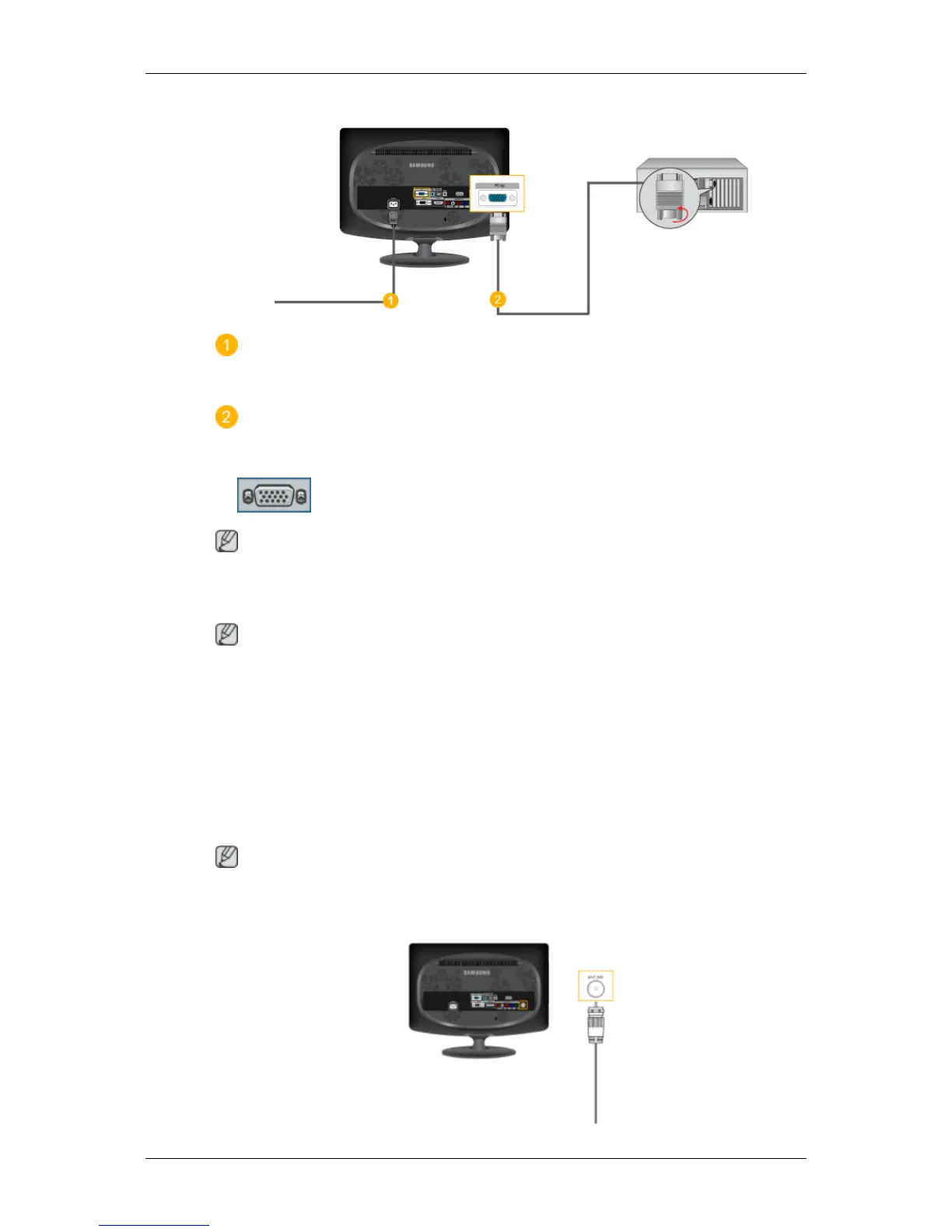
Connect the power cord for your monitor to the POWER port on the back of the monitor.
Plug the power cord for the monitor into a nearby outlet.
Using the D-sub (Analog) connector on the video card.
• Connect the signal cable to the D-SUB port on the back of your monitor.
[PC IN]
Note
Turn on the monitor and Macintosh.
Connecting to Other devices
Note
•
This monitor allows the user to connect it to such input devices as a DVD player, a VCR
or camcorder, or a DTV or TV without disconnecting the PC.
• The configuration at the back of the monitor may vary from product to product.
• The DVI to HDMI cable, digital audio optic output cable, and RCA to stereo (for PC) cable
are all sold separately.
Contact a Service Center to purchase any products sold separately.
Connecting TV
Note
You
may view television programs on the monitor if it is connected to an antenna or CATV
cable without installing any separate TV reception hardware or software on your computer.
Connections






 To Next Page