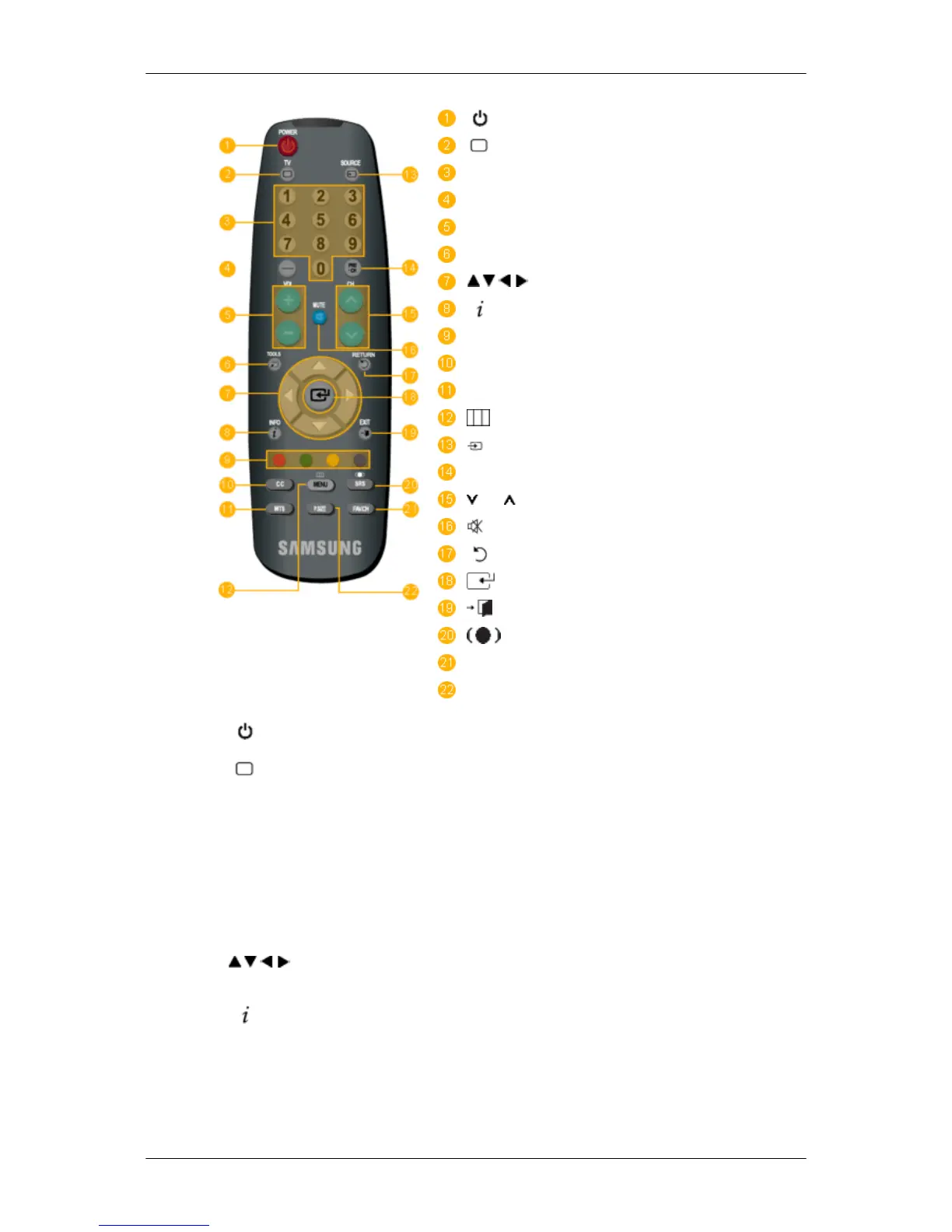
POWER
TV
Number Buttons
- button
+ VOL -
TOOLS
Down-Up Left-Right buttons
INFO
COLOR BUTTONS
CC
MTS
MENU
SOURCE
PRE-CH
CH
MUTE
RETURN
ENTER
EXIT
SRS
FAV.CH
P.SIZE
1. POWER
Turns the product On/Off.
2.
TV
Selects the TV mode directly.
3. Number Buttons
Press to change the channel.
4. - button The "-" button operates only for TV. It is used to select MMS
(multi-channel) for a TV.
5. + VOL - Adjusts the audio volume.
6. TOOLS Use to quickly select frequently used functions.
7.
Down-Up Left-
Right buttons
Moves
from one menu item to another horizontally, vertically
or adjusts selected menu values.
8.
INFO
Current
picture information is displayed on the upper left
corner of the screen.
9. COLOR BUTTONS Press to add or delete channels and to store channels to the
favorite channel list in the “Channel List” menu.
10. CC Controls the caption decoder.
Introduction






 To Next Page