(3)
When all the connections are completed, connect the power cords for the monitor
and DVD (or the device connected to the digital output terminal).
(4) Select "HDMI" using the 'SOURCE [
]' button.
Note
If you just connect using the DVI to HDMI cable without connecting to the sound source,
you cannot hear sound.
Connecting the audio output terminal of a digital device to the
[R-AUDIO-L]
of
[COM-
PONENT IN]
of the monitor using an audio cable will not give you sound. Make sure to
connect to the
[HDMI / PC/DVI-D AUDIO IN]
terminal of the monitor.
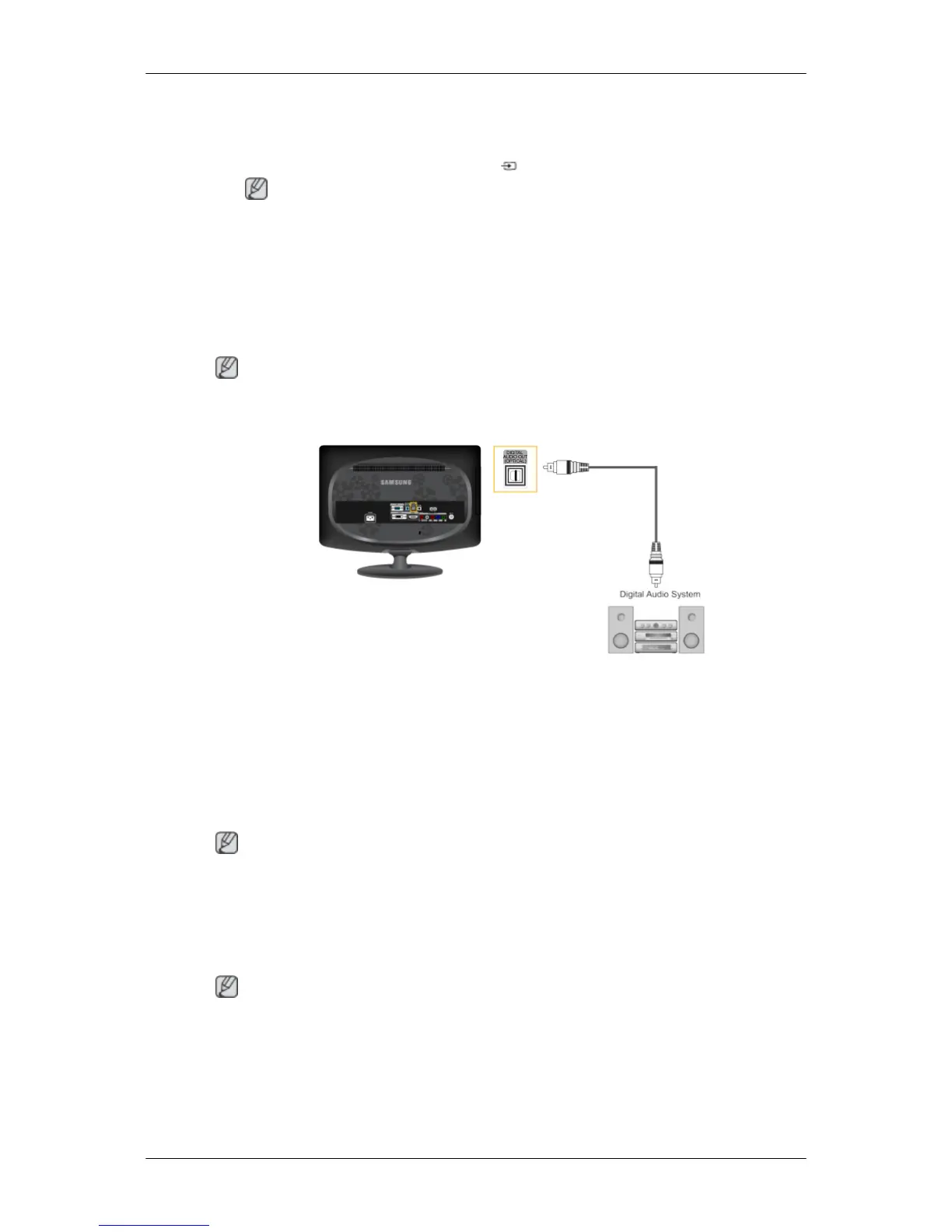
Connecting and Using an Amplifier
Note
You
can connect the digital sound input (optical) or standard sound input terminal of your
amplifier to your monitor using the correct cable.
1. Connect
the
[DIGITAL AUDIO OUT (OPTICAL)]
terminal of your monitor to the digital
sound input terminal of your digital amplifier using an optical cable.
2. Set the Internal Mute On in the Sound menu using the MENU button.
3. If the connections are set up, power up your monitor and amplifier.
4. Adjust the sound volume using the Volume button of your amplifier
Note
• Because no sound is emitted from the monitor, you need to use an amplifier.
• For information on how to connect a speaker and amplifier, refer to the respective user
manuals provided by their manufacturers.
Connecting Headphone
Note
You may connect your headphones to the monitor.
Connections






 To Next Page