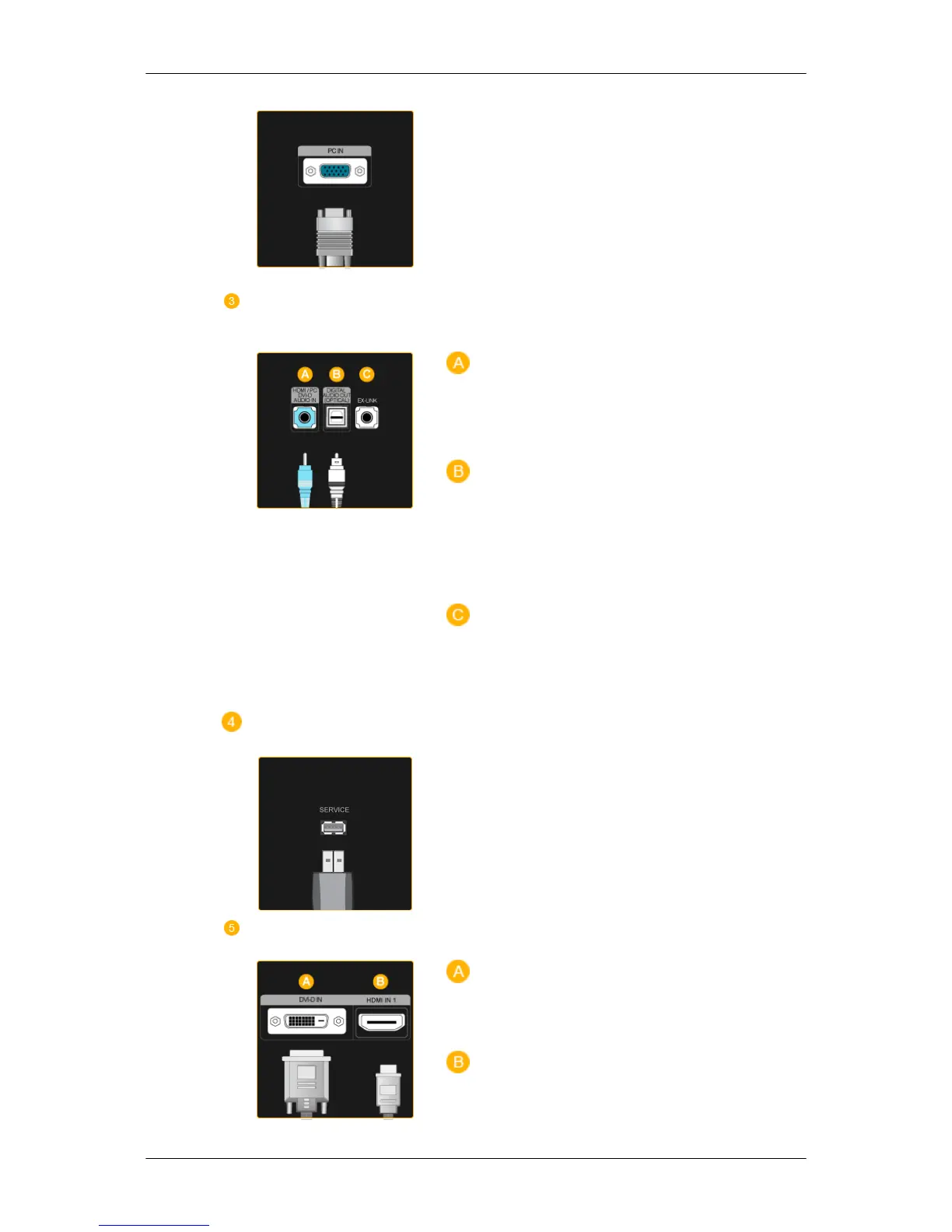
Connect the
PC
terminal at the back of your
monitor to your computer.
HDMI/PC/DVI-D AUDIO
IN , DIGITAL AUDIO OUT
(OPTICAL) , EX-LINK
HDMI/PC/DVI-D AUDIO IN
Connect the
[ HDMI/PC/DVI-D AUDIO IN ]
terminal at the back of your product to your
computer’s sound card.
DIGITAL AUDIO OUT(OPTICAL)
Connect the
[DIGITAL AUDIO OUT(OPTI-
CAL)]
terminal of your product to the digital
sound output or standard sound output ter-
minal of the DVD home theater (or amplifier)
using a digital audio optical output cable.
EX-LINK
This is a reserved terminal used for servicing.
SERVICE
This is a reserved terminal used for servicing.
DVI-D IN / HDMI IN 1
DVI-D IN
Connect the DVI cable to the
DVI-D IN
port
on the back of your product.
HDMI IN 1
Introduction






 To Next Page