INSTALLATION ]
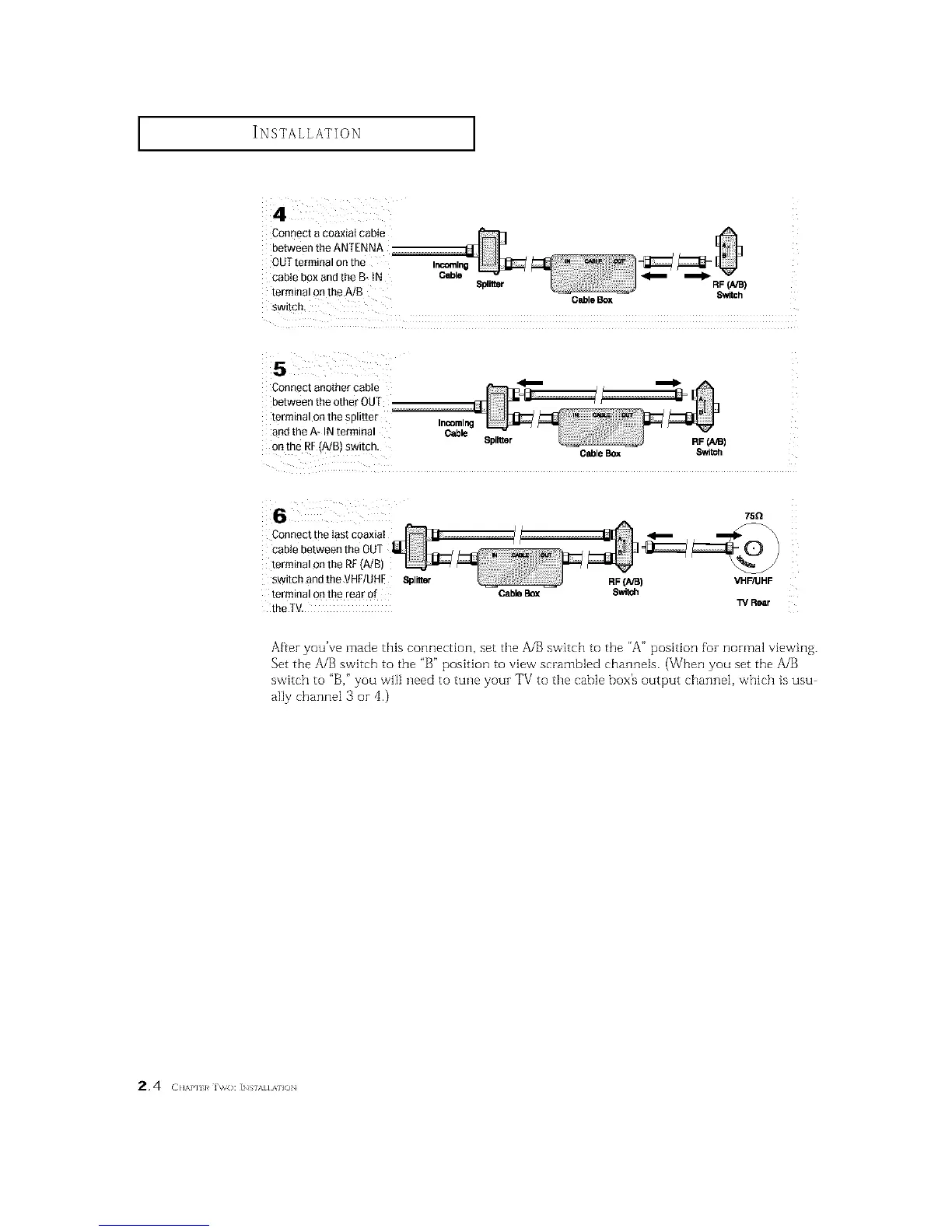
Connect a coaxial cable
between the ANTENNA
OUT terminal 0nthe
cable box and the B- tN Cable _
terminal on the A/B Splitter RF(NB)
GableBox Switch
switch.
Connect another cable
between the other OUT
terminal on the splitter
and the A* IN terminal
on the RF(A/B) switch,
Incoming
Cable
Splitter
CableBox Switoh
Connect the Iast coaxiaI
cable between the OUT
terminal on the RF(A/B)
switch and the VHF/UHE Spinier
terminal on the rear of
the TV.
75Q
RF(A/B) VHF/UHF
Cable Box
13/Rear
After you've made this connection, set the A/B switch to the "A" position foz normal viewing.
Set the A/B switch to the "B" position to view scrambled channels. (When you set the A/B
switch to "B," you will need to tune youz TV to the cable box's output channel, which is usu
ally channel 3 or 4.)
2.4 ( ,,A,.,,,_h,o: ]NS,.,,,A,,ON






 To Next Page