I I
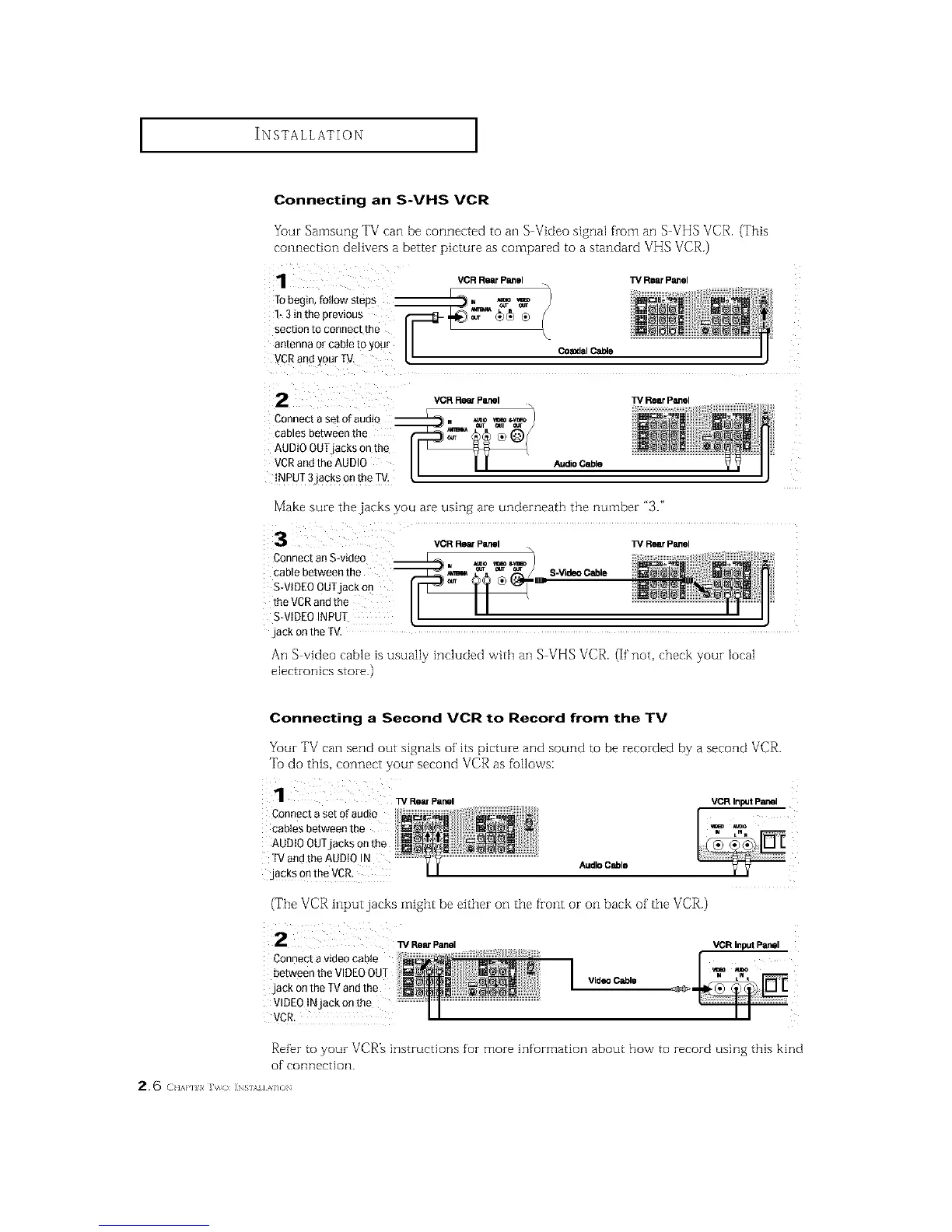
Connecting an S-VHS VCR
Your Samsung TV can be connected to an S Video signal from an S VHS VCR. (This
connection delivers a better picture as compared to a standard VHS VCR.)
VCR Rear Panel ]_ Rear Panel
2
Connect a set of audiQ
cables between the
AUDIO OUTjacks on th_
VCRand the AUDIO
iNPUT 3`jackson the TV,
VCR Rem Panel TV Rear Panel
Audio Cable
Make sure the jacks you are using are underneath the number "3."
VCRRearPanel W RearPanel
Connect an S-video
cable between the S-VideoCable
S-VIDEO OUTjack on _:
the VCRand the
S-VIDEO INPUT
`jack on the TV.
An S video cable ts usually included vvith all S VHS VCR. (If not, check your Mcal
electronics store.)
Connecting a Second VCR to Record from the TV
Your TV can send out signals of its picture and sound to be recorded by a second VCP,.
Tu do this, connect your second VCR as fullows:
Connecta set ofaudio
cablesbetweenthe
AUDIO OUTjacks on the
TVand the AUDIO !N AudioCable
,jacksontheVCR.
(The VCR input jacks might be either on the front or on back of the VCR.)
i 2 w RearPanel
Connectavideocable
betweentheVIDEOOUT
.jackontheTVandthe
VIDEOtNjack onthe
VCR.
VideoCable
VCR InputPanel
_" !i i
I I ii
Refbr to your VCR_ instructions for more information about how to record using this kind
of connection.
2, 6 ( H,,,aq_}_ i_s],v] AHO_






 To Next Page