OPERATION ]
Labeling the Channels
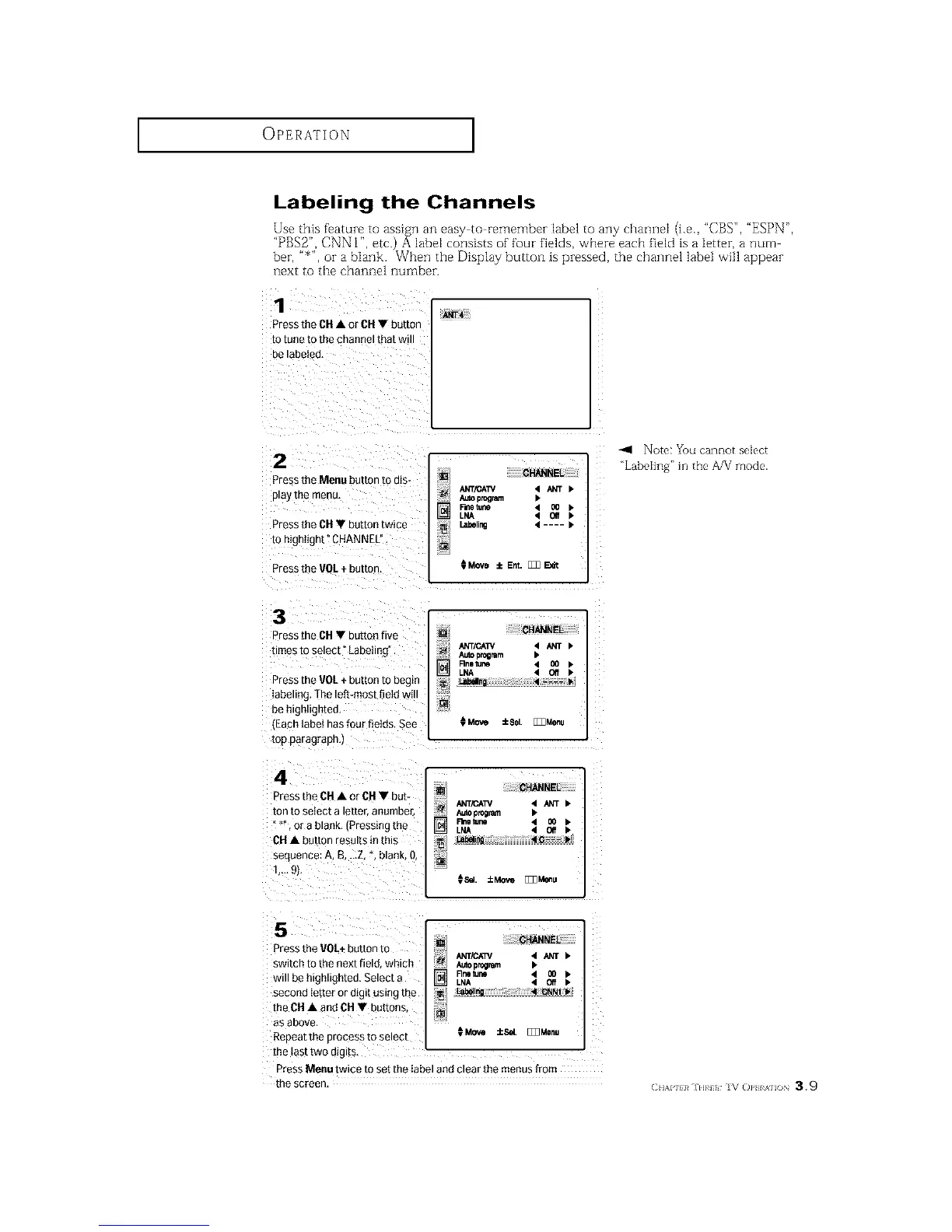
Use this feature to assign an easy to remember label to any channel (i.e., "CBS", "ESPN",
"PBS2", CNN 12 etc.) A 1abet consists of four fields, where each fietd is a letter, a num
ber, "_", or a blank. When the Display button is pressed, the channel labeJ will appear
next to the channel number.
1
ANT4
Press the CH• or CH• button
10 tune [o Ine cn_lnnel ira[ Wl
Be laDetea,
2
Press the Menu button to dis-
play me menu,
Press the CH• button twice
to mgnught" CHANNEL"
Press the VOL + button.
CHANNEL
ANT/CAW 4 _T •
Auto program I*
P-metune 4 O0 •
LNA 4 QIf •
Labeling 4 .... •
0 Move i Ent. [_ _dt
Note: You cannot seIect
_LabeIing '_in the A/V mode.
3
D'ess the CH • button five
times io select La Detlng
Press the VOL+ button to begin
labeling The left-most field wl
be ntgn,gntea.
.Each label has four fields. See
mp paragrapn,J
4
Press the CH• or CH• but-
ton to select a etter, anumbe£
or a blank Pressing me
CH• bLtton results in mls
seauence: A, B, ...Z,*. blank. &
1..- £h
CHANNEL
_; A_O program
_--_ Rnetun • O0
LNA • Off
Ll_lng 4 .... I*
Move iSe []Z]Menu
[] CHANNEL
ANT/CAW 4 _ •
Rmle_ne 4 {10 •
LNA < C¢ •
L_t_e_mg 4 C--- I,
[]
¢SeL ::LMove []_Meeu
5
Press the VOLt button to
swncn to the next fiele wntcn
will be hign.gnted, Select a
secona iet[er or aigl[ OSlt3gthe
the CH • and OH • buttons,
aS aBOVe,
Repeat The process m select
[] CHANNEL
ANT/C_/ 4 ANT •
Autopr_lmm •
Rnsturin 4 _ •
LNA 4 Off •
[]
_Move _cSd [_Monu
the last two utglts
Press Menu twice to set the label and clear the menus from
me screen
CHAPll}¢ IH}¢i IV ()P} AII()N 39






 To Next Page