EasyManua.ls Logo

Samsung TSK2792F - Customizing the Sound

Samsung TSK2792F
65 pages
Print Icon
To Next Page IconTo Next Page
To Previous Page IconTo Previous Page
Loading...
OPERATION ]
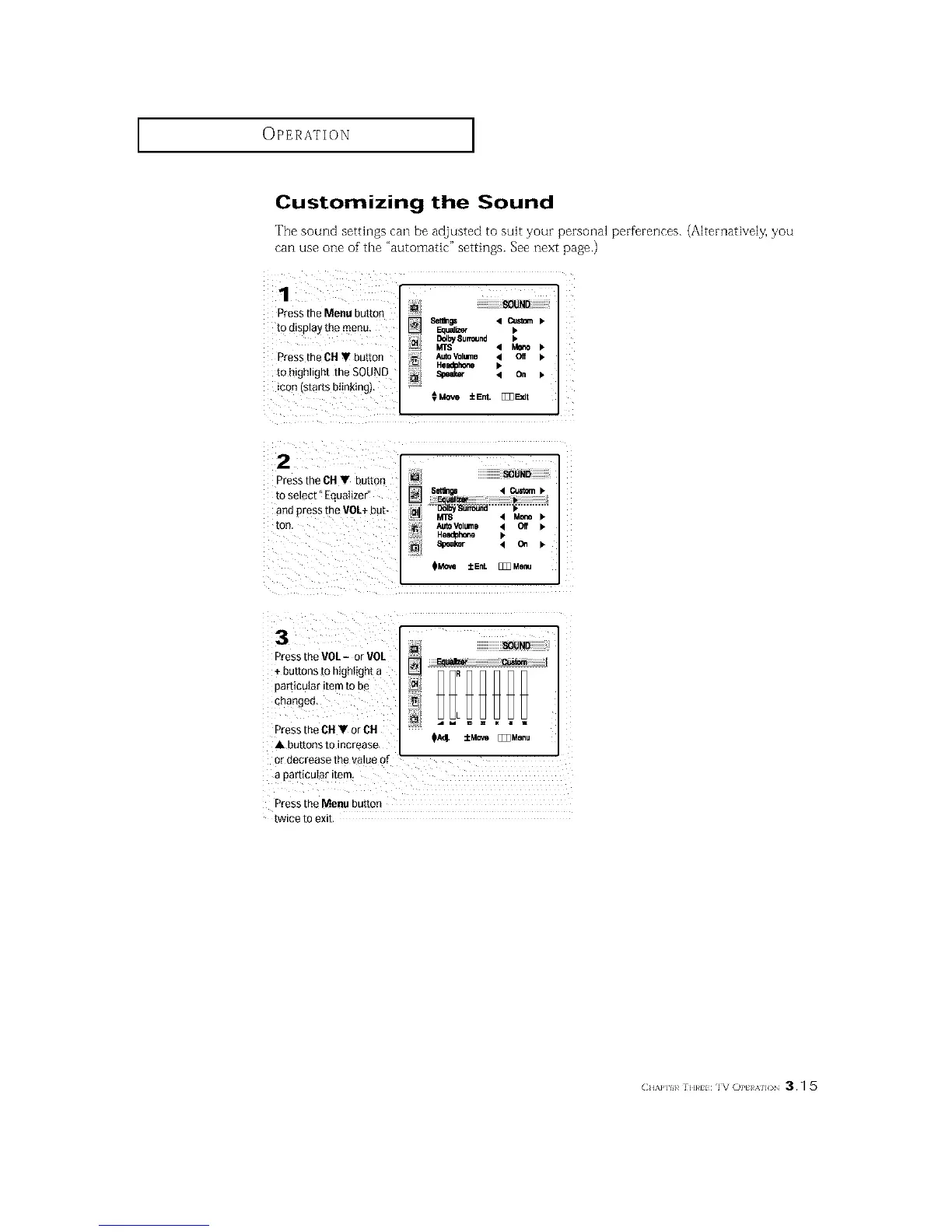
Customizing the Sound
The sound settings can be adjusted to suit your personal perferences. (Alternatively, you
can use one of'the "automatic" settings. See next page.)
1
Pressthe Menu button
to d_sp_ayme menu
Pressthe CH button
to hgn.gnt the SOUND
icon starts blinking).
Setilnp Custom
Eaual_er b
AutoVolume 4 Oif I_
He.hone
Speal_ On
€Move ±Ent. []]]Ebdt
2
D'ess the DH button
[o select _ Equalizer _
an{] aress the VOL+ DU[_
[]
MTS Mo_
AUtoVOl_nll Off
HIladl}hofle
Speaker C_
-_ressthe VOL- or VOL
+ [}utTonsm ntghtigh_ a
oarticularitem to be
cbanget],
_ress the CH or CH
A 3u_[ot2s TO increase
_r decrease the .alue of "
a particuIsr item
L
_A_. ±Move []]] Menu
_ress the Menu DU[[On
l_wlee 10 eXll
CH/,a']H_ ]H}_H IV OPt A]]( 3.q 5

Related product manuals