INSTALLATION ]
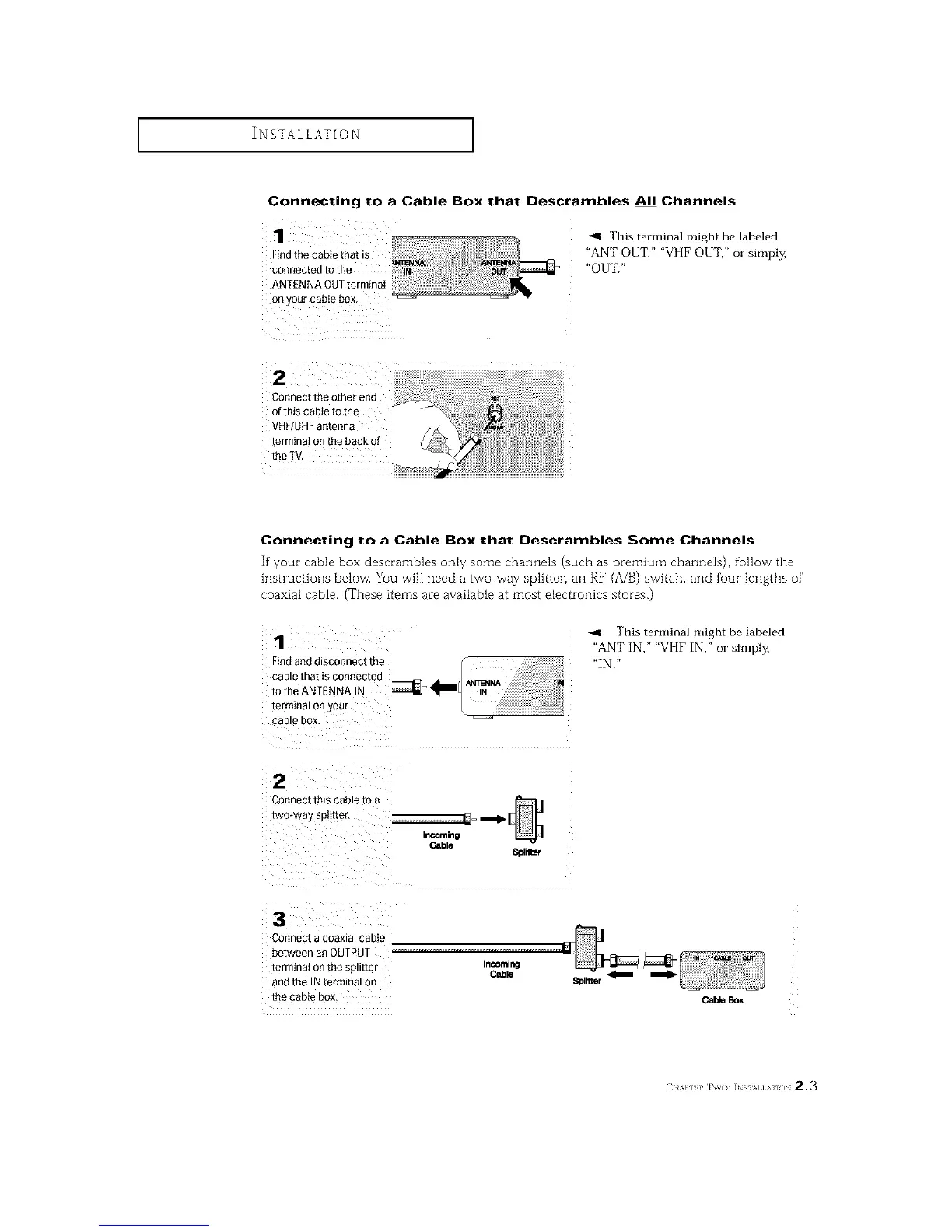
Connecting to a Cable Box that Descrambles All Channels
H
1
Find the cable that is
connected to the _ _
ANTENNA OUTterminaI
Onyour cable box, ..................' _
-.9 This terminal might be labeled
"ANT OUT," "VI [F OUT," or simply,
"OUT."
Connect the other end
of this cable to the
VHF/UHFantenna
terminal on the back of
the TV.
Connecting to a Cable Box that Descrambles Some Channels
If"your cable box descrambles only some channels (such as premium channels), fullow the
hlstructions below. You wilI need a two way splitter, an RF (A/B) switch, and fuur lengths of'
coaxial cable. (These items are available at most electronics stores.)
1
Find and disconnect the f
cable that is connected d'totheANTENNA N _ _
IN
terminal or your L _ '
CaD _ DOX
--4 This terminal might be labeled
"ANT IN," "VI [F IN," or simply,
"IN."
2
Connect this cable [o
two-way spit[tel
Cable
8platmr
3
Connect a coaxial cable
between an OUTPUT
termtnat on the spmter
and the IN terminal on
the cable box,
InCOming
Cable
m
CableBox
(:IIAP] }/ IV() ]NSI%I]AI /IN 2.3






 To Next Page