INSTALLATION ]
Connecting a Camcorder
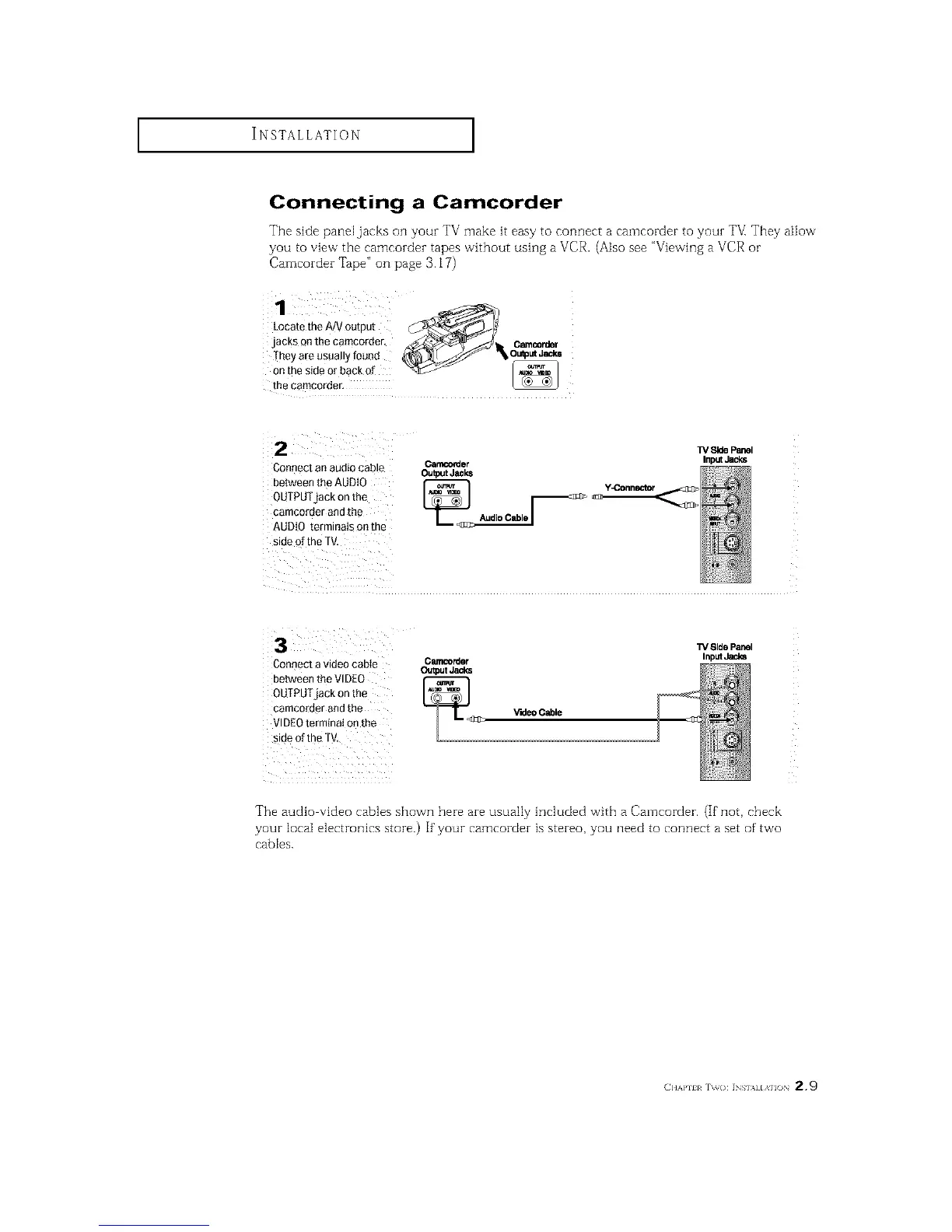
The side panel jacks on your TV make it easy to connect a camcorder to your TVI They allow
yOU to vie_v the camcorder tapes without using a VCR. (Also see "Viewing a VCR or
Camcorder Tape" on page 3.17)
1
Locate the AJV output
jacks on the camcorder, _/_1 O_rde
,.e.teos0o,,y,aood
_tat_:siderdrabaCk of _
Connect an audio cable
between the AUDIO
OUTPUTjack on the
camcorder and the
AUDIO terminals on the
side of the TV,
Carncorder Input_
OutputJacks
Audio Cable /
Connect a video cabie
between the VIDEO
OUTPUTjack on the
camco[der andthe
VIDEOterminai on the
side of the TV,
C_rder
Output Jacks
_<_[_ V'Kle0 Cable
Side Panel
Input Jacks
The audio video cables shown here are usually included with a Camcorder. (If not, check
your local electronics store.) If your camcorder is stereo, you need to connect a set of' two
cables.
(]]'kl'll l r\_o: INs],,][,\]l() 2.9






 To Next Page