OPERATION ]
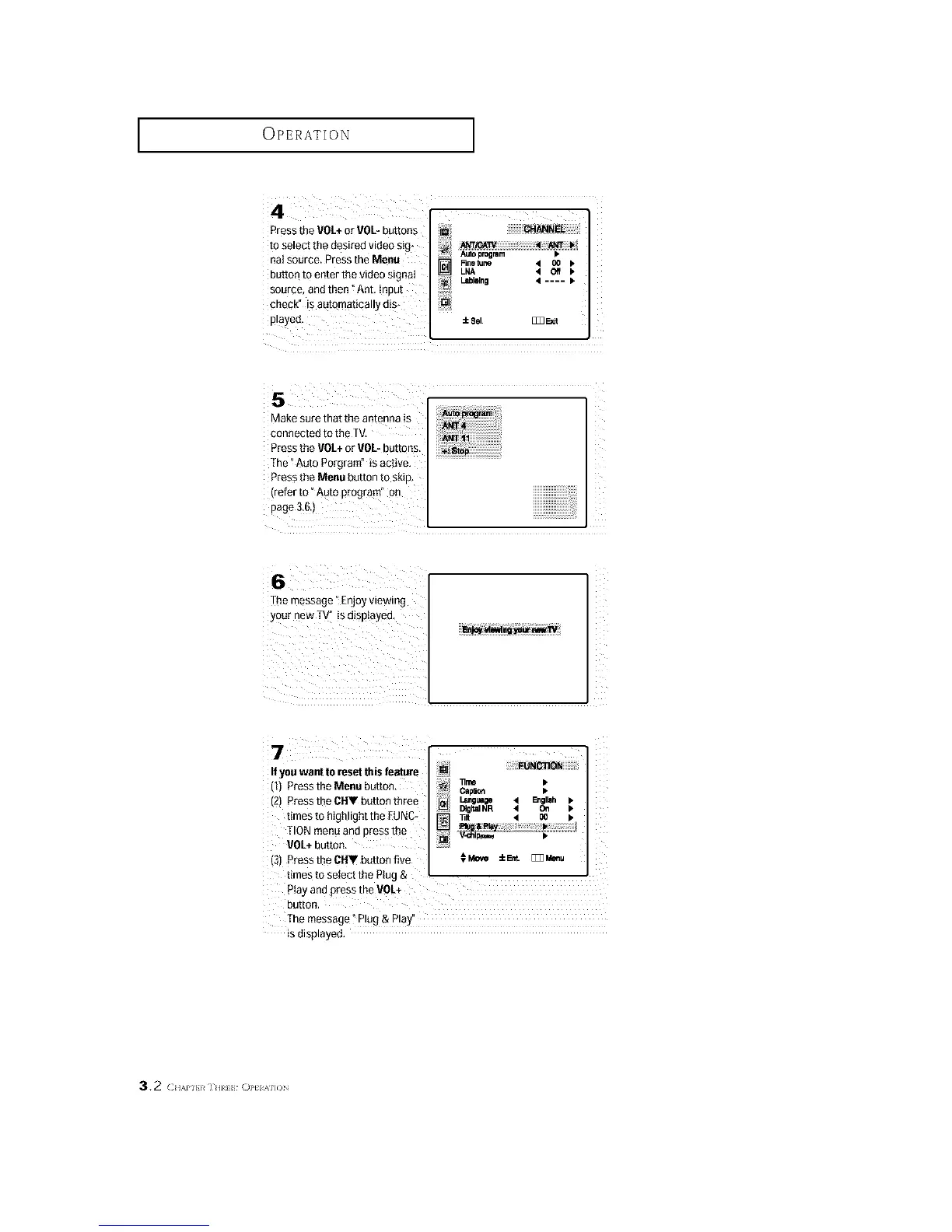
Pressthe VOL+or 90L- buttons
to select the desired video sig*
aai source. Press the Menu
button to enter the video signal
source, and then _Ant, input
check" is automatically d!s*
played,
Autoprogmm >
Rnetune 4 O0 b
] LNA 4 Off b
LJblolno 4 .... •
:to8el, [_ F:_dt
connected to the TV,
Press the VOL+or VOL-buttons.
The _Auto Porgram" is active,
Press the Menu button to skip,
The message ° Enjoy viewing
YOUrnew T_ is displayed,
_i iiiii i i i
If you want to reset this feature
(1) Press the Menu button,
(2) Press the CHV button three
fimes to highlight the EUNC-
TION menu and press the
VOL+button.
(3) Press the CIIV button five
Z
CalVert •
Language 41 E_olleh I_
DigitalNR • On •
_lt < O0 k
_Move :EEre. [_Meeu
times to select the Plug &
Ptay and press the VOL+
button.
The message" Plug & Play"
is displayed,
3.2 (H/,.PI}}# IHII_ ()]'tIM]()






 To Next Page