OPERATION ]
Option 2: Using the Local PBS Channel to Automatically Set the
TV Clock
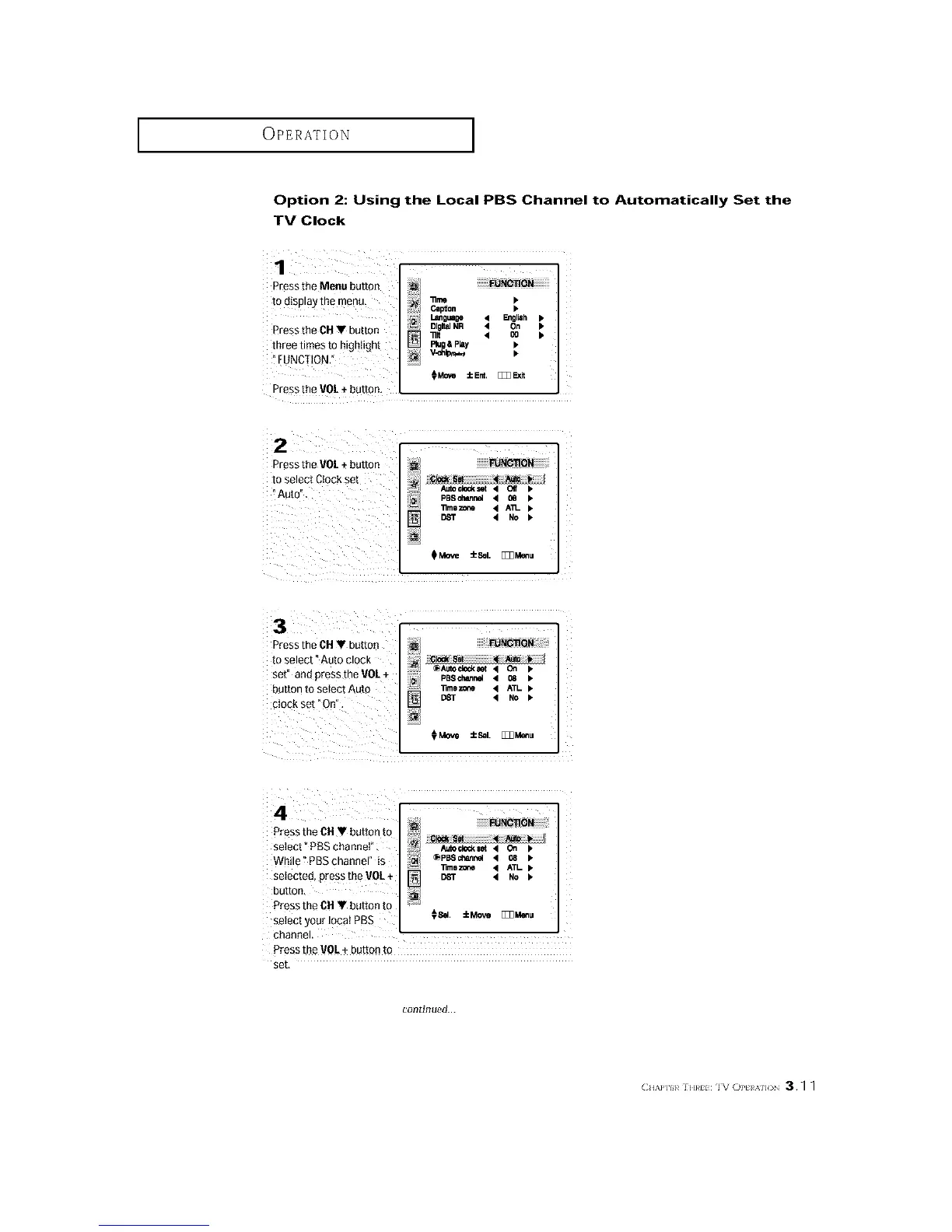
Pressthe Menu button
todisplay the menu_
Press the CH • button
three times to highlight
FUNCTION."
_UN_ON
"ill I_
Capdon I,
l,,l_guaoe 4 _gliah Ip
Dlgl_lNR 4 On IP
_It 4 O0 I*
Rug&Play I,
Pressthe VOL+ button,
Press the VO/+ button ......_ !!!!!!!iE_R_ OB!i!i!i!i!i!i!ii!i
to select Ctockset
@
11mozone • An-
• No I.
Pressthe CH • button
to select" Auto clock
set" and press the VOL+
button to seIect Auto
clock set "On".
@Auto¢le_et • On _.
PBechBnrmel • 08 •
limezone • ATL
• NO P"
_Move ±Sel. [_Z_Menu
Press the ON• button to ?
se ect _PBSchanne"
- @PBSchann_ • 08 I_
While PBSchannel is
_mo z_le • ATL
selected, presstheVOL+ [] DST • No
button,
Press the 01-1• button to _:
selectyourloPatPB S 08_. _Me._ _,_u
channel.
Press _heVOL+ button to
set,
continued...
CH/,a']H_ ]EmH IVOPt A]]( 3.q q






 To Next Page