SPECIAL FEATURES ]
Fine Tuning Channels
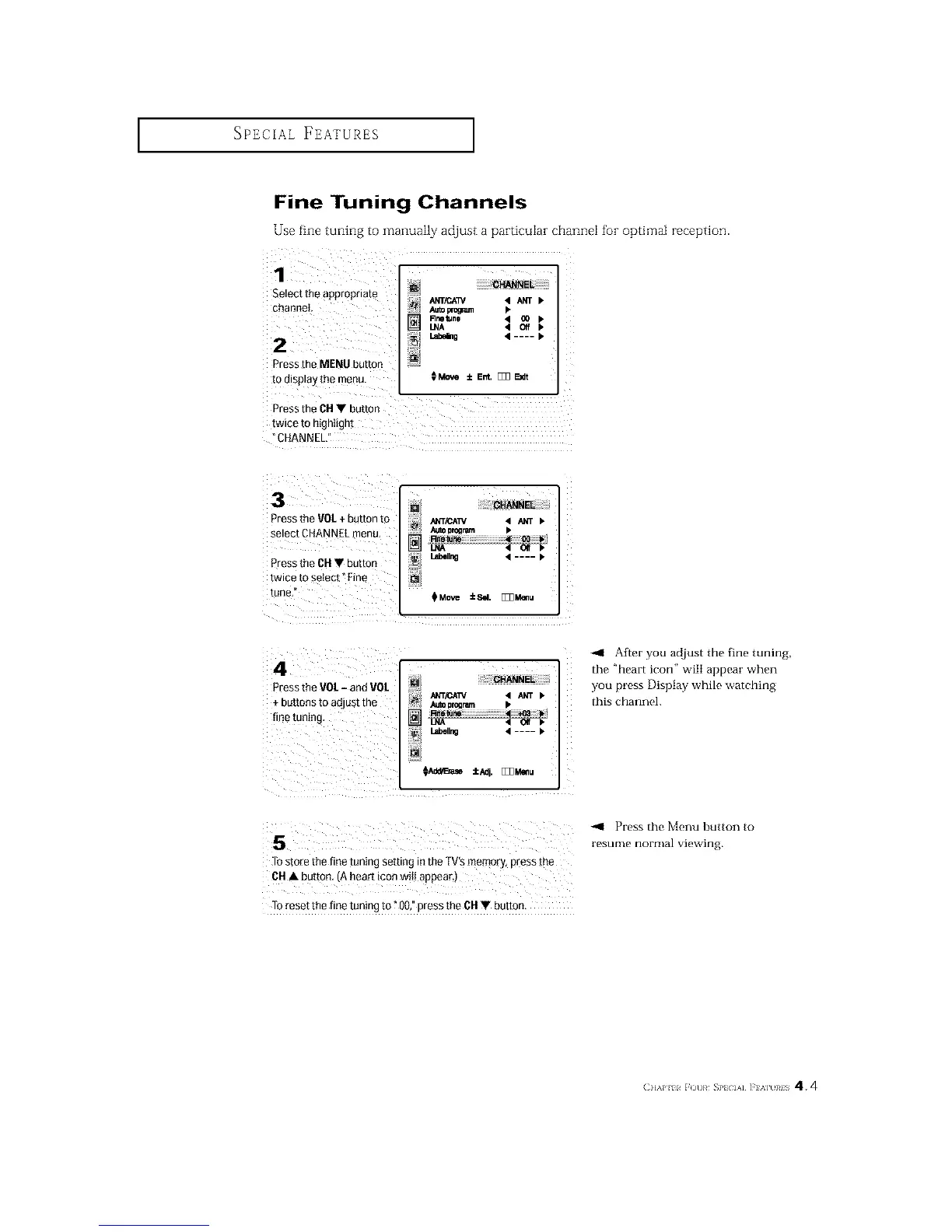
Use fine tuning to manually adjust a particular channel for optima[ reception.
1
Select the appropnam
channel
2
DreS_the MENU button
to display me menu.
CHANNEL
ANT/CA3V 4 _NT •
Au_ pro_um •
Rne tun0 • 00
LNA 4 Off
I.abe_g • .... •
€Move ±Ent. [_ E_I
DreSS me CH • buttor
twice lo ntgnttgni
CHANNEL,
3
3ress the VOL+ button [o
select CHANNEl. menu,
3ress he CH • button
twmemselect°Fme
tune,
[] CHANNEL
J_NT/CATV • _ >
AU_10rogram •
] Rnetune 4 [] b
Lnboll_ • .... I*
_Move _Se/. [Z_M_u
4
Pressthe VOL- and VOL
+ buttons to adjust the
!i iii i iiiiiill
@ i!!i!!!!I__H_ NE_!iiiiiiiiiiiiiiii
i;_ Auto program •
Labeling 4 .... >
Afmr you ad.just the fine tuning,
the "heart icon" will appear when
you press Display while watching
this channel.
s "'° u"'ePres theM°nUn°rmalvie"ing.bUtt°nt°
TOstole the fine tuning setting in the TV's memory, press the
6H • button. A hear_icon will appear.
Toreset the fine tuning to ?00,"press the 6H • button,
(11'_}' ii _()[)}# _P} D&] ]'1 '_1 }#IS 4.4






 To Next Page