J SPECIAL FEATURES J
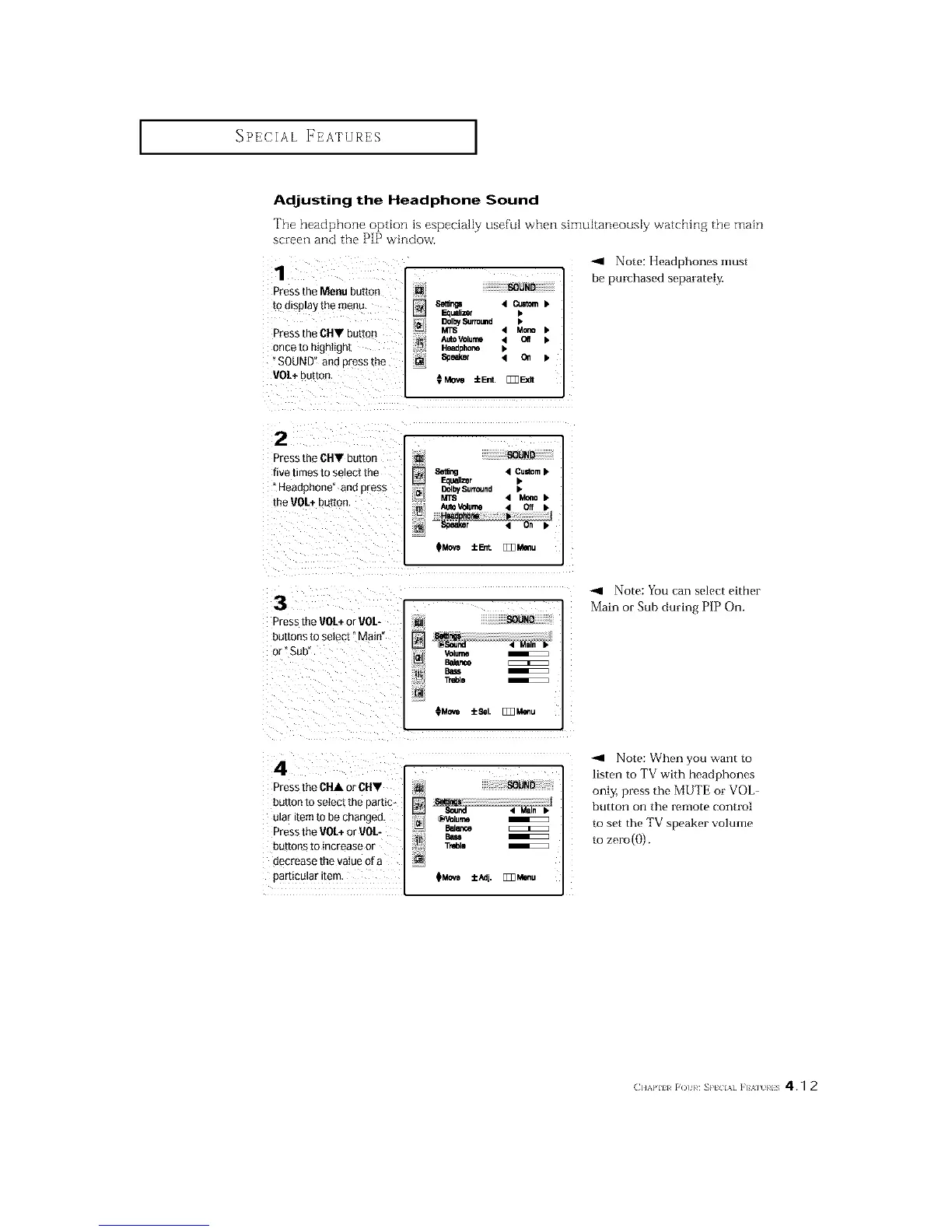
Adjusting the Headphone Sound
The headphone option is especially useful when simultaneously watching the main
screen and the PIP window.
1
Press the Menu button
to d_sp_ay the menu
Press the CHY butto_
once to highlight
SOUND" and Dressme
VO/+ button
[] SOUND
8etlr_ 4_•
_1 DoI_Su_u.d •
_L_
M_ 4 Mc_o •
AutoVOlume ,t Off •
Headoho_ •
Soeaker '4 011 •
€Mow IEnt. []_Ex_
-_1 Note: Headphones must
be purchased separately,
2
_'gss theCHV button
five times TOSeleCtme
Heaoonone ana Dress
the VOL+ouuon
Seting 4 Cu=tom•
[][]lzer •
I_I DclbySurround •
MTS 4 M_o•
_MOvO iErit. [ZZ_Mmlu
3
Dress the VOL+or VOL-
buttons to select" Main'
or" Sub"
_gHg
Volume
B_ence
TrdDle
¢Movo :_1. [_Z_Menu
-_ Note: You can select either
Main or Sub during PIP On.
4
r_'ess the CHA or CHV
bUTTOnto setect me oartic
[tlaF Item [o De changeD.
°_ess the VO[+ or VOL-
button_ to increase or
clecre_Ise the value Qf_l
particular ire-
[]
OVolume
Balar_e
Ba_
Treblo
OMOVe :tc/_]j. [_Menu
-_ Note: When you want to
listen to TV with headphones
only, press the MUTE or VOL-
button on the remote control
to set the TV speaker volume
to zero(()).
(]l'kl'lll _()t 1¢ SP[ IA] ]'F%] }¢IS 4.7 2






 To Next Page