SPECIAL FEATURES I
Using the V-Chip (Option)
The VChip feature automatically locks out programming that is deemed inappropriate for
children. The user must fh-st enter a PIN (personal ID number) before any of the VChip
restrictions can be set up oi- changed.
Note : When the Vchip feature is active, the PIP and channel auto program features does
not function.
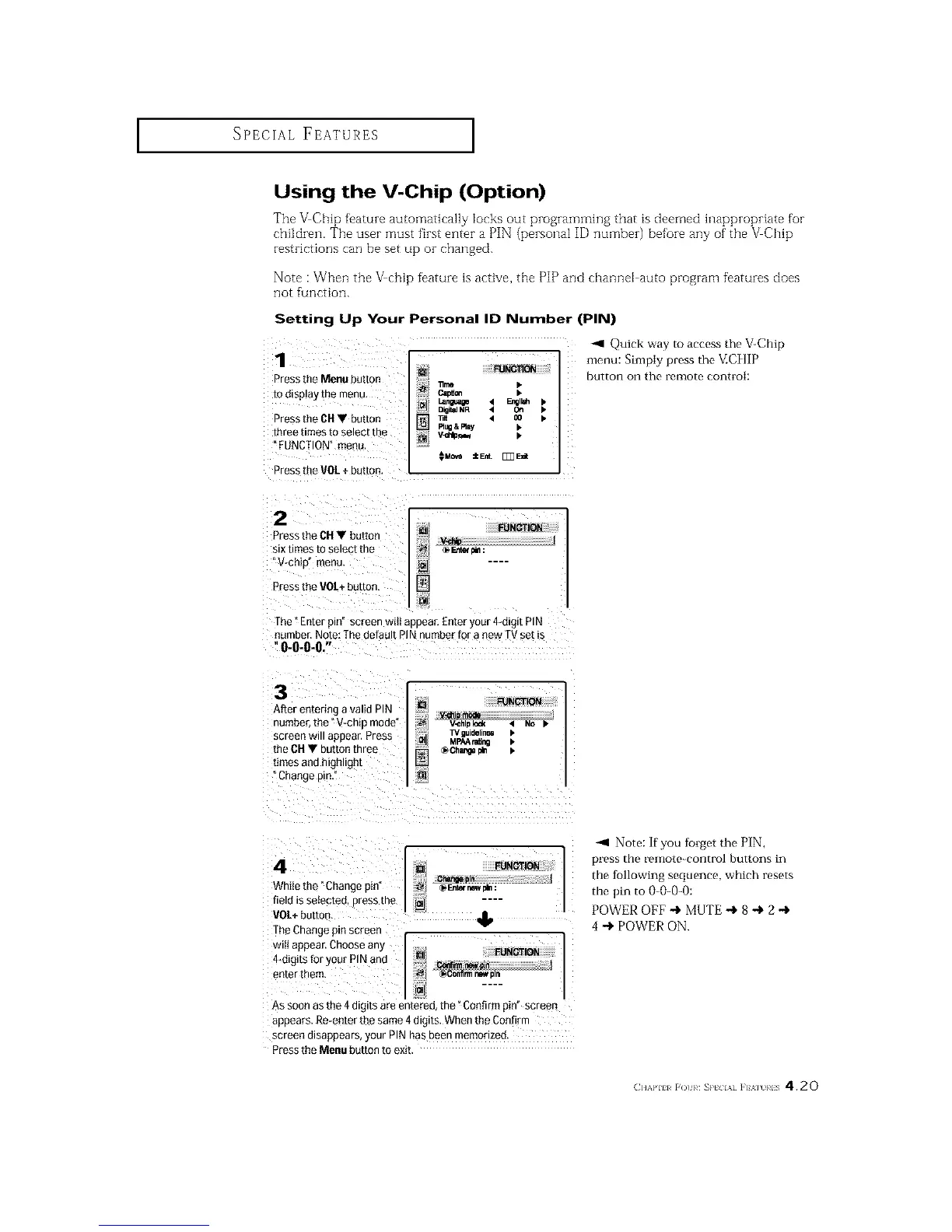
Setting Up Your Personal ID Number (PIN)
1
Press the Menu button
to (]lsplay ire menu,
Press the CH• button
three times to select the
FUNCTION" menu,
Press the VOL + button.
[] FUNOTIOI_
"ilme
Language
Rug &Rny
_ql Quick way to access the V-Chip
menu: Simply press the V.C][IlP
button on the remote control:
2
Press the CH • buttor
six times to selec[ [De
V-chi[ menu.
Pressthe VOL+button
FUNCTION
m;
[]
The"Enterpin"screenwillappear,Enteryour4-digitPIN
number.Note:ThedefaultPINnumberfor a newTVsetis
O-O-O-&"
3
Alter enmrmg a valid PIN
numoer, the "V-chip mode
screen will appear. Press
the CH • button three
limes ann nlgnllgn[
]hange p l,
FUNCTION
V_hlo Iod( '1 NO I*
TV guloellnel I,
MI_A r=Ur_ I.
_Ohangopin =.
4
While the "Change pm
field isselectee. Dress me
VOL+butto n
TheChange pm screen
Wilt appear,Choose anx
4*dlgits for your PIN and
enTerthem
FUNOTION
m
_DIn
As soon as the 4 d g is are enterec the" Confirm pin" screen
aBE}ears.Re-enter the same 4 d_g_ts.When the Confirm
screen d_sappears,your PIN has Beenmemorized
Press the Menu button to exit
-_1 Note: if you tblget the PIN,
press the remote-control buttons in
the tollowing sequence, which resets
the pin to 0-()-0-0:
POWER OFF -I, MUTE -,l, 8 -I, 2 -,l,
4 -1, POWER ON.
(]]'Will _O1}¢ _P[ IA] ]'] '_] }¢1S 4.20






 To Next Page