59
Conguring Sound Source
스크린
화면 크기
수평 위치
수직 위치
동시 화면 모드
와이드
3
3
▶
PIP/PBP
PIP/PBP Mode
Size
Position
Sound Source
Source
Image Size
Contrast&Color
Set which screen you
want to hear the sound
for.
On
DisplayPort1/DisplayPort2/HDMI/DVI
Wide/Wide/Wide/Wide
-
The displayed image may differ depending on the model.
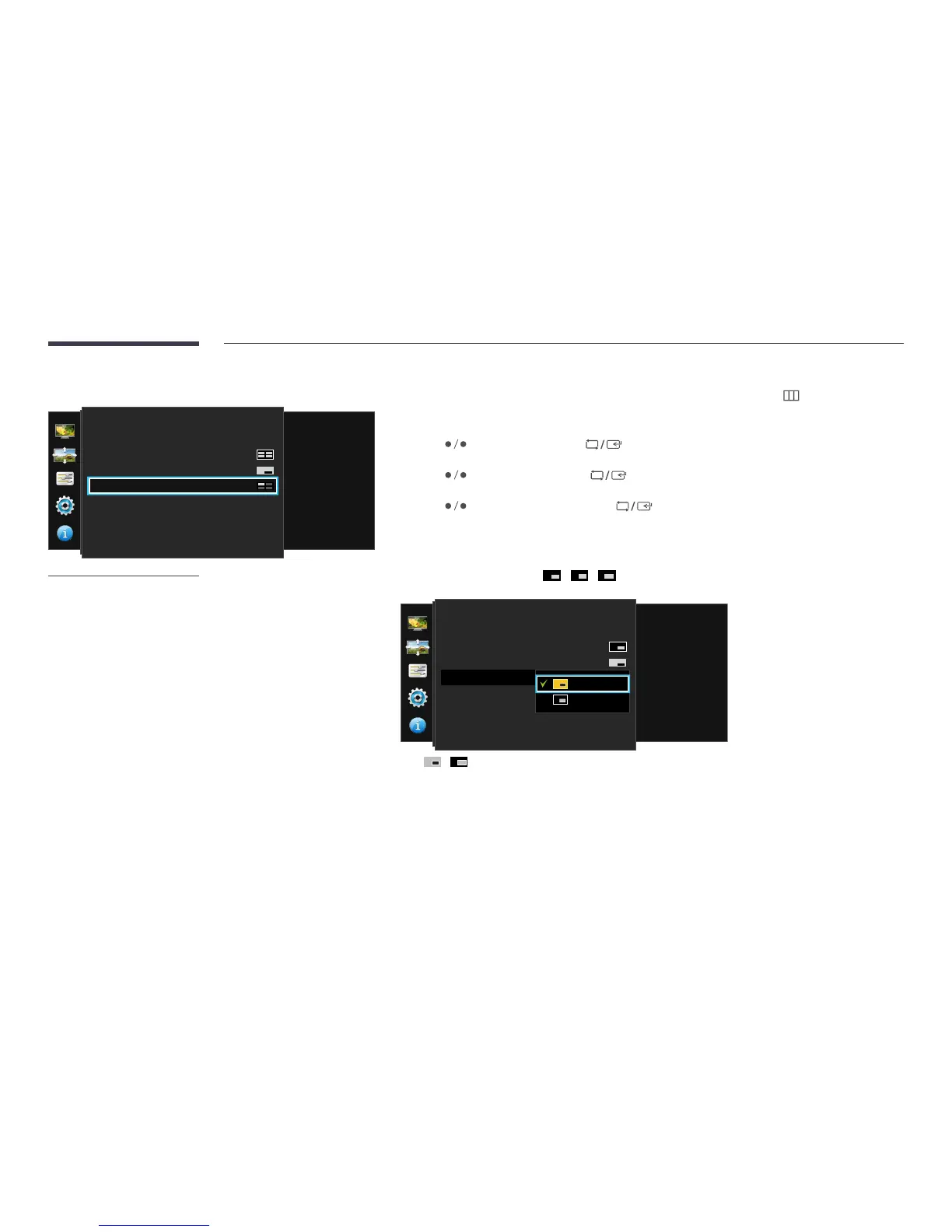
Set which screen you want to hear the sound for.
1
Press any button on the front of the product to display the Function Key Guide. Next, press to display the
corresponding menu screen.
2
Press to move to Screen and press on the product.
3
Press to move to PIP/PBP and press on the product.
4
Press to move to Sound Source and press on the product.
―
The gray area in each icon refers to the sound source (Sound Source). The source of sound can be from the main or sub
screen or the left or right screen.
(available in PIP mode(Size / / ))
스크린
화면 크기
수평 위치
수직 위치
동시 화면 모드
와이드
3
3
▶
PIP/PBP
PIP/PBP Mode
Size
Position
Sound Source
Source
Image Size
Contrast&Color
Set which screen you
want to hear the sound
for.
On
•
/




 To Next Page