SAMWONTECH
2nd Edition of TEMP2000_Series IM : July. 16. 2010 Page 83 / 87
13. INITIAL SYSTEM SETTING
13.1 Initial Display setting
▶ ‘Picture’ setup is possible only with SD CARD option.
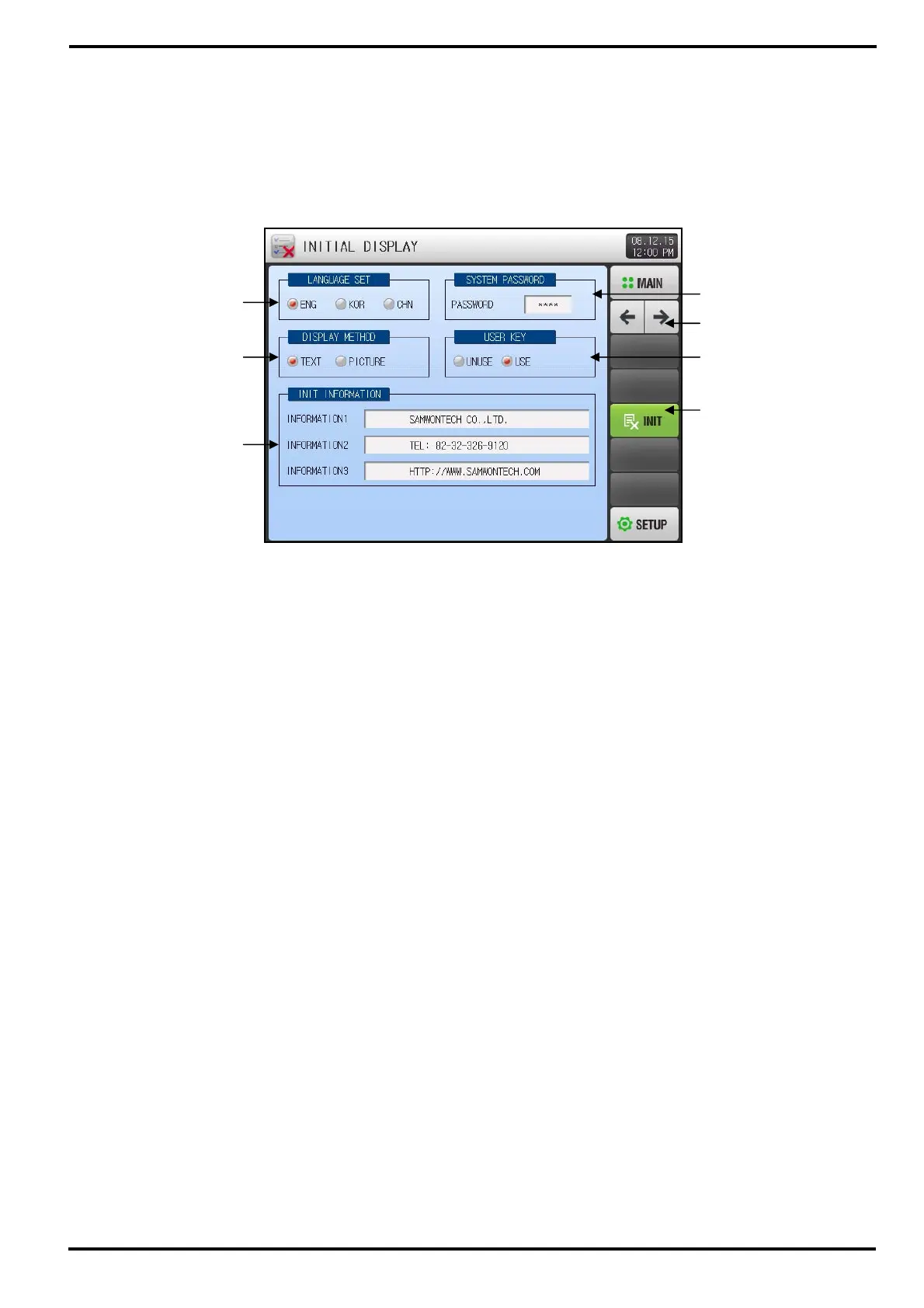
① Select Language.
② Select Initial Screen Display Method when power ‘ON’.
③ Enter the test to display on the screen during power ‘ON’.
☞ Able to set Information1, 2, 3 text up to 24 characters for each line.
☞ Display Method should be set to Text.
④ Set Password to enter System Screen
☞ Factory set password is ‘0’.
⑤ Select whether to use or unuse User Key in Fix and Program Operation Screen.
⑥ Initialize all Parameter to Factory set state.
⑦ Move the screen to previous or next.
①
②
③
④
⑦
⑤
⑥
[Figure 13-1] System Initial Setup Screen-1/1



 To Next Page