EasyManua.ls Logo

S&A CWFL-6000 - Detailed parameter setting

S&A CWFL-6000
34 pages
Print Icon
To Next Page IconTo Next Page
To Previous Page IconTo Previous Page
Loading...
CWFL-6000 Series
8
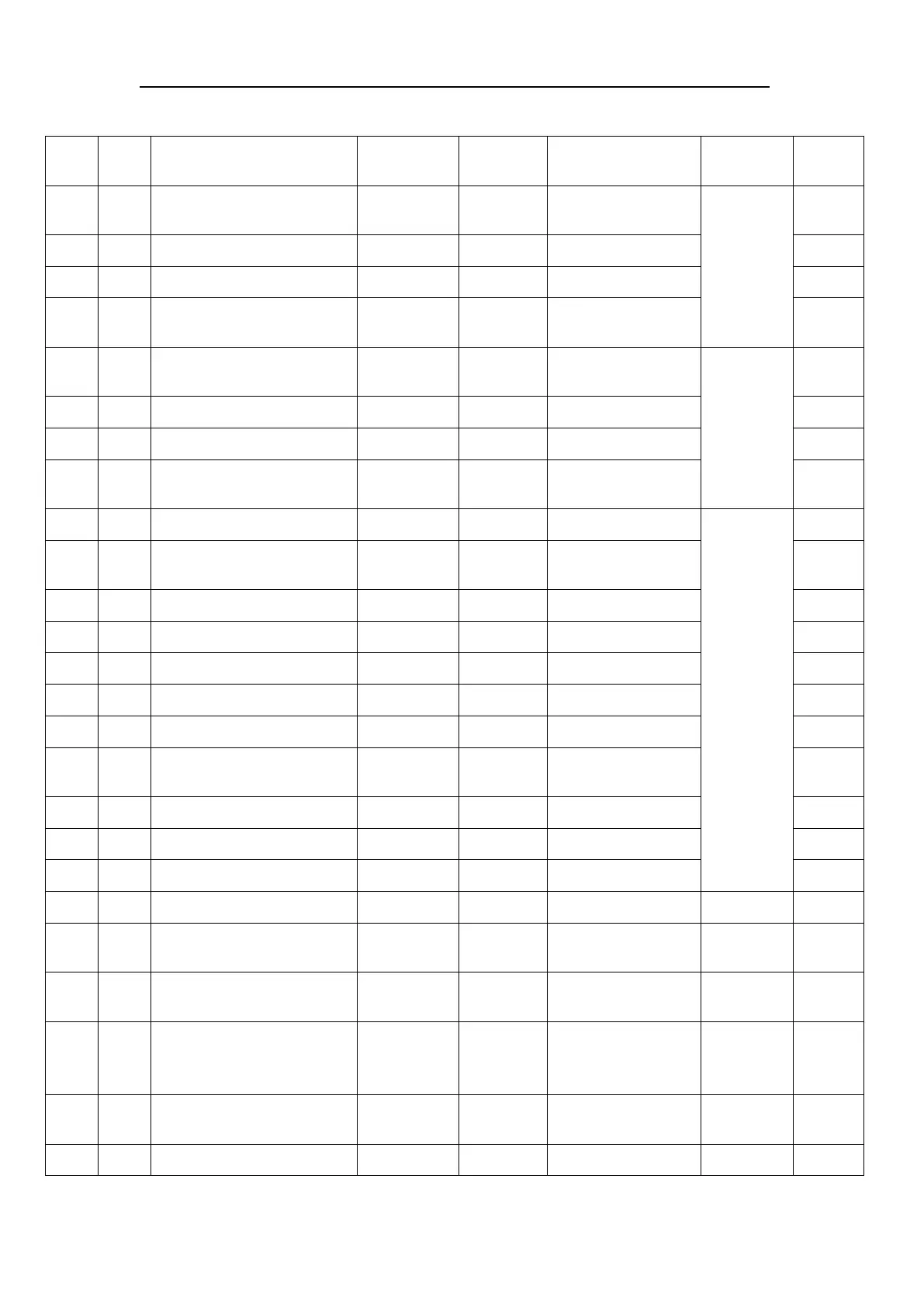
2. Detailed parameter setting is as below table
Order
Code
Set item
Range
Factory
setting
Remark
illustration
Register
address
1
F1
Set temp.
F10F9 /
-2040
25
Intelligent mode /
Constant temp mode
setup menu
of low temp
system
0x0401
2
F2
Temp. difference values
-155
-2
0x0402
3
F3
Cooling hysteresis
0.13.0
0.8
0.1 resolution ratio
0x0403
4
F4
Way of control
01
0
0 Constant,
1 Intelligent
0x0404
5
F5
Set temp.
F10F9 /
-2040
30
Intelligent mode /
Constant temp mode
setup menu
of high
temp
system
0x0405
6
F6
Temp. difference values
-155
-2
0x0406
7
F7
Cooling hysteresis
0.13.0
1
0.1 resolution ratio
0x0407
8
F8
Way of control
01
1
0 Constant,
1 Intelligent
0x0408
9
F9
The highest set temp.
F10+140
35
Constant temp. mode
Common in
high&low
Temp
systems
0x0409
10
F10
The lowest set temp.
1~(F9-1
20
Min. 1, Constant
temp. mode invalid
0x040a
11
F11
Ultra-high room temp.alarm
4050
45
0x040b
12
F12
Ultra-high water temp. alarm
120
10
0x040c
13
F13
Ultra-low water temp. alarm
120
15
0x040d
14
F14
Temp. alarm delay
030
5
Minute
0x040e
15
F15
Sensor failure alarm delay
0180
10
Second
0x040f
16
F16
Water flow detection delay
of machine startup
0180
5
Second
0x0410
17
F17
Flow alarm delay
0180
2
Second
0x0411
18
F18
Heating hysteresis
010
0.8
0.1 resolution ratio
0x0412
19
F19
Water pump stop delay
0180
5
Second
0x0413
20
F20
Startup delay
0180
30
Second
0x0414
21
F21
Compressor activate
protection
0180
90
Second
0x0415
22
F22
Turn on setting of phase
sequence protection
On off
/
Single-phase OFF /
three-phase ON
0x0416
23
F23
Turn on setting of external
input function
(startup and standby)
On off
off
0x0417
24
F24
NO and NC setting of external
input function
NO / NC
NC
NO-normally opened /
NC-normally closed
0x0418
25
F25
External input activation delay
0180
0
Second
0x0419

Related product manuals