TY-JS-220607-001
12
V. Operating States &Parameters Adjustment
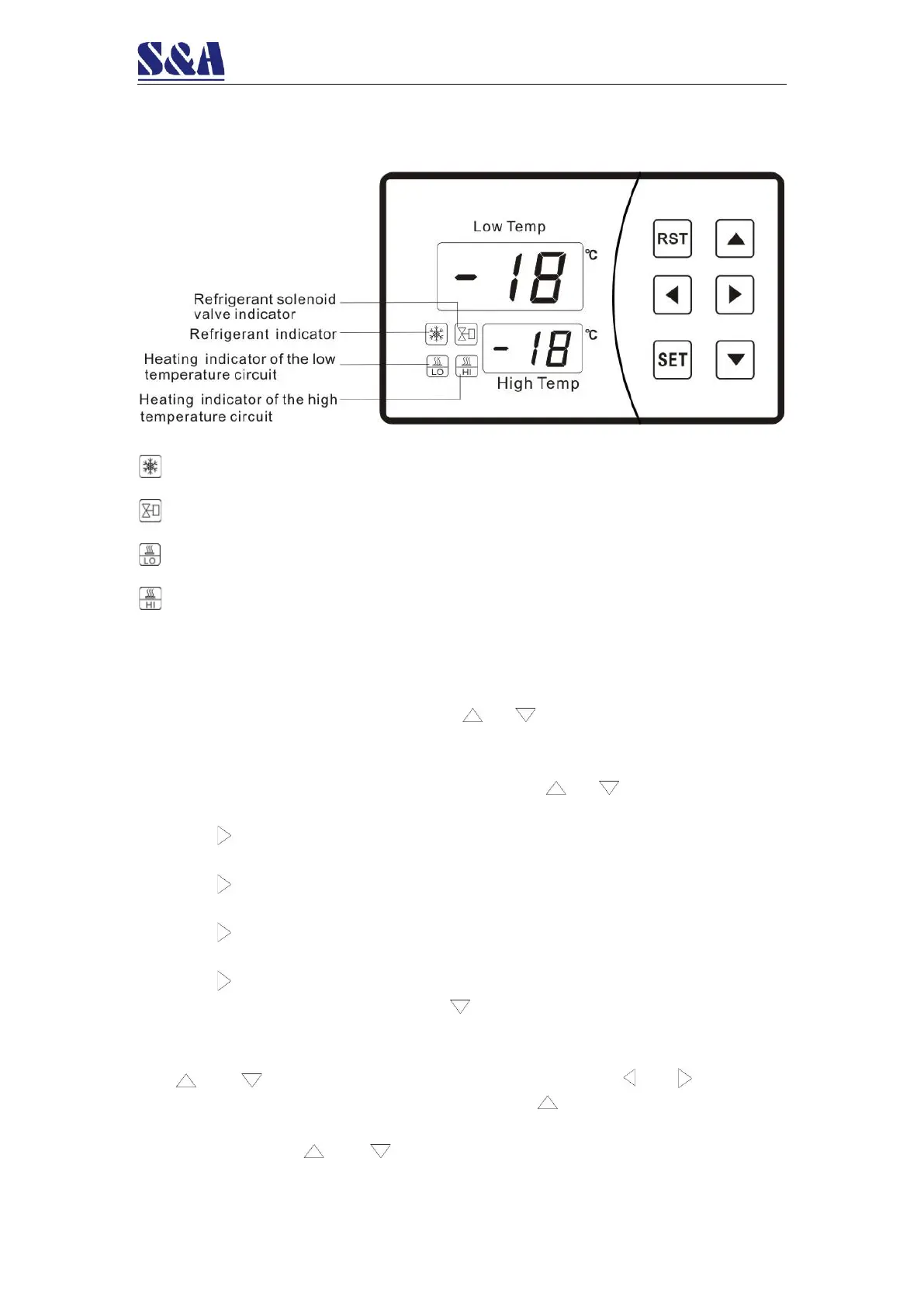
1. Temperature control panel introduction
2. Working status indicator of the temperature controller
Refrigeration indicator: during refrigeration, the indicator is on; In constant temperature
status, the indicator is off; During delay, the indicator flashes.
Refrigerant solenoid valve indicator: the indicator is on when connected and it’s off
when disconnected
Heating indicator of the low temperature circuit: the indicator is on when connected
and it’s off when disconnected.
Heating indicator of the high temperature circuit: the indicator is on when connected
and it’s off when disconnected.
3. Rapid adjustment:
Press “SET” button to set the temperature of the low temperature circuit. The low
temperature window indicates F0 (F1 in intelligent control mode) and the high temperature
window flashes with real-time value. Press or buttons to change the value and
save. Press “SET” button again to set the temperature of the high temperature circuit. The
low temperature window indicates F4 (F5 in intelligent control mode) and the high
temperature window flashes with real-time value. Press or buttons to change the
value and save. Press “RST” button to save the data and exit.
4. Press key once to enter status display menu and it indicates t1 which
suggests temperature of room temperature probe.
Press key twice to indicate t2 which suggests flow rate of the low
temperature circuit. ((L/min, resolution rate=0.1)
Press key twice to indicate t3 which suggests flow rate of the high
temperature circuit. ((L/min, resolution rate=0.1)
Press key three times to return to normal operation.
5. In the first connection, press button to cancel delay time and
connect the compressor.
6. User data setting (F0~F16 available):
The and buttons are for changing and storing data. The and buttons are
for changing items. Press and hold “ SET” and buttons simultaneously for 6
seconds to enter data setting. The lower window indicates “PAS” while the upper window
indicates “00”. Press and buttons to change the password (08). Press “SET”
button. If the password is incorrect, the lower window will indicate F0 and then data


 To Next Page