11
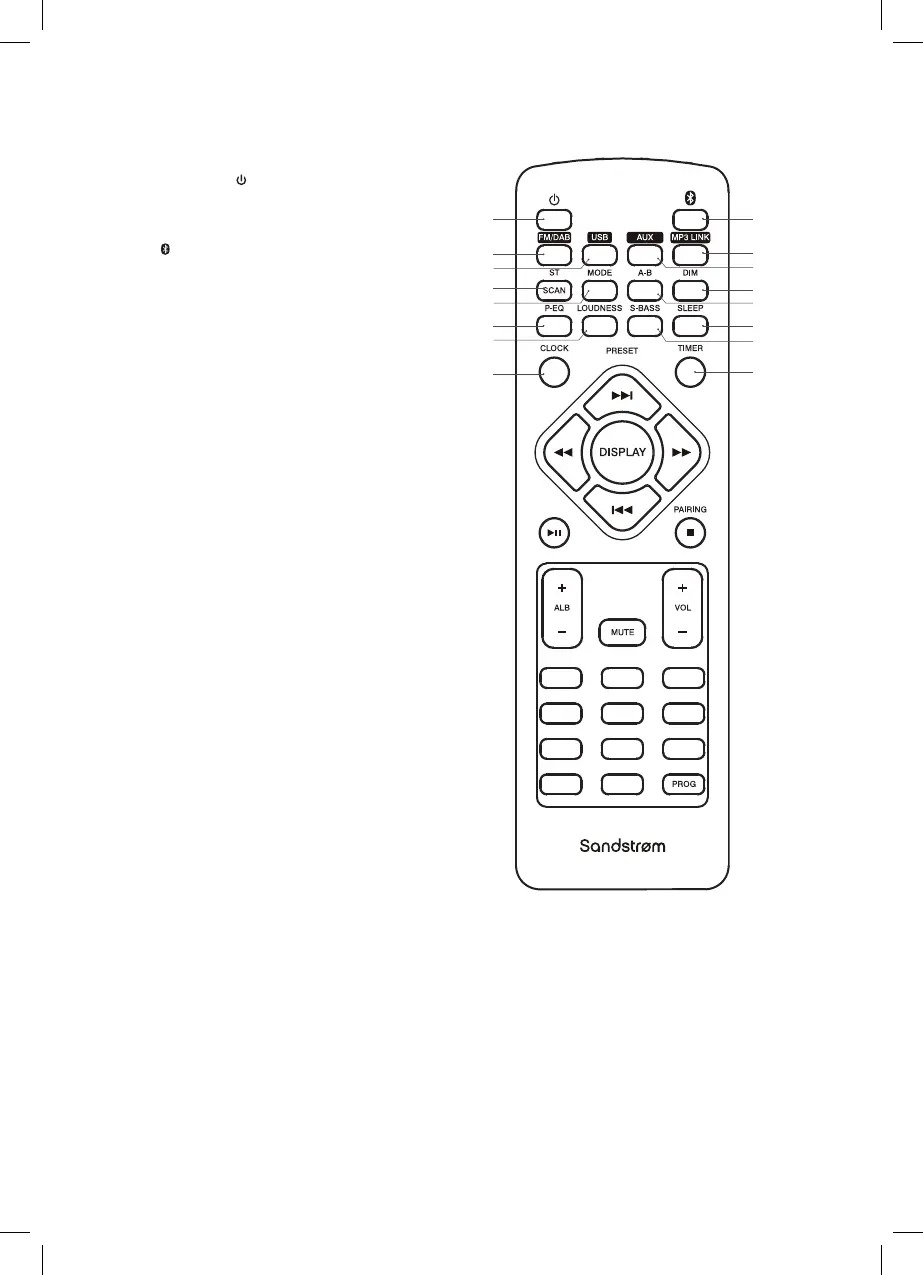
Remote Control
1 2 3
4 5 6
7 8
10+ 0
9
1. STANDBY Button
Switches the unit between
ON and STANDBY modes.
2. Bluetooth Button
Selects Bluetooth mode.
3. FM/DAB Button
Switches between DAB and
FM mode.
4. USB Button
Selects USB mode.
5. MP3 LINK Button
Selects MP3 Link mode.
6. AUX Button
Selects AUX-IN mode.
7. ST/SCAN Button
In FM mode switches between
mono and auto modes.
In DAB mode selects quick scan.
8. MODE Button
Repeats/random playback of
a track(s).
9. DIM Buttons
Adjusts display brightness level.
10. A-B Button
Repeats a section of a soundtrack.
11. P-EQ Button
Switches between equalizer modes.
12. LOUDNESS Button
Switches LOUDNESS function
ON/OFF.
13. SLEEP Button
Sets up a sleep timer.
14. S-BASS Button
Switches S-BASS function ON/OFF.
15. CLOCK Button
Displays the time.
16. TIMER Button
Selects alarm timer.
1
3
8
12
15
7
11
4
2
5
9
13
16
14
10
6
SDBXHFB13_IB Sandstrøm.indd 11 15/05/2013 13:26



 To Next Page