40
5 PARTITIONING VOLUMES
5.1 PARTITION A VOLUME
5.1.1 WINDOWS SYSTEMS
Note: Before repartition a volume, back up your data and delete previously defined partitions.
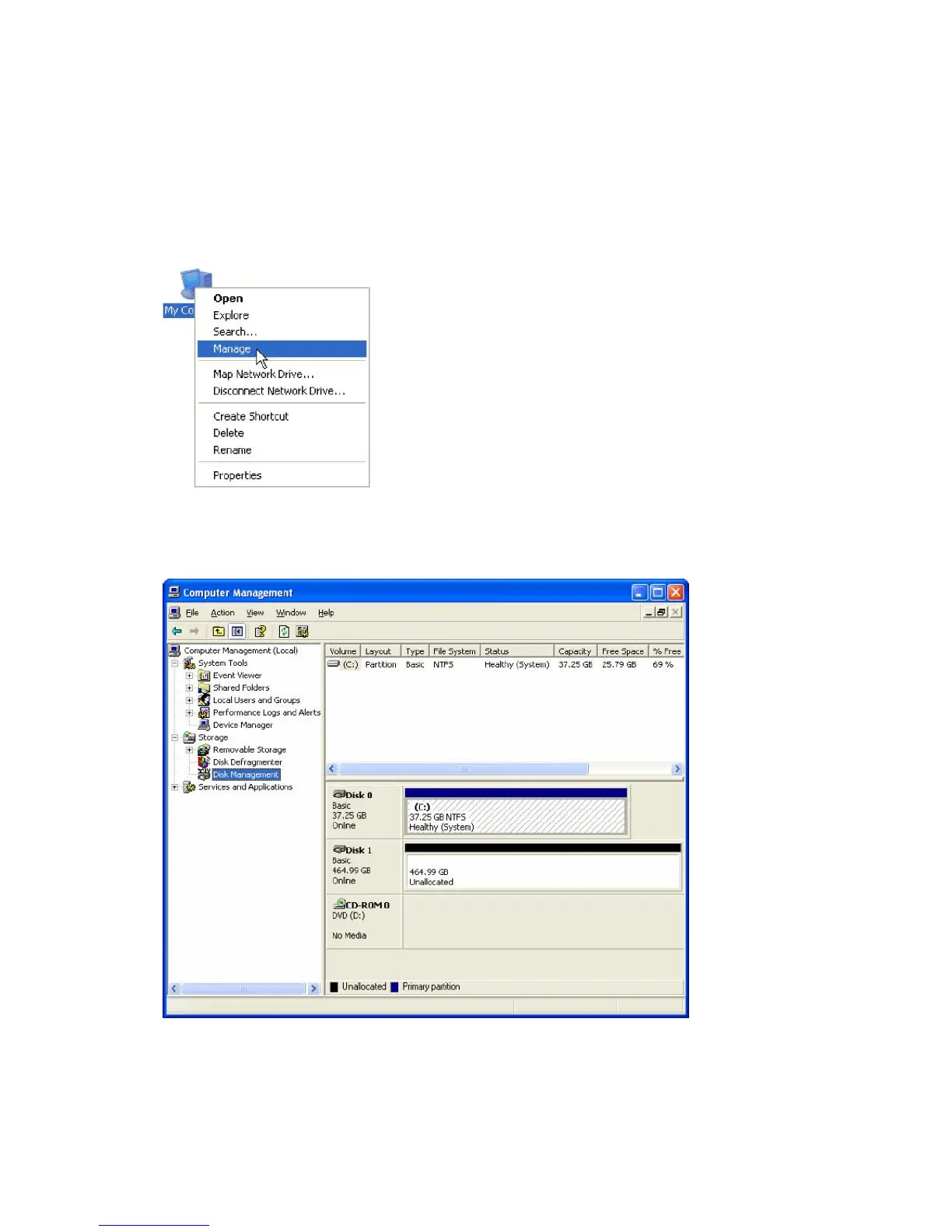
1. Right-click the My Computer icon on your desktop and select Manage from the pop-up window.
2. Select Disk Management under Storage to open the Windows Disk Manager. This example illustrates the
LARGE storage policy, which concatenates the capacity of all hard drives connected to the TERA BOX SATA
RAID III.
Every disk should appear with the word “Basic”, a size value that shows the available storage capacity, and a
status of “Online”. Instead of Basic, a disk could appear Unknown, Dynamic, or Not Initialized.
If the disk appears as “Unknown”, right-click the disk icon and select Write Signature. A window opens
with the selected disk (all Unknown disks may appear in this window). Make sure the box next to each disk is


 To Next Page