EasyManua.ls Logo

Sansui G-9000 - Page 34

Sansui G-9000
58 pages
Print Icon
To Next Page IconTo Next Page
To Previous Page IconTo Previous Page
Loading...
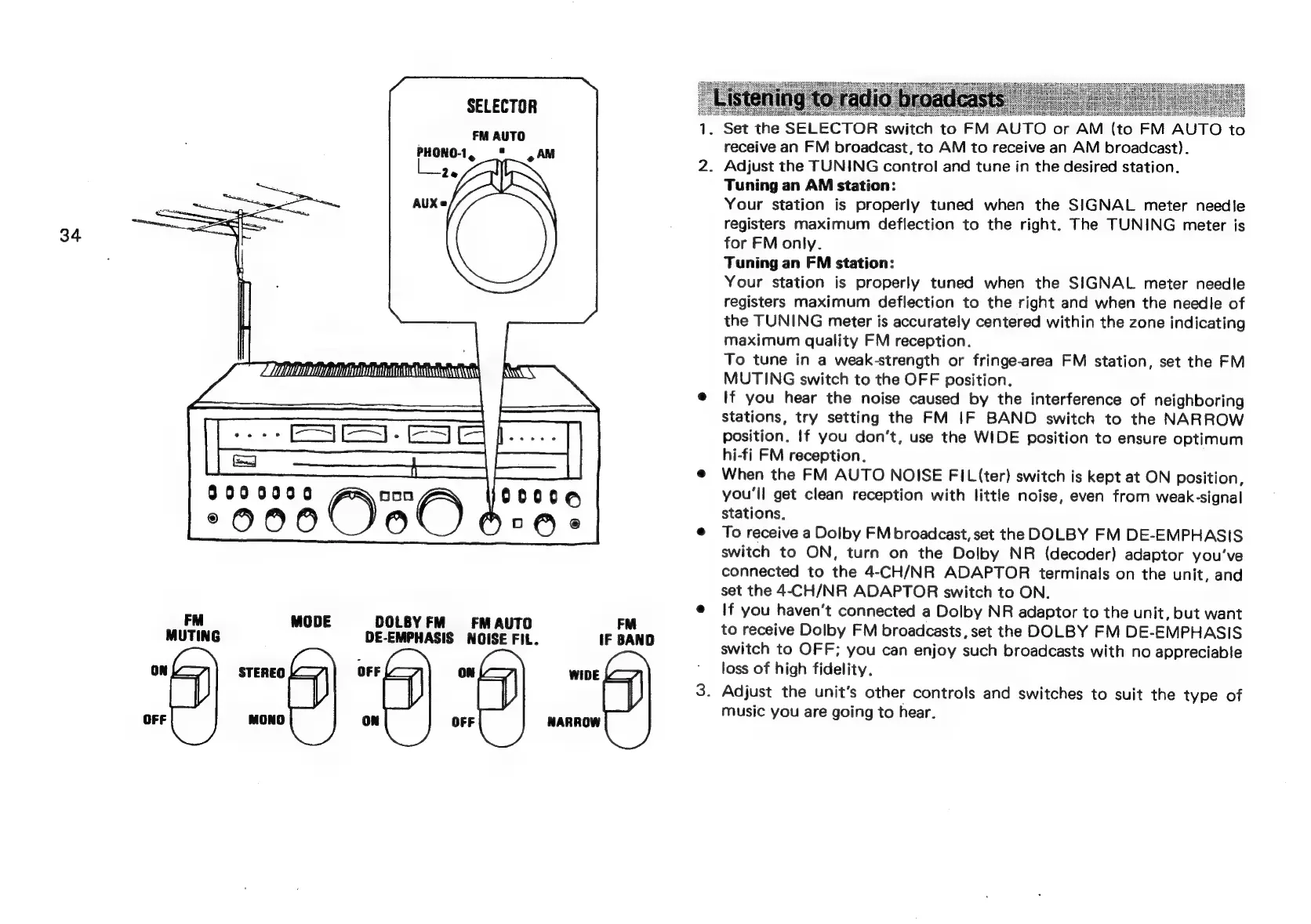
SELECTOR
FM
AUTO
PHONO-1,
="
JAM
2e
AUXe
34
|
ES
Sa
9000000
ooo
00006
00000
Ore
FM
MODE
DOLBYFM
FM
AUTO
MUTING
DE-EMPHASIS
NOISE
FIL.
iF
BAND
8)
=8)
“8
6)
=
.
Set
the
SELECTOR
switch
to
FM
AUTO
or
AM
(to
FM
AUTO
to
receive
an
FM
broadcast,
to
AM
to
receive
an
AM
broadcast}.
.
Adjust
the
TUNING
control
and
tune
in
the
desired
station.
Tuning
an
AM
station:
Your
station
is
properly
tuned
when
the
SIGNAL
meter
needle
registers
maximum
deflection
to
the
right.
The
TUNING
meter
is
for
FM
only.
Tuning
an
FM
station:
Your
station
is
properly
tuned
when
the
SIGNAL
meter
needje
registers
maximum
deflection
to
the
right
and
when
the
needle
of
the
TUNING
meter
is
accurately
centered
within
the
zone
indicating
maximum
quality
FM
reception.
To
tune
in
a
weak-strength
or
fringe-area
FM
station,
set
the
FM
MUTING
switch
to
the
OFF
position.
If
you
hear
the
noise
caused
by
the
interference
of
neighboring
stations,
try
setting
the
FM
IF
BAND
switch
to
the
NARROW
position.
If
you
don’t,
use
the
WIDE
position
to
ensure
optimum
hi-fi
FM
reception.
When
the
FM
AUTO
NOISE
FIL
(ter)
switch
is
kept
at
ON
position,
you'll
get
clean
reception
with
little
noise,
even
from
weak-signal
stations.
To
receive
a
Dolby
FM
broadcast,
set
the
DOLBY
FM
DE-EMPHASIS
switch
to
ON,
turn
on
the
Dolby
NR
(decoder)
adaptor
you've
connected
to
the
4-CH/NR
ADAPTOR
terminals
on
the
unit,
and
set
the
4-CH/NR
ADAPTOR
switch
to
ON.
If
you
haven‘t
connected
a
Dolby
NR
adaptor
to
the
unit,
but
want
to
receive
Dolby
FM
broadcasts,
set
the
DOLBY
FM
DE-EMPHASIS
switch
to
OFF;
you
can
enjoy
such
broadcasts
with
no
appreciable
loss
of
high
fidelity.
.
Adjust
the
unit's
other
controls
and
switches
to
suit
the
type
of
music
you
are
going
to
hear.

Related product manuals