EasyManua.ls Logo

Sansui G-9000 - Page 36

Sansui G-9000
58 pages
Print Icon
To Next Page IconTo Next Page
To Previous Page IconTo Previous Page
Loading...
36
9000000
©0000
©
noo
oeoote
nA
«e
o)
©
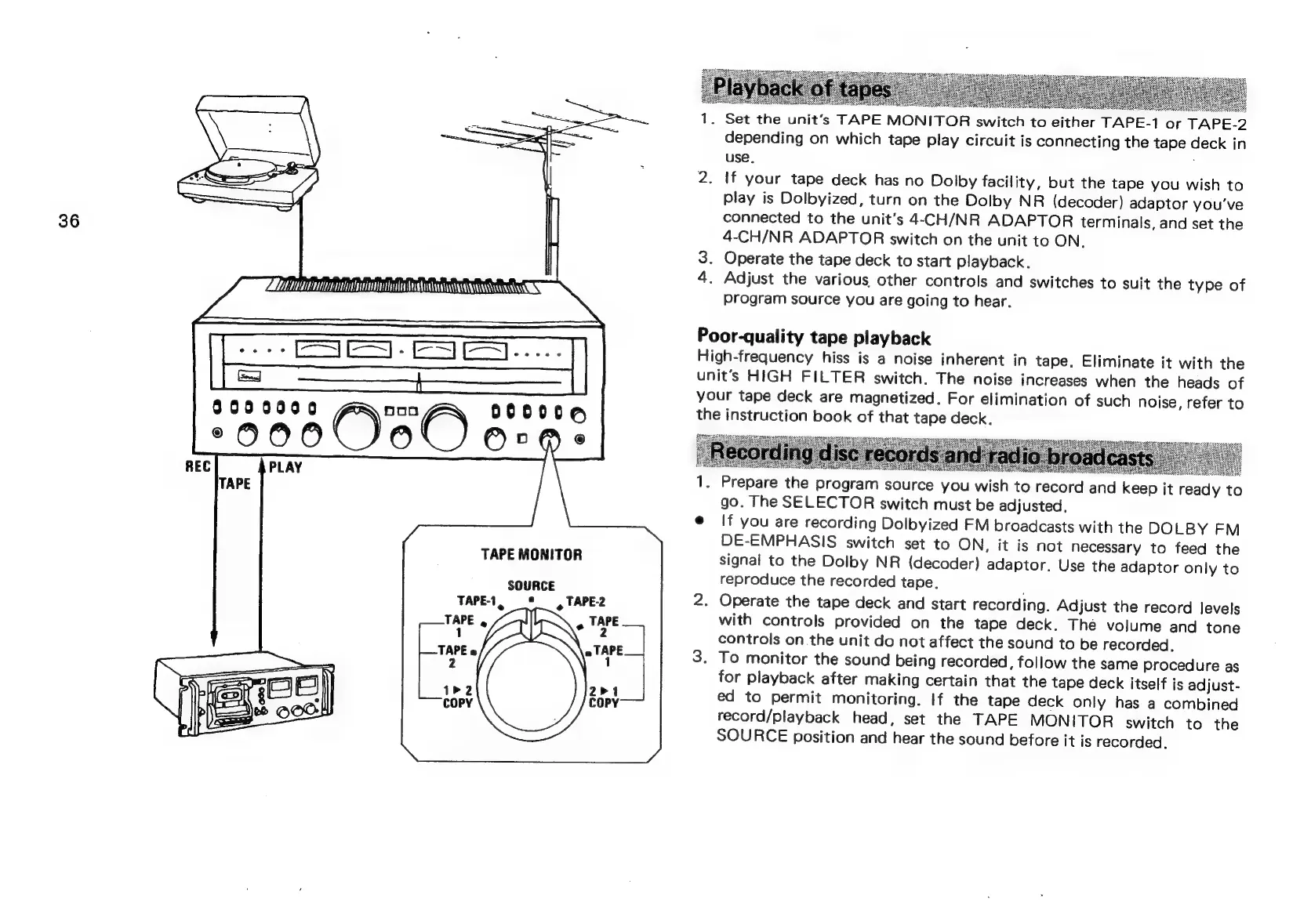
TAPE
MONITOR
TAPE-1,
TAPE
,
1
SOURCE
9
TAPE2
1.
Set
the
unit‘s
TAPE
MONITOR
switch
to
either
TAPE-1
or
TAPE-2
depending
on
which
tape
play
circuit
is
connecting
the
tape
deck
in
use.
2.
If
your
tape
deck
has
no
Dolby
facility,
but
the
tape
you
wish
to
play
is
Dolbyized,
turn
on
the
Dolby
NR
(decoder)
adaptor
you've
connected
to
the
unit's
4-CH/NR
ADAPTOR
terminals,
and
set
the
4-CH/NR
ADAPTOR
switch
on
the
unit
to
ON.
3.
Operate
the
tape
deck
to
start
playback.
4.
Adjust
the
various
other
controls
and
switches
to
suit
the
type
of
program
source
you
are
going
to
hear.
Poor-quality
tape
playback
High-frequency
hiss
is
a
noise
inherent
in
tape.
Eliminate
it
with
the
unit’s
HIGH
FILTER
switch.
The
noise
increases
when
the
heads
of
your
tape
deck
are
magnetized.
For
elimination
of
such
noise,
refer
to
the
instruction
book
of
that
tape
deck.
seas
aresesese)
RSs
EE
ee
ets
Bs
ae
es
Sess
1.
Prepare
the
program
source
you
wish
to
record
and
keep
it
ready
t
go.
The
SELECTOR
switch
must
be
adjusted,
e@
If
you
are
recording
Dolbyized
FM
broadcasts
with
the
DOLBY
FM
DE-EMPHASIS
switch
set
to
ON,
it
is
not
necessary
to
feed
the
signal
to
the
Dolby
NR
(decoder)
adaptor.
Use
the
adaptor
only
to
reproduce
the
recorded
tape.
2.
Operate
the
tape
deck
and
start
recording.
Adjust
the
record
Jevels
with
controls
provided
on
the
tape
deck.
The
volume
and
tone
controls
on
the
unit
do
not
affect
the
sound
to
be
recorded.
3.
To
monitor
the
sound
being
recorded,
follow
the
same
procedure
as
for
playback
after
making
certain
that
the
tape
deck
itself
is
adjust-
ed
to
permit
monitoring.
If
the
tape
deck
only
has
a
combined
record/playback
head,
set
the
TAPE
MONITOR
switch
to
the
SOURCE
position
and
hear
the
sound
before
it
is
recorded.
ie)

Related product manuals