EasyManua.ls Logo

Sansui G-9000 - Advanced Operations

Sansui G-9000
58 pages
Print Icon
To Next Page IconTo Next Page
To Previous Page IconTo Previous Page
Loading...
38
80000006
noo
Ma
@)
le000C)0
OcPe
TAPE
MONITOR
SOURCE
TAPE-1,
TAPE-2
o
TAPE
See
1,
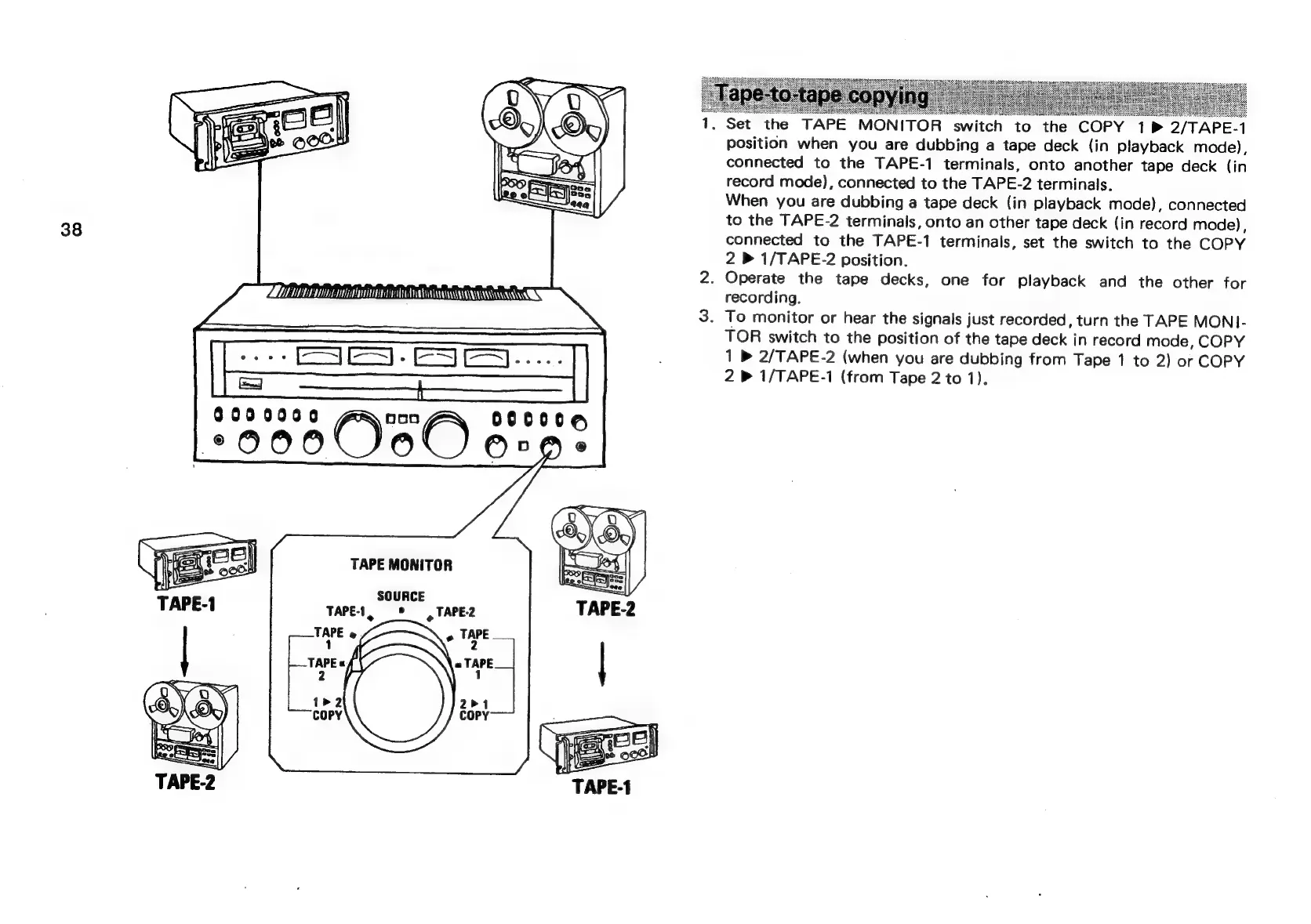
Set
the
TAPE
MONITOR
switch
to
the
COPY
1B
2/TAPE-1
position
when
you
are
dubbing
a
tape
deck
(in
playback
mode),
connected
to
the
TAPE-1
terminals,
onto
another
tape
deck
(in
record
mode),
connected
to
the
TAPE-2
terminals.
When
you
are
dubbing
a
tape
deck
(in
playback
mode),
connected
to
the
TAPE-2
terminals,
onto
an
other
tape
deck
(in
record
mode),
connected
to
the
TAPE-1
terminals,
set
the
switch
to
the
COPY
2
»
1/TAPE-2
position.
2.
Operate
the
tape
decks,
one
for
playback
and
the
other
for
recording.
3.
To
monitor
or
hear
the
signals
just
recorded,
turn
the
TAPE
MON]-
TOR
switch
to
the
position
of
the
tape
deck
in
record
mode,
COPY
1
»
2/TAPE-2
(when
you
are
dubbing
from
Tape
1
to
2)
or
COPY
2
»
1/TAPE-1
(from
Tape
2
to
1).