EasyManua.ls Logo

Sansui G-9000 - Page 44

Sansui G-9000
58 pages
Print Icon
To Next Page IconTo Next Page
To Previous Page IconTo Previous Page
Loading...
44
INPUT
OUTPUT
Low
8000000
*9O00
O
ooo
occotg
O
O°08
@
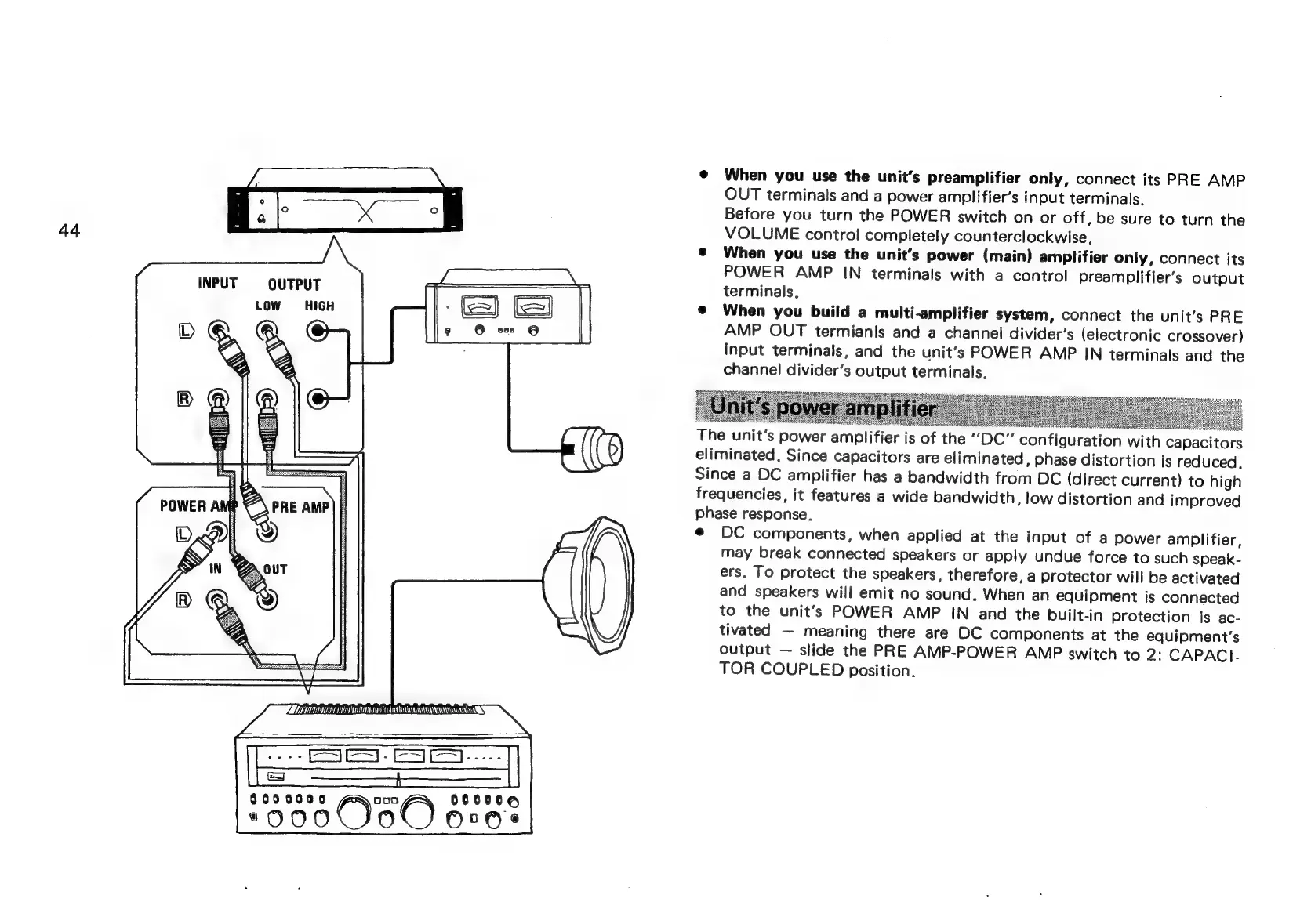
When
you
use
the
unit’s
preamplifier
only,
connect
its
PRE
AMP
OUT
terminals
and
a
power
amplifier’s
input
terminals.
Before
you
turn
the
POWER
switch
on
or
off,
be
sure
to
turn
the
VOLUME
control
completely
counterclockwise.
@
When
you
use
the
unit’s
power
(main)
amplifier
only,
connect
its
POWER
AMP
IN
terminals
with
a
control
preamplifier’s
output
terminals.
e@
When
you
build
a
multi-amplifier
system,
connect
the
unit's
PRE
AMP
OUT
termiants
and
a
channel
divider's
(electronic
crossover)
input
terminals,
and
the
unit’s
POWER
AMP
IN
terminals
and
the
channel
divider’s
output
terminals,
Nees:
Svea
eee
Sea
Se
ee
The
unit's
power
amplifier
is
o
SSE
SERN
AOR
Wie
Soe
CON
NOR
Fe
SRO
eo
oS
f
the
‘DC’
configuration
with
capacitors
eliminated.
Since
capacitors
are
eliminated,
phase
distortion
is
reduced.
Since
a
DC
amplifier
has
a
bandwidth
from
DC
(direct
current)
to
high
frequencies,
it
features
a
wide
bandwidth,
low
distortion
and
improved
phase
response.
e
DC
components,
when
applied
at
the
input
of
a
power
amplifier,
may
break
connected
speakers
or
apply
undue
force
to
such
speak-
ers.
To
protect
the
speakers,
therefore,
a
protector
will
be
activated
and
speakers
will
emit
no
sound.
When
an
equipment
is
connected
to
the
unit's
POWER
AMP
IN
and
the
built-in
protection
is
ac-
tivated
meaning
there
are
DC
components
at
the
equipment’s
output
slide
the
PRE
AMP-POWER
AMP
switch
to
2:
CAPACI-
TOR
COUPLED
position.

Related product manuals